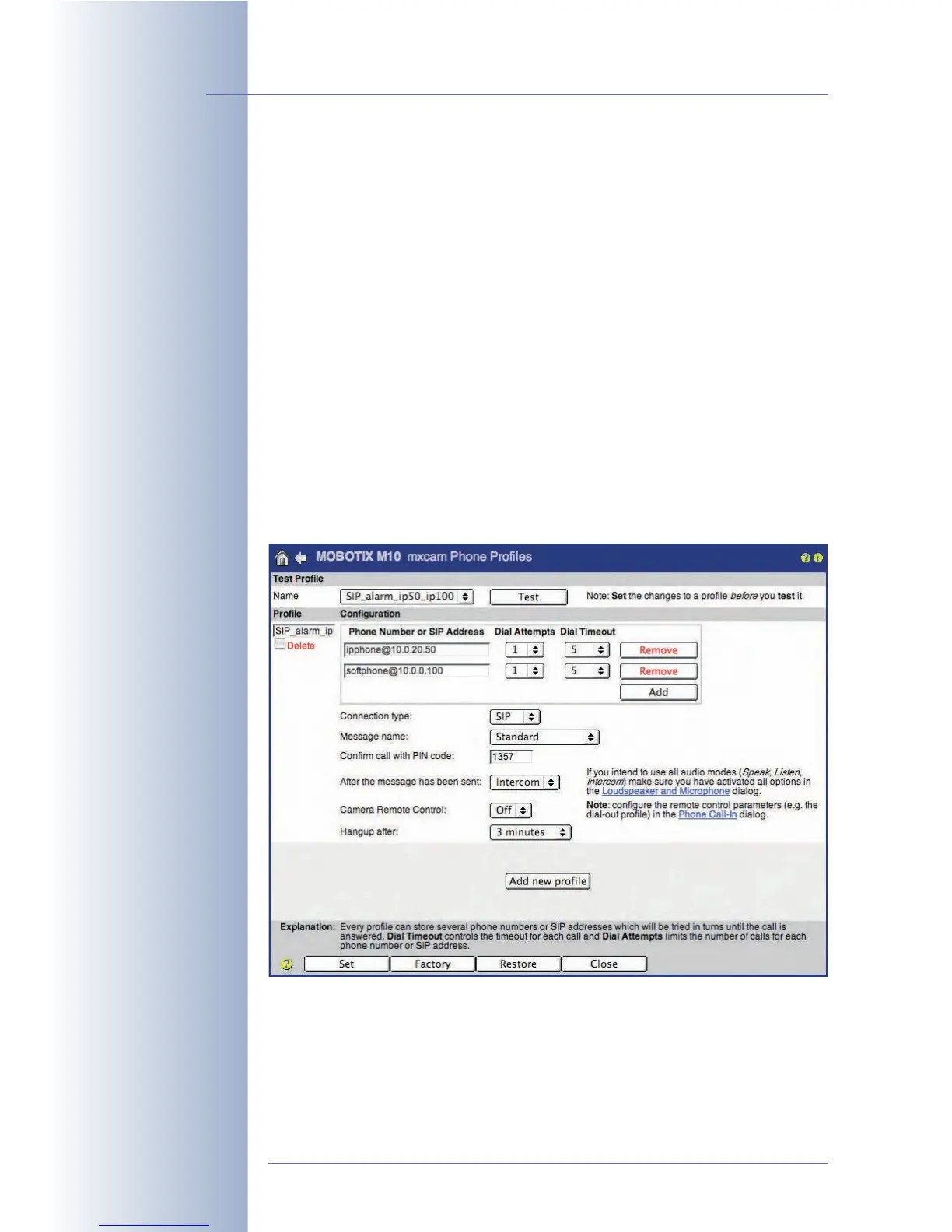
Creating the Phone Profiles (Voice Call-Out)
Configure a phone profile (Admin Menu > Phone Profiles).
The SIP addresses of this example are also used in the following sections when
configuring an IP phone and a softphone. Once the IP phone and the softphone
have been set up properly, you can test the phone profile of the MOBOTIX camera
using the Test button. Next, you can assign this profile to a certain event (Setup
Menu > Messaging). In case of an alarm, the configured SIP addresses will be
called one after another.
• Profile: SIP_alarm_ip50_ip100 (freely definable)
• SIP address 1: ipphone@10.0.20.50
• SIP address 2: softphone@10.0.0.100
• Dial Attempts:
1
• Idle Time: 5 (seconds)
• Connection type:
SIP
• Message name:
Standard
• After the message has been sent:
Intercom
© MOBOTIX AG • Security-Vision-Systems • Made in Germany
www.mobotix.com • sales@mobotix.com • 10.10.2006
264/288
Software Camera Manual Part 2



 To Next Page