Video : Wrap in Video
21 - 531
Wrapping Timeline Audio in a Video File using Video > Wrap Selection
This feature enables new audio to be wrapped quickly and easily into a video file directly in the Pyramix Timeline.
It is also available from the right-click context menu when the mouse cursor is on a Video clip. Video > Wrap
Selection.
Note: This method is suitable for direct wrapping from the Timeline without effects processing,
automation, mixing etc. If you wish to include any processing such as this, then please use: Proj-
ect > Mix Down with the Wrap options described earlier in this chapter instead.
Video > Wrap Selection
1. Select the Video Clip you wish to wrap the Audio into and one or more Audio Clips in the Timeline.
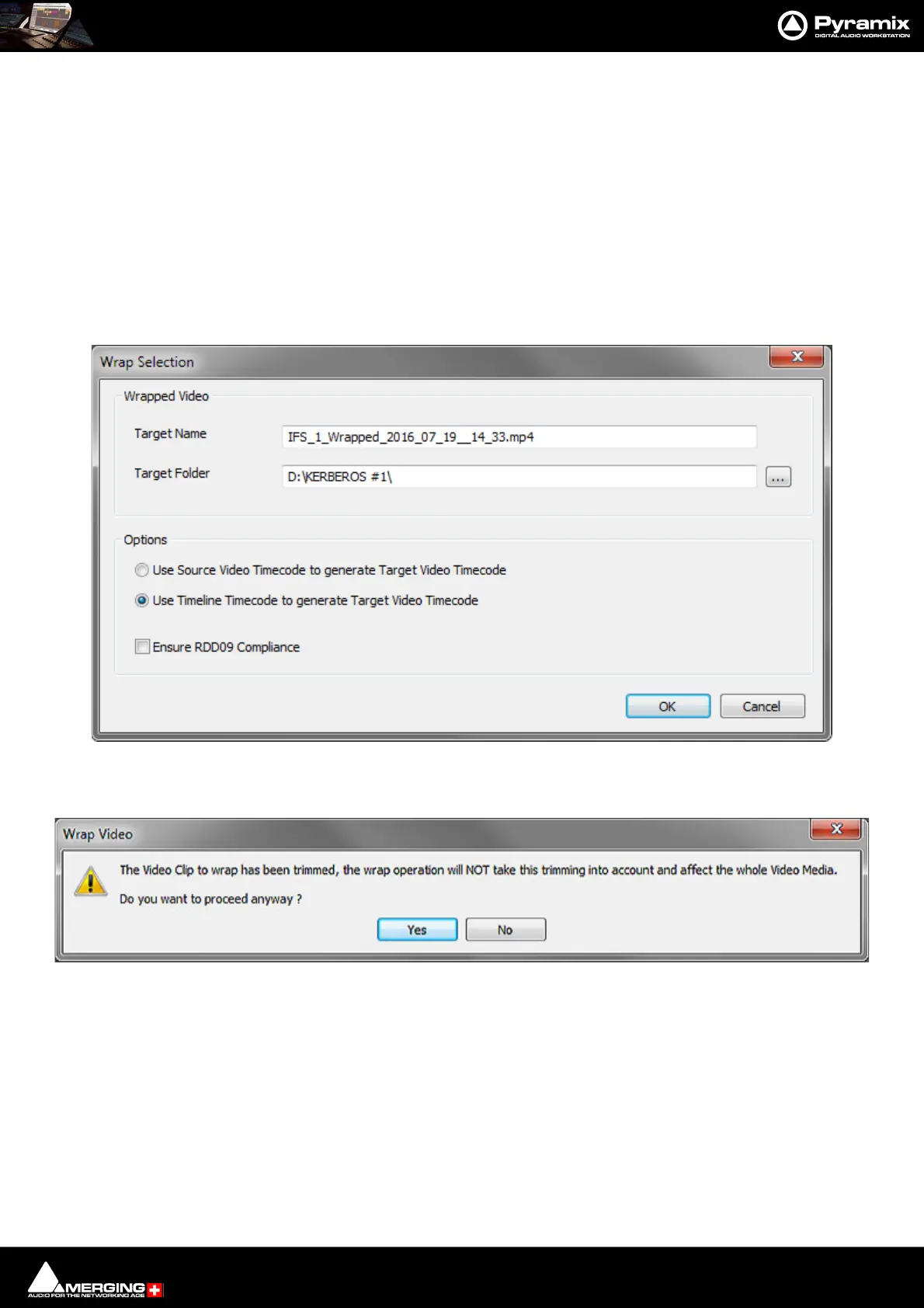
2. Choose Video > Wrap Selection. The Wrap Selection dialog window opens:
Note: If the Video Clip has been trimmed the following warning is displayed:
Wrapped Video
Target Name Shows the Target Name generated automatically. Click in the field and type if you require
an alternative file name.
Target Folder Defaults to the Project Folder. Click on the ... button to open a File Browser to choose a
different Folder.
Options
Use Source Video Timecode to generate Target Video Timecode As it says when checked. Toggles with:
Use Timeline Timecode to generate Target Video Timecode.
Wrap Video warning dialog



 To Next Page