31
LOGO! Manual
A5E00380835-01
Note
A power failure may cause an additional edge triggering
signal at the special functions, for example.
Data of the last uninterrupted cycle are stored in LOGO!.
Connecting LOGO!
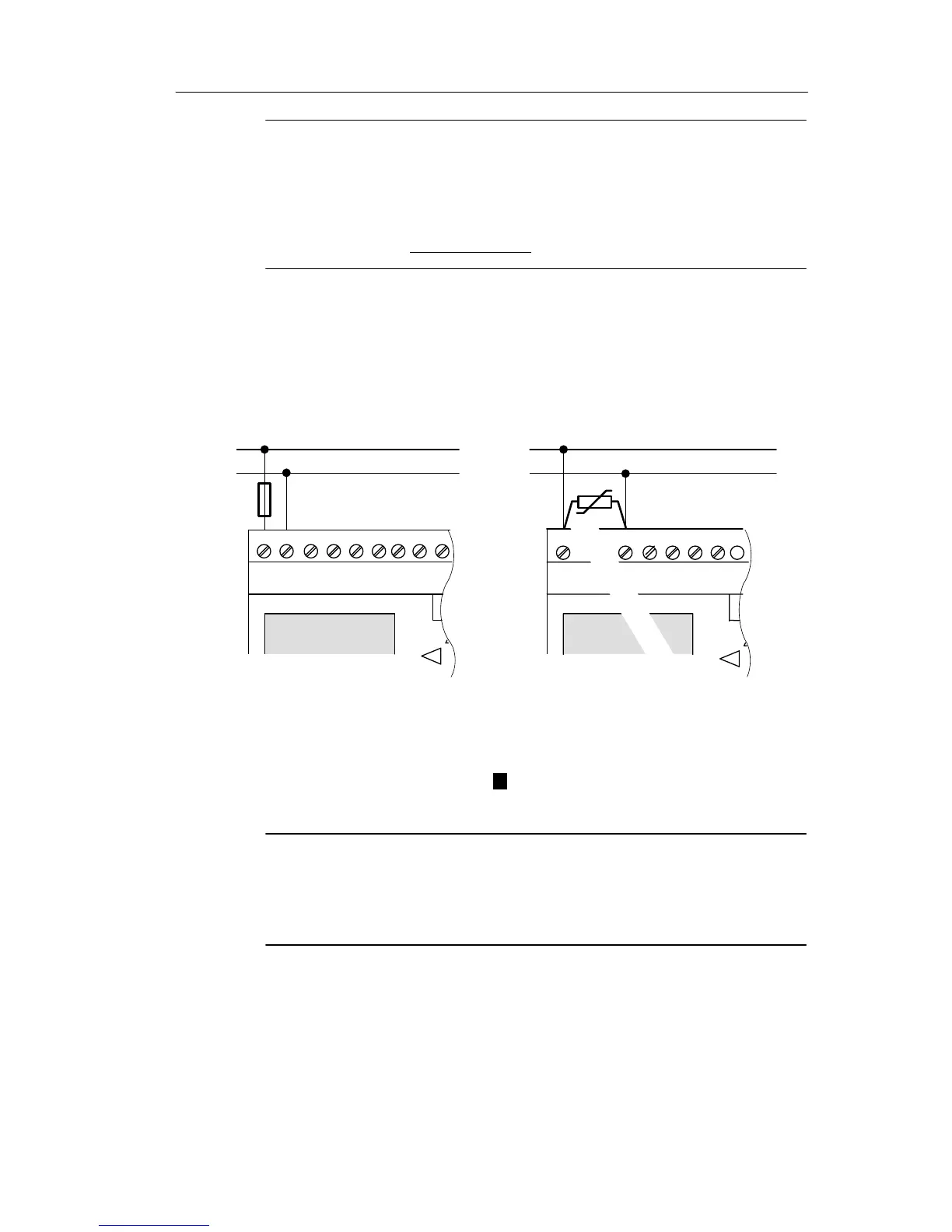
To connect LOGO! to the power supply:
L1
L+
N
M
LOGO! .....
with DC power supply
LOGO! .....
with AC power supply
Protection with safety fuse
if required (recommended) for:
12/24 RC...: 0.8 A
24: 2.0 A
EIB/KNX 0.08 A
To suppress surge voltages,
install varistors (MOV) with an
operating voltage at least 20 %
above the rated voltage.
ML+ I1 I2 I3 I4 I5
I1 I2 I3 I4L1 N
Note
LOGO! is a double-insulated switchgear. It is not required
to connect an equipment grounding conductor.
Circuit protection with AC voltage
To suppress voltage peaks on the power supply lines, you
can install a metal oxide varistor (MOV) (MOV). Make sure
that the operating voltage of the varistor (MOV) used lies at
least 20 % above the rated voltage (for example S10K275).
LOGO! installation and wirin







 To Next Page