Applications Guide
Strata Net over IP Programming Guidelines
A-22 Strata CIX Programming Vol.1 12/09
Example
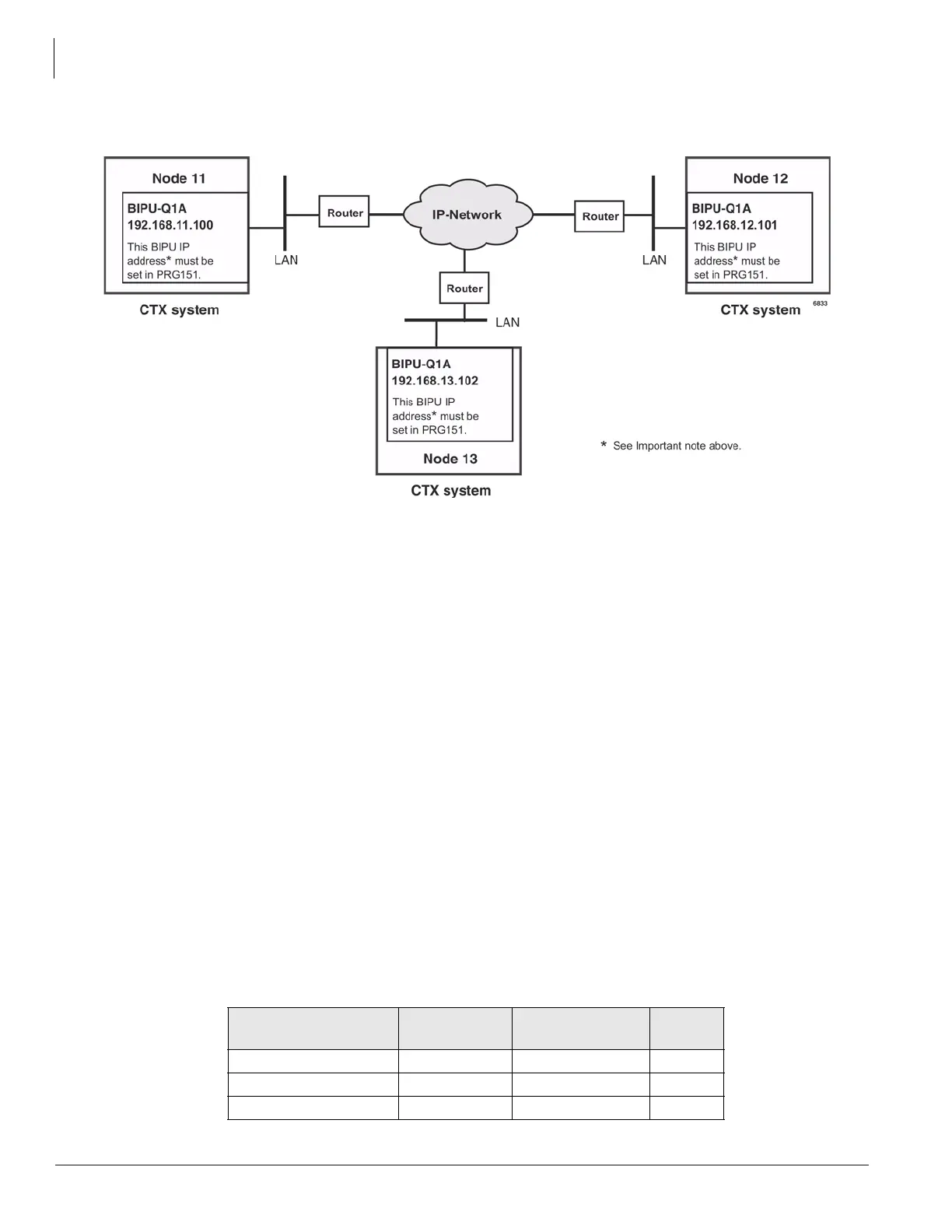
Figure A-6 Strata Net over IP Routing
To program the configuration in the above figure using programs 671 and 672
The steps below show you how to setup Node 11 to route to remote Nodes 12 and 13.
1. With Network eManager connected to Node 11, go to Program 672 (Strata Net > Network Over IP,
Detail Info tab).
2. Create Node 12 and verify all parameters are set to defaults.
3. Create Node 13 and verify all parameters are set to defaults.
4. With Network eManager connected to Node 11, go to Program 671 (Strata Net > Network Over IP, IP
Route tab). The IP addresses of BIPU-Qs connected to Node 11 are set in this program.
5. Select Node 12 and enter its BIPU-Q IP address (192.168.12.101) into IP Address Route 1.
6. Select Node 13 and enter its BIPU-Q IP address (192.168.13.102) into IP Address Route 2.
Notes
• The IP addresses used in this example are only examples, check with the facility network
administrator for the IP addresses that should be used in your installation.
• If a remote node has more than one BIPU-Q installed, its IP address would be entered in Route 2.
A maximum of six remote BIPU-Qs can be assigned in each remote node. Route 1 will be used
until all channels are busy, or not working, in which case Routes 2~6 will be used sequentially.
7. Repeat Steps 1~6 with Network eManager connected to Node 12 to set up Remote Nodes 11 and 13.
8. Repeat Steps 1~6 with Network eManager connected to Node 13 to set up Remote Nodes 11 and
12.StrataNet IP Port Ranges
The following ports must be enabled on all routers that pass StrataNet packets.
Function
Protocol
Name
Ports Type
Connection Request StrataNet 4029 TCP
Call Control Channel StrataNet 4096 - 8191 TCP
Media Channel RTP, RTCP 16384 - 24575 UDP



 To Next Page