Software and Firmware Updates
IP Telephone, MIPU, GIPU, LIPU and BIPU Firmware Update Procedures
B-6 Strata CIX Programming Vol.1 12/09
Method 2: Update from an External FTP Server
Prerequisites
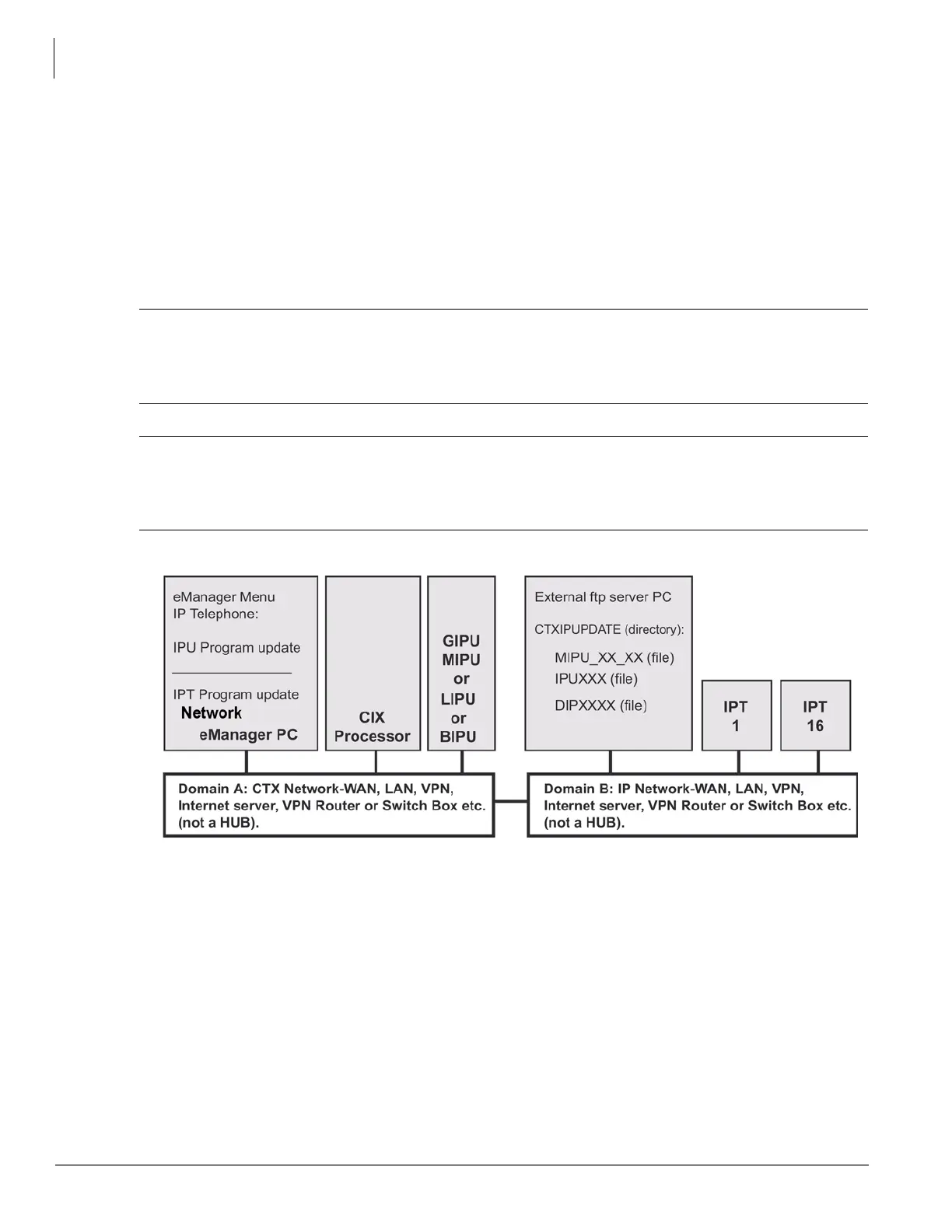
1. An FTP server must be connected on the same network domain as the IP telephones. The Network
eManager PC, CIX processor and xIPU must be in the same domain but it does not have to be the
domain that supports the IP telephones and FTP server.
2. The Network eManager PC cannot be connected directly to the CIX processor network jack. All
connections must be through the network (see Figure 2 below).
CAUTION! Do not unplug the xIPU, press the xIPU reset button or turn off the CIX power during
the xIPU program update process. Any of these operations will damage the xIPU
kernel software and require the xIPU software restoration process to allow the xIPU to
function.
CAUTION! Be sure that you are loading the update firmware to the correct device. Incorrect
firmware can cause the device to be inoperable. For example, BIPU firmware loaded
onto an LIPU will cause the LIPU card to stop functioning. This caution also applies to
IPTs. Restoration can only be done at a Toshiba TSD repair facility.
Figure B-2 FTP Server (External Server) Network Connection
Note The Network eManager PC cannot be connected directly to the CIX processor network jack - all
connections must be through the network.



 To Next Page