Network eManager®
Features of Network eManager
2-20 Strata CIX Programming Vol.1 12/09
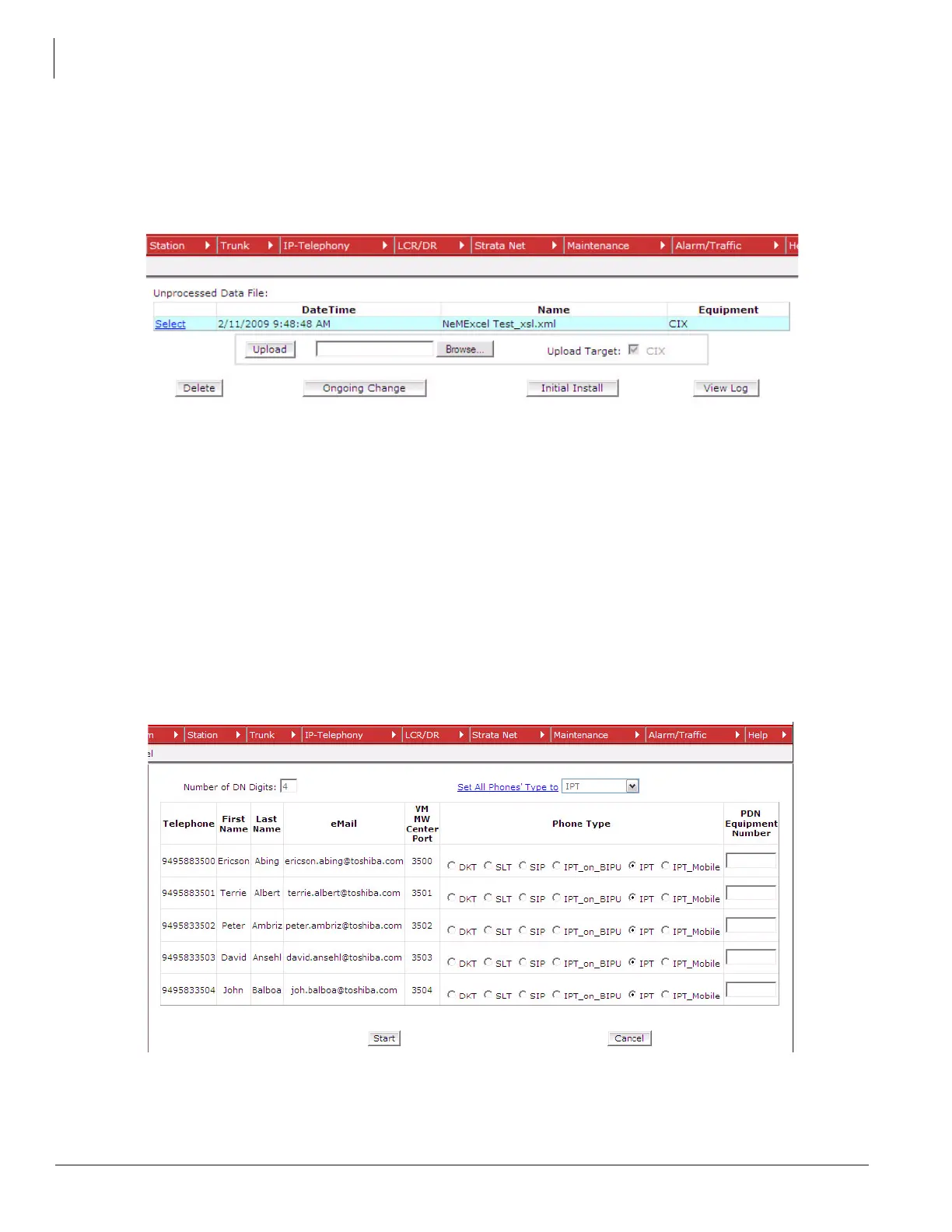
- The Ongoing Change button is the process for adding, deleting, or changing stations after the
initial install. After an initial install has been performed, an image of the database is created on
the Network eManager PC. This image is used for comparison when adds, moves and
changes are executed. This button is only available after a successful initial install.
- The View Log button shows any recent activities adds/deletions and modifications.
Figure 2-7. Import Screen
7. Define the station types and extension numbers
- From the initial install screen as shown in Figure 2-8, the “Number of DN Digits” specifies how
many digits from far right to left should be counted as the extension number. Notice, for
example, the user Ericson Abing in Figure 2-8. The telephone number listed is 9495833500.
Since the “Number of DN Digits” is set to 4, Network eManager will use the last four numbers
as the extension number, in this example, 3500.
- Click Start to begin the import process.
Figure 2-8. Number of DN Digits



 To Next Page