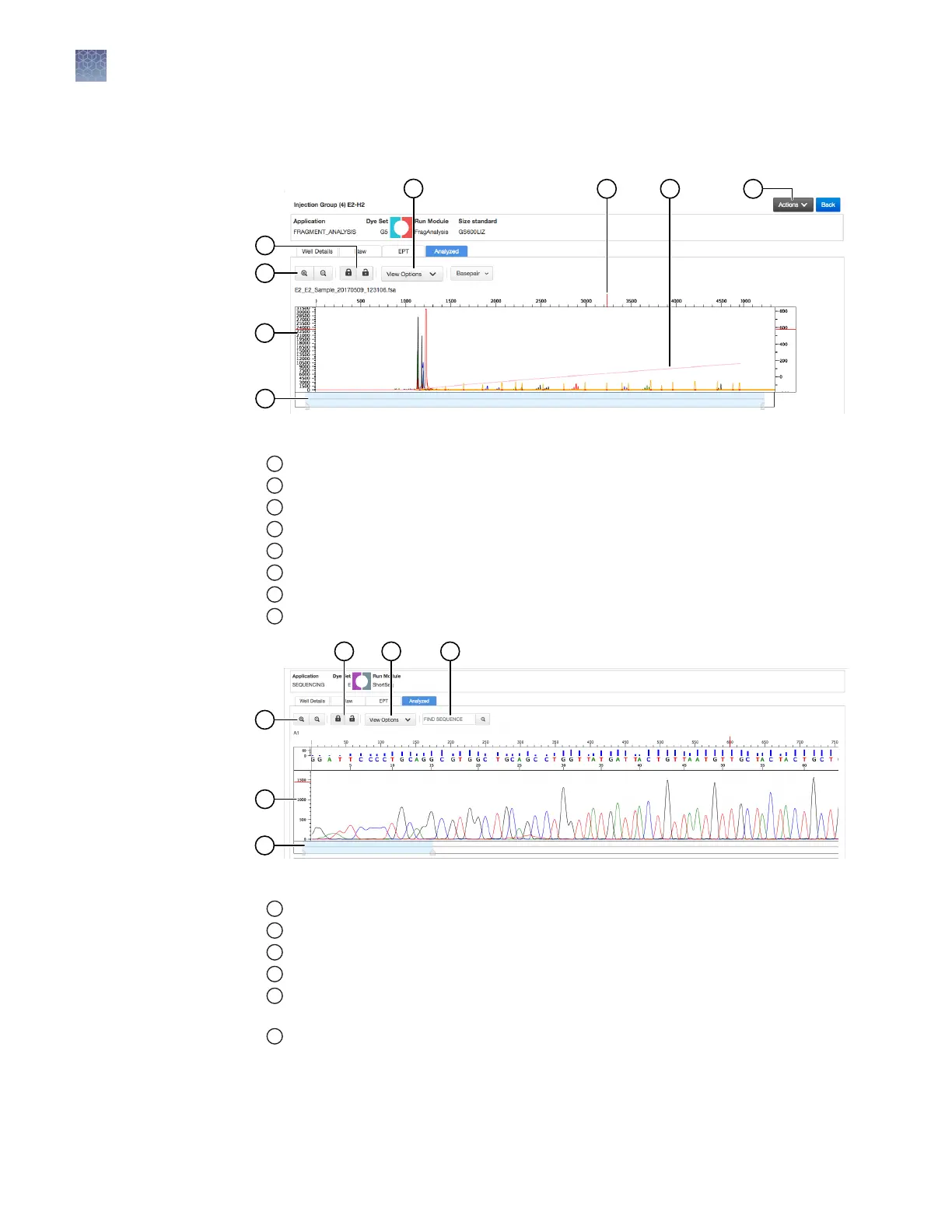
Remote Monitoring App analyzed trace
Figure 15 Fragment analysis analyzed trace
1
Lock/unlock trace zooming for all traces in the injection group.
2
Zoom in/out.
3
Analyzed trace.
4
Thumbnail trace—Click-drag to view another region of the trace.
5
View Options—Select the dye colors to display; set vertical scaling.
6
Cursor position indicator (red vertical and horizontal tick marks outside trace).
7
Size standard curve (red line).
8
Actions—Select commands to pause and cancel injections.
Figure 16 Sequence analysis analyzed trace
1
Zoom in/out.
2
Analyzed trace.
3
Thumbnail trace—Click-drag to view another region of the trace.
4
Lock/unlock trace zooming for all traces in the injection group.
5
View Options—Select the basecalls to display; show/hide quality bars and values; set
vertical scaling.
6
Search for a sequence.
Chapter 7 Start and monitor a run
Monitor a run from the Connect cloud-based platform
7
102
SeqStudio
™
Genetic Analyzer Instrument and Software User Guide













 To Next Page