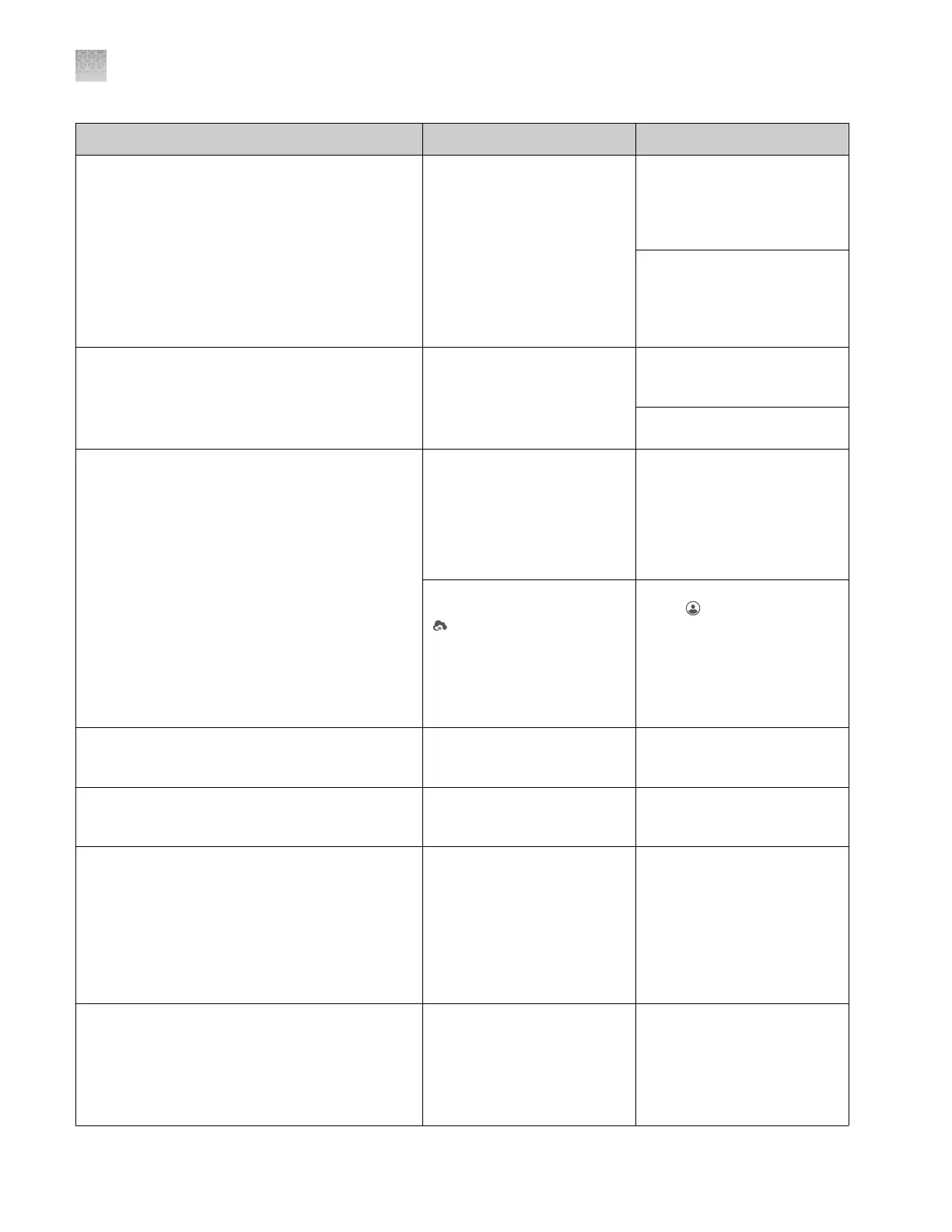
Observation Possible cause Recommended action
Analysis settings or run module is not available for
selection by some users
This situation is seen on the instrument.
Analysis settings and run
modules are saved per user.
If the analysis settings or run
modules are associated with
a
hidden
plate setup, the
analysis settings or run
modules are not listed for
selection unless the user who
created the plate setup is
signed in.
Change the plate setup
security from Hidden to
Shared (see “Hide or share a
plate (Plate setup security)
“ on page 89).
Create the analysis settings
or run modules manually.
Your local instrument profile name is not available
for sign in
Your local instrument profile
is linked to your Connect
platform account and is
replaced by your Connect
platform profile.
See “Local instrument profile
roles and functions“ on
page 151.
Sign in with your Connect
platform profile.
Cloud account is already linked to a local profile
message
You have a local instrument
profile that has previously
been linked to Cloud account.
You touched Get
Started4Connect, then typed
in your Cloud account email
and password.
Return to Sign in screen, then
select your local profile from
the Sign in list.
Another user was signed in to
the instrument. You selected
Cloud in the Set up run
screen or in the Save location
field in the Plate properties
screen, then typed in your
Cloud account email and
password.
Return to Sign in screen,
touch , touch Sign out, then
select your local profile from
the Sign in list.
The Notifications button is not displayed in
Instrument Settings
You are signed in to the
instrument with a local
instrument profile.
Sign in to the instrument with
a Connect platform
instrument profile.
A button is dimmed The function is available to
users with administrator role
only.
None.
Sample data files from the SeqStudio
™
Genetic
Analyzer can be opened but not analyzed in
secondary analysis software
• Sequencing Analysis Software
• GeneMapper
™
Software
• SeqScape
™
Software
• Variant Reporter
™
Software
An updated version of the
secondary analysis software
is required.
Download and run the latest
version of secondary analysis
software. See “Secondary
analysis software“ on
page 29.
Note: The SeqStudio
™
Genetic Analyzer instrument
model is listed as 3200.
Files cannot be imported into Connect cloud-
based platform applications or cannot be analyzed
in Connect platform sequencing apps
The sample name or file
name used a special
character.
Rename the sample name or
file name.
Note: Special characters (/,
&, @, %) will impact file
import into Connect platform
applications.
Appendix A Troubleshooting
Software troubleshooting
A
182
SeqStudio
™
Genetic Analyzer Instrument and Software User Guide













 To Next Page