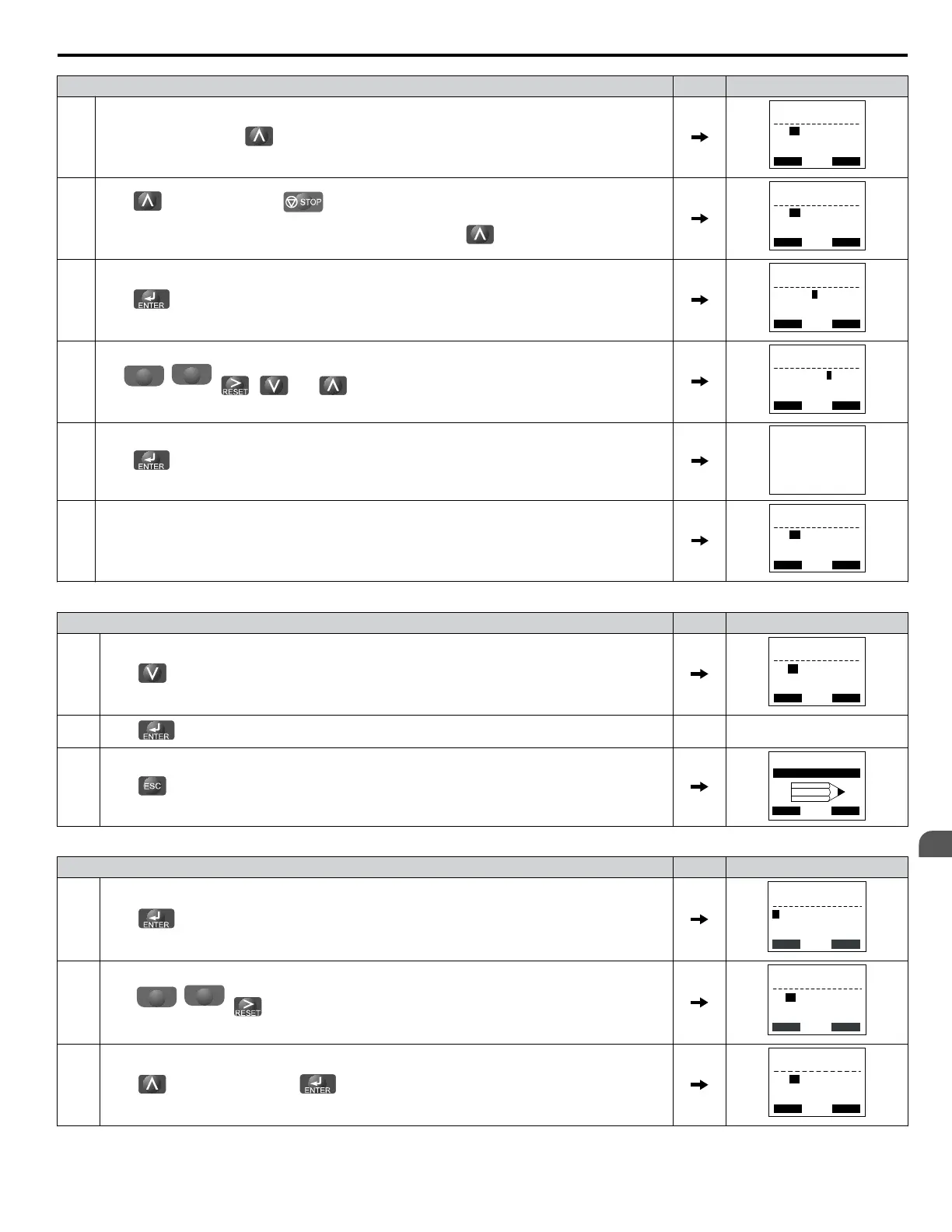
Step Display/Result
5.
Select A1-04 by pressing .
← →
-PRMSET-
A1- 04 = 0
(0~9999)
“0”
PRG
Enter Password
FWD
6.
Press while holding down at the same time. A1-05 will appear.
Note:
A1-05 is hidden and will not display by pressing only .
← →
-PRMSET-
A1- 05 = 04
(0~9999)
“0”
PRG
Select Password
FWD
7.
Press .
← →
-PRMSET-
A1- 05 = 0000
(0~9999)
“0”
PRG
Select Password
FWD
8.
Use
F1
left
,
F2
right
, , and to enter the password.
← →
-PRMSET-
A1-05= 1234
(0~9999)
“0”
PRG
Select Password
FWD
9.
Press to save what was entered.
Entry Accepted
10. The display automatically returns to the display shown in step 6.
← →
-PRMSET-
A1- 05 = 04
(0~9999)
“0”
PRG
Select Password
FWD
Table 5.3 Check if A1-02 is Locked (continuing from step 10 above)
Step Display/Result
1.
Press to display A1-02.
← →
-PRMSET- PRG
Control Method
FWD
A1-02= 2 *2*
Open Loop Vector
2.
Press , making sure that the setting values cannot be changed.
3.
Press to return to the first display.
HELP
- MODE - PRG
DATA
Programming
FWD
Table 5.4 Enter the Password to Unlock Parameters (continuing from step 3 above)
Step Display/Result
1.
Press to enter the parameter setup display.
← →
-PRMSET-
Initialization
Select Language
PRG
FWD
A1-00= 0
2.
Press
F1
left
,
F2
right
, to select the flashing digits as shown.
← →
-PRMSET-
Select Language
English
PRG
FWD
A1-00= 0 *0*
3.
Press to scroll to A1-04 and .
← →
-PRMSET-
A1- 04 = 0
(0~9999)
“0”
PRG
Enter Password
FWD
5.1 A: Initialization
YASKAWA ELECTRIC SIEP C710616 31B YASKAWA AC Drive – A1000 Technical Manual
123
5
Parameter Details


 To Next Page
 Loading...