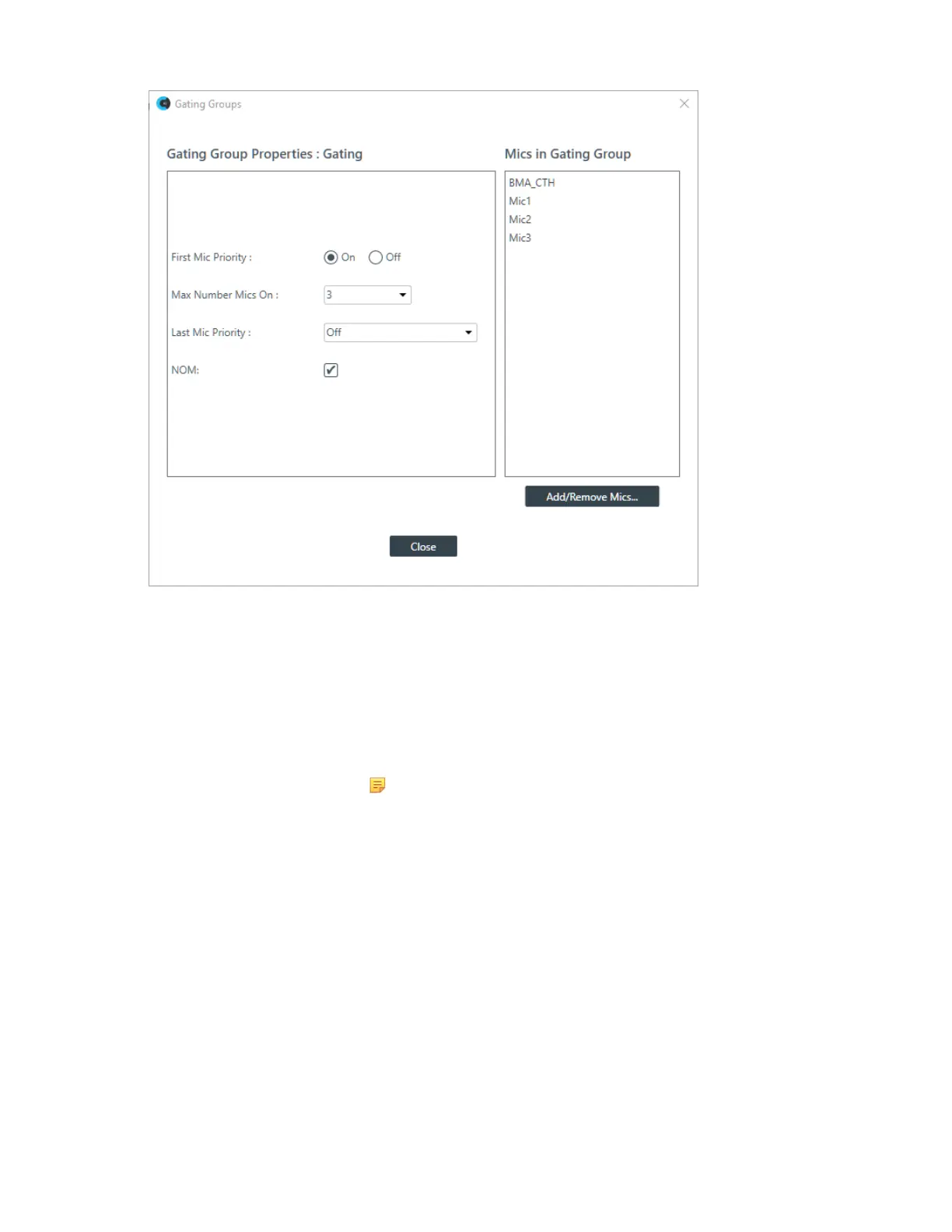
2. (Optional) You can choose which of the three mic channels should be included in the gating group.
3. (Optional) You can change any of the Gating Group Properties, as described in the table below:
Option Description
First Mic Priority First Mic Priority allows more than one microphone to gate on at same
time, but it restricts more than one mic fromgating on to the same audio
source. It does this by determining the audio level received by all mics
when the first mic is gated on, and then using this audio level as the
ambient level for the gating group.
Note:
ClearOne recommends using First Mic Priority to maintain
maximum audio intelligibility. If First Mic Priority is disabled,
two or more microphones will usually gate on when only one
person speaks.
Max Number Mics On This sets the maximum number of microphones that can be gated on
at any one time within a gating group. The maximum number of mics is
limited to the number of mics included in the gating group.
Last Mic Priority This leaves the specified mic gated on until another mic gates on. You
can choose Last On, to keep the most recently gated mic on, or choose
a particular microphone to keep on (available microphones are shown
in the drop-down list). This feature is useful in conferencing situations,
so the far end doesn’t think the call has disconnected.
NOM Number of Open Microphones Mode. This feature optimizes the audio
level based on the number of open microphones being used.
4. Click Close.









 To Next Page