CONSOLE AI | Online Mode (Huddle) | 285
Once the update is complete, the device restarts and you are disconnected.
Downloading Updates (Huddle)
You can check for available updates, such as firmware, documentation updates, and software installation
files, and download them to your computer.
Note:
Your computer must be connected to the Internet to use this feature.
To check for and download updates:
1. If you have not already done so, connect to a Huddle device.
For more information about connecting to a device, see Connecting to a Device (Huddle).
2. From the Navigation Panel, choose Admin.
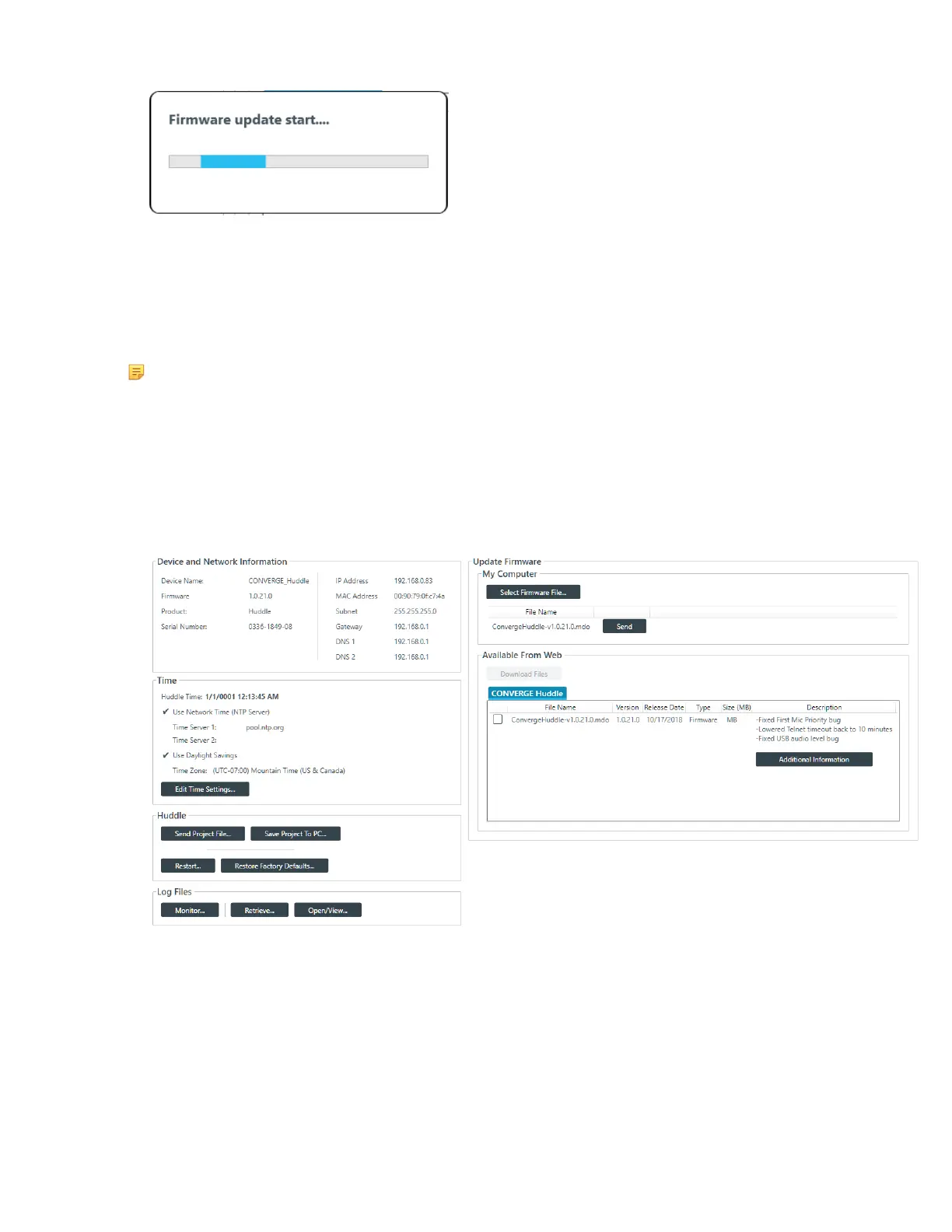
The Admin screen appears:
Available updates are shown in the Available From Web area.
3. Some files have additional information available. You can click the Additional Information button
below a file to see more information about that file.
4. To download a file, select it in the Available From Web area and click Download Files.
The Download Files dialog box appears and shows download progress.
5. Once download progress is 100%, click OK.
If you have downloaded a firmware file, the file you downloaded now appears in the My Computer
list in the upper right of the Firmware screen. If you have downloaded an updated Help file, the file is
CONSOLE AI User Manual









 To Next Page