CONSOLE AI | Managing Channels (CP2) | 194
Connecting Channels Using MatrixView
™
(CP2)
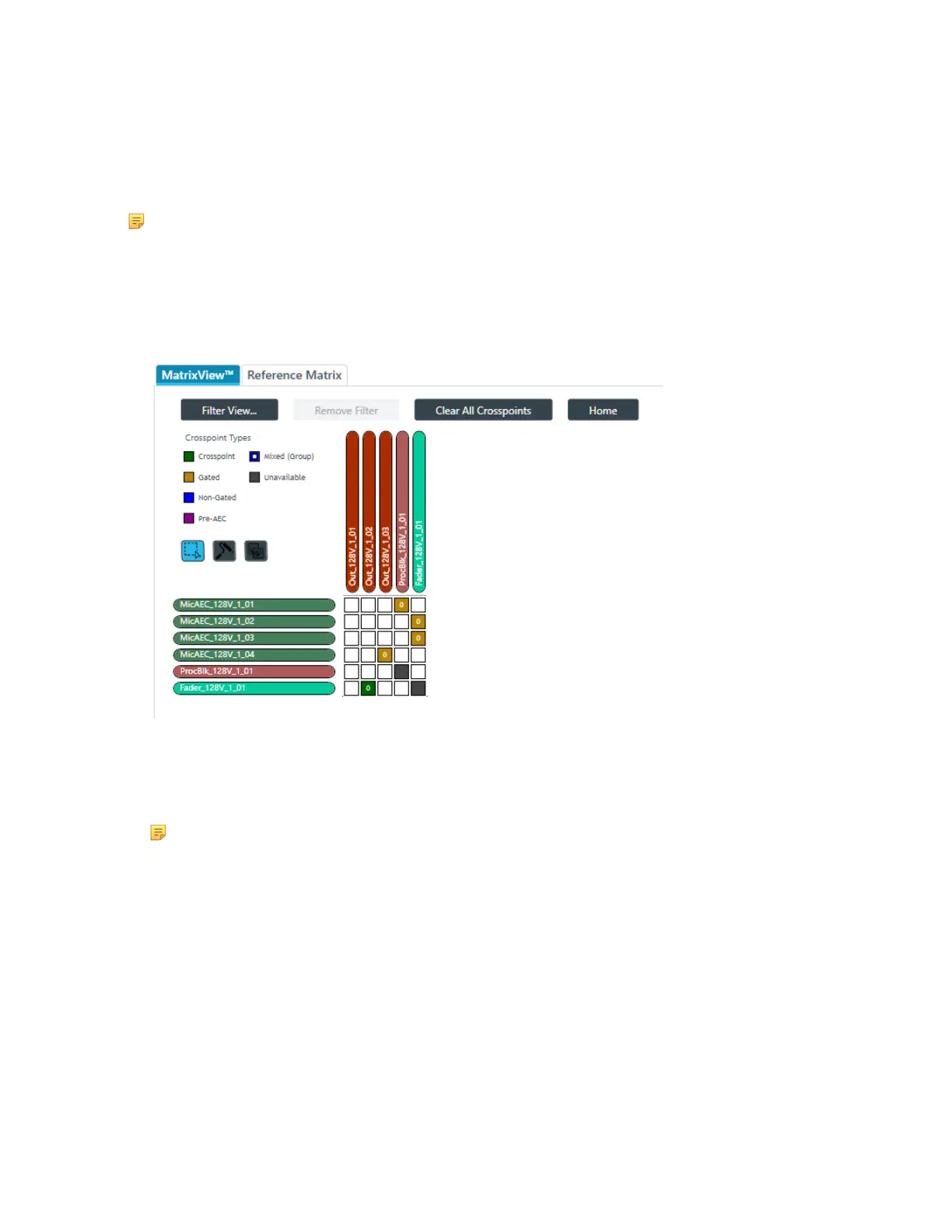
You can use MatrixView to make connections between audio channels. MatrixView is designed to let you
visualize connections between channels as a matrix, with output channels in columns and input channels
in rows, and the connections between them shown as crosspoints that can be selected or deselected.
Note: MatrixView and FlowView are alternative methods of visualizing the connections between
audio devices. Therefore, when you make connections in MatrixView, those connections are
reflected in FlowView as well.
To make connections between channels using MatrixView:
1. From the Navigation Panel, choose MatrixView
™
.
The MatrixView screen appears:
Inputs appear as matrix rows and outputs appear as matrix columns. Some channels, such a
processing block channels, have both inputs and outputs, so they appear as both a row, for the input,
and as a column, for the output.
2. If you are using Advanced Room mode, choose a partition from the Partition drop-down list.
Note:
The channels available in MatrixView are limited to those you have added to the selected
partition. Changes you make in MatrixView apply only to the selected partition.
3. (Optional) Choose a preset from the Preset drop-down list.
Filter
4. To limit which assets appear, click Filter View.
The Filter dialog box appears:
CONSOLE AI User Manual









 To Next Page