CONSOLE AI | Introduction | 17
Manager (CP2). If you are using Advanced Room mode and have created partitions, when you add
assets, you add them to a particular partition. Then when you want to connect assets, using FlowView or
MatrixView, you can create different configurations for different partitions.
For information about using GPIO logic input pins to set divider states, see Changing GPIO Configuration.
About Channel Groups
Channel groups let you group channels together under a name of your choosing.
Channel groups are a very convenient way to configure related or similar audio assets. You can name
each group, to help you keep track of your assets, and you can make configuration changes to the entire
group. For example, if you have a conference room with several microphones, you could have one group
for podium mics, another for ceiling mics, and still another for handheld mics. Or, if you wanted, you could
make a group for mics in the front half of the room, and another for the mics in the back half of the room.
You can apply settings to a channel group just as you would an individual asset, and you can also create
audio paths that involve entire groups, to make audio routing simpler.
About References
Acoustic Echo Cancellation (AEC) uses audio references to determine which signals to cancel. You can
also use custom references when you want to cancel some channels but permit others to be used. This
topic explains AEC and how it uses standard and custom references to cancel echo.
For information about adding standard references to a room partition, see Adding Standard References
(CP2) and Adding Custom References (CP2).
For information about making reference associations (between inputs and outputs), see Assigning
References (CP2).
Note:
CONVERGE Huddle uses only standard references, and has the references already created, but
you can make standard reference assignments. See Assigning Standard References (Huddle) for
more information.
Echo and AEC Explained
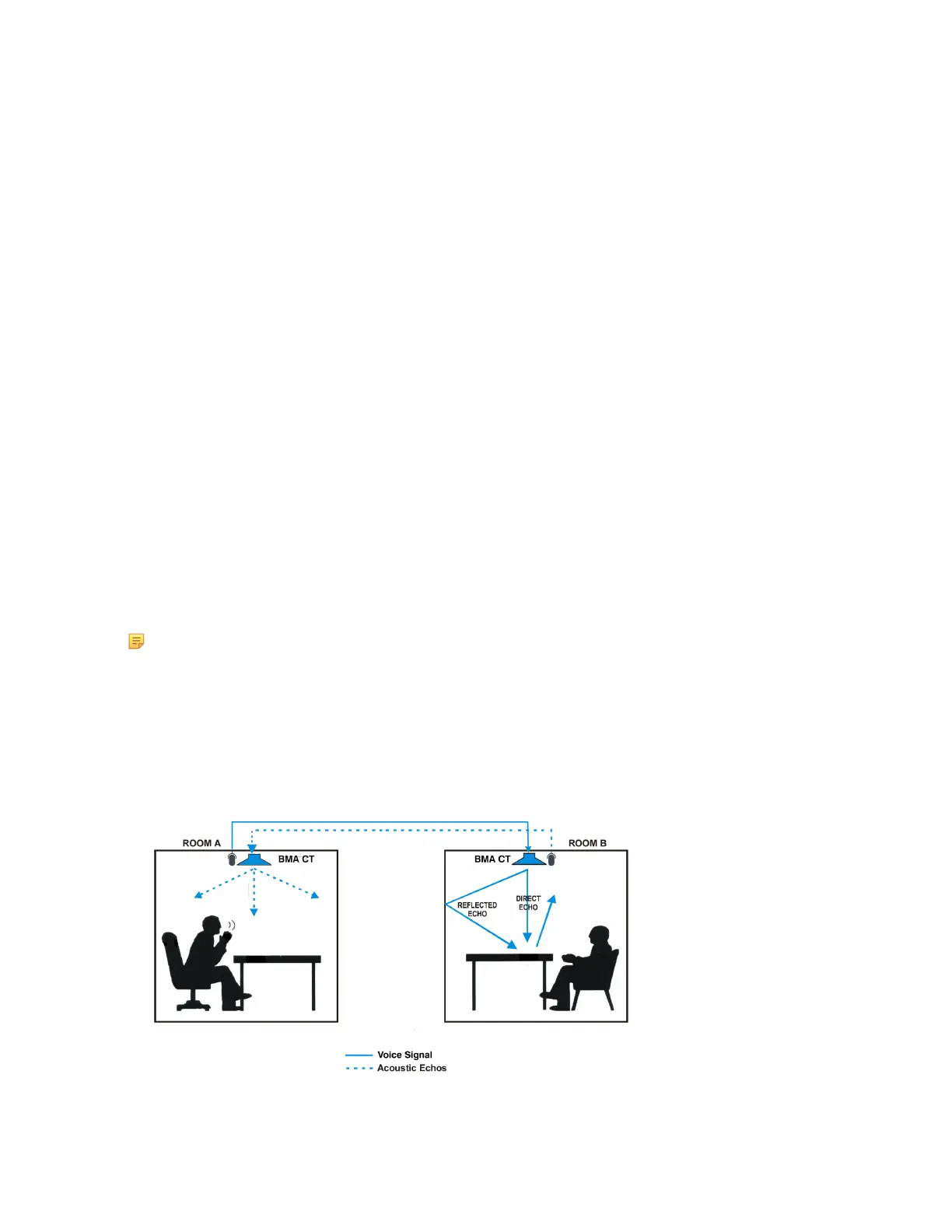
Acoustic echo occurs when audio from a remote source comes out of the speakers in a room, is picked up
by the microphone(s) in a room, and sent back to the remote source, as shown in the diagram below:
In the diagram above, the speaker in ROOM A speaks into a microphone, and the signal is carried across
a network or telephone line to ROOM B and is played from the BMA CT speaker at the top of ROOM B, as
CONSOLE AI User Manual









 To Next Page