CONSOLE AI | Interface | 28
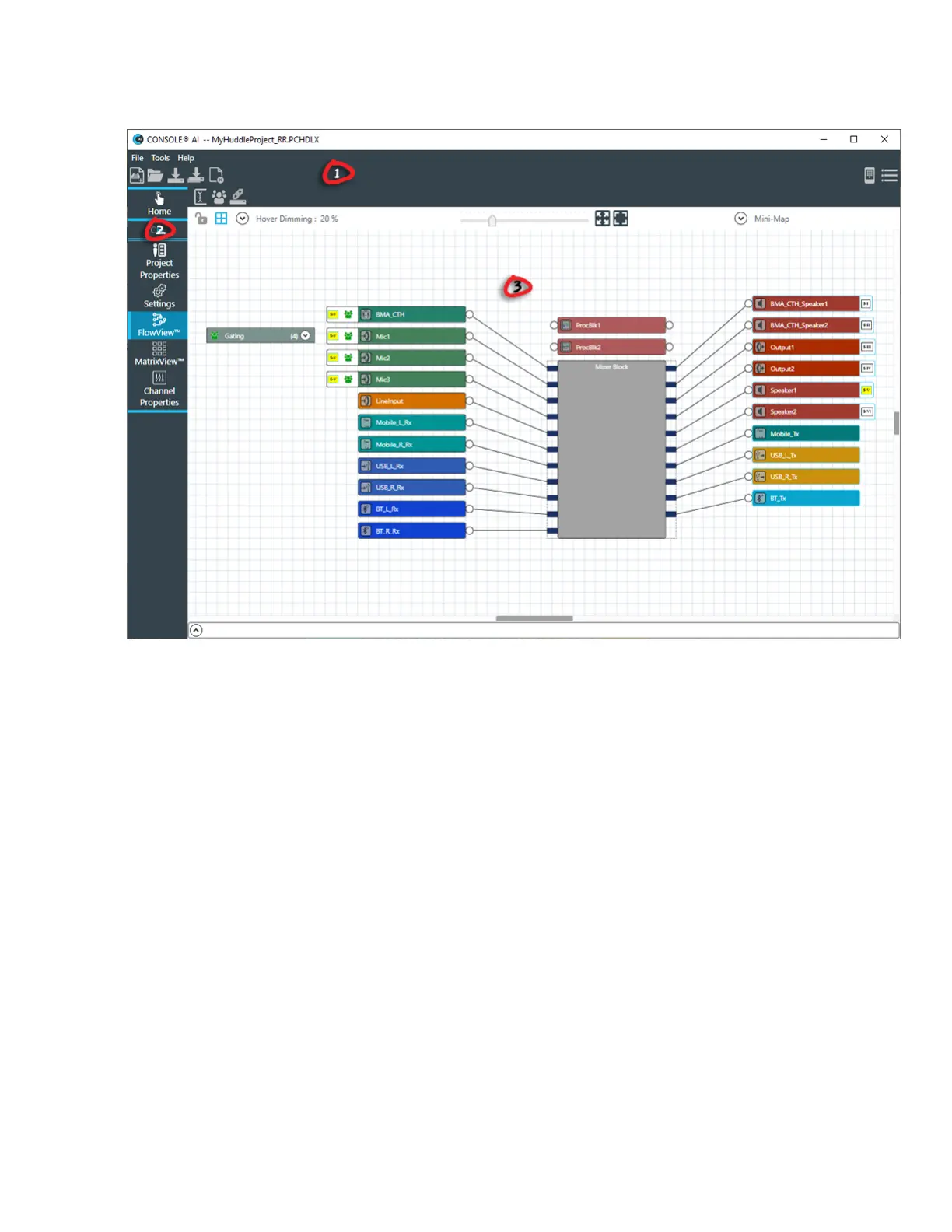
Interface Layout (Huddle)
1. The Toolbar shows tools that give you easy access to essential features.
2. The Navigation Panel lets you choose between a number of different screens.
3. The interface screen area is where you can make changes to features. The contents of the interface
screen change depending on what you have selected in the Navigation Panel.
Text Fields
Unless otherwise specified, text fields in the CONSOLE AI interface can contain up to 64 characters.
Names (such as device names) may contain alphanumeric characters (a-z, uppercase and lowercase, and
0-9), hyphens (-) and underscores (_) but may not contain spaces or special characters, such as !, @, #,
$, etc. Other limitations may apply as appropriate (for example, email addresses must be in the form of an
email address).
Changing the CONSOLE AI Interface Language
You can change the language used in the CONSOLE AI user interface.
You can choose any of the following languages:
• Arabic
• Chinese
• English
• French
• German
• Japanese
CONSOLE AI User Manual









 To Next Page