CONSOLE AI | Project - Offline | 57
Adding or Modifying Presets (CP2)
You can add, clone, delete, rename, and reset presets, or set a particular preset as the default for the
partition.
To add or modify a preset:
1. From the Navigation Panel, choose FlowView, MatrixView, or Channel Properties.
2. Make any changes you want to include in the preset.
Add a Preset
3.
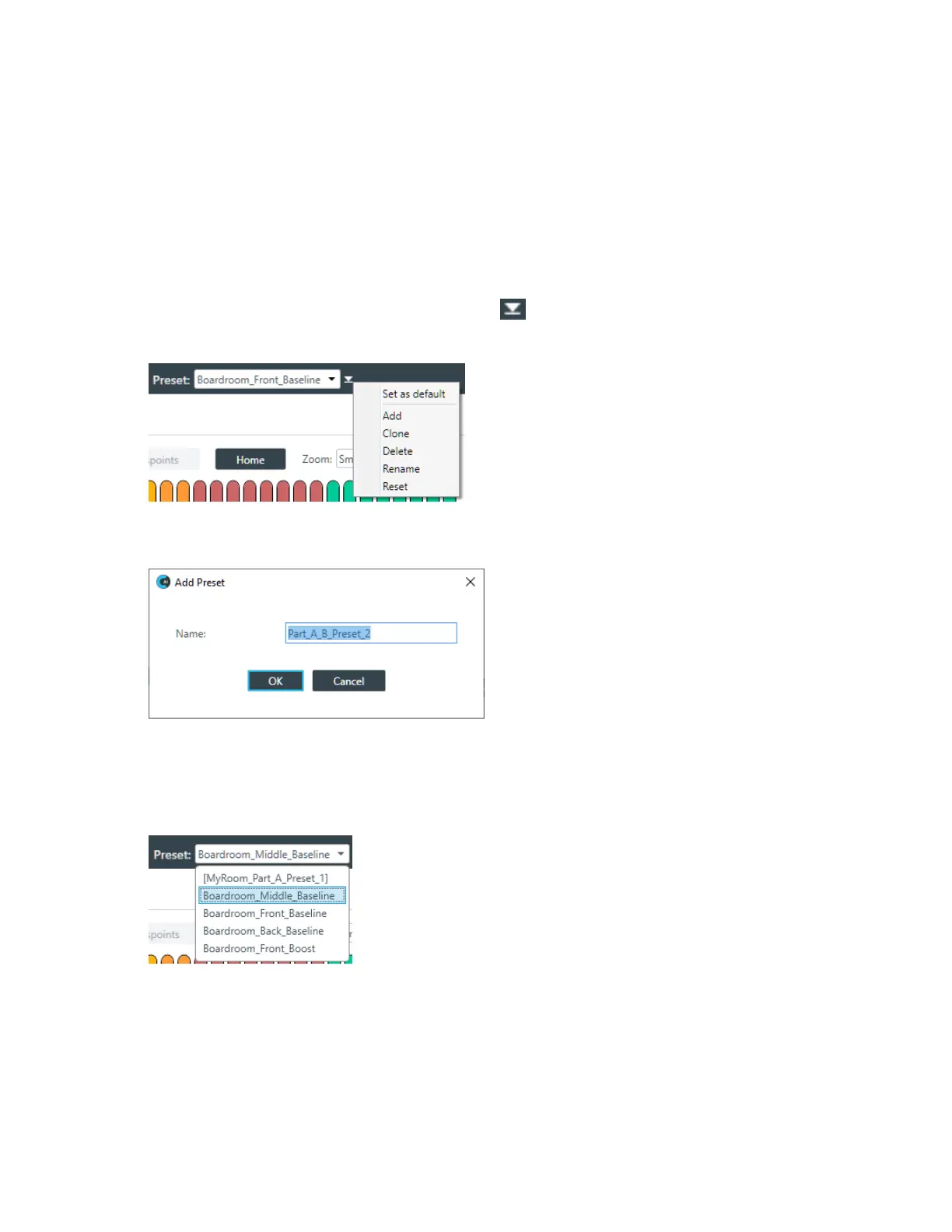
To add a preset, open the Preset menu by clicking to the right of the Preset drop-down list.
The Preset menu appears:
4. From the Preset menu, choose Add.
The Add Preset dialog box appears:
5. Type a name for the preset in the Name field.
6. Click OK.
Clone a Preset
7. To clone a preset, select the preset you want to clone from the Preset drop-down list:
8. From the Preset menu, choose Clone.
A copy of the selected preset is made with “_copy” at the end of the name.
Delete a Preset
9. To delete a preset, select the preset you want to delete from the Preset drop-down list.
10.From the Preset menu, choose Delete.
The preset is deleted.
CONSOLE AI User Manual









 To Next Page