CONSOLE AI | Adding Devices (CP2) | 143
The tabs shown on this dialog box depend on the type of device. All devices have General and
Network tabs. Devices with VOIP capability have VoIP and IP-Phone tabs. Devices with Telco
capability have a Telco tab.
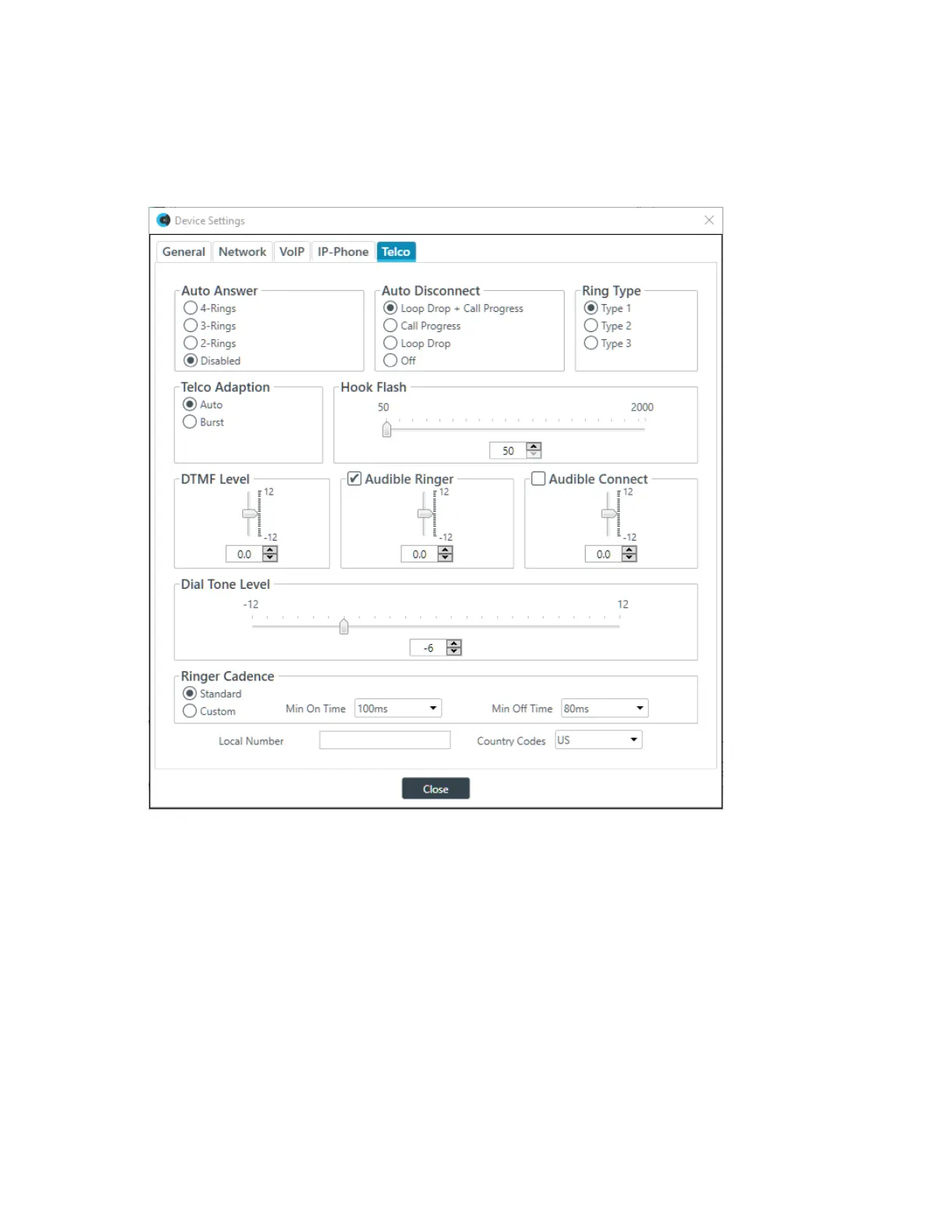
3. Select the Telco tab.
The Telco settings appear:
4. Change any of the Telco settings (as described in the table below).
Option Description
Auto Answer Whether to automatically answer and if so, specify after how many rings.
Default is disabled.
Auto Disconnect Select the auto disconnect mode to control when the unit disconnects a
connected call. Modes include Loop Drop + Call Progress, Call Progress,
and Loop Drop, and Off. Default is Loop Drop + Call Progress.
Ring Type Select from three different ring tones (Type 1, Type 2, Type 3). To test a
particular tone, click Test after you have selected the tone. Default is Type
1.
Telco Adaptation Some applications require the unit to adapt to line conditions using a
white-noise burst (Noise) rather than automatically (Auto). Default is Auto.
Hook Flash Sends a momentary interruption in the line seizure, allowing activation
of options such as 3-way calling, call waiting, and call hold. This feature
CONSOLE AI User Manual









 To Next Page