CONSOLE AI | Introduction | 15
offline mode. In order to see online mode, you have to connect to a Huddle or CP2 device or stack. See
Connecting to a Device or Stack (CP2) and Connecting to a Device (Huddle) for more information.
Note: It’s important to understand that the CONSOLE AI application does not have all the same
interface options available in online mode that it has in offline mode. There are some interface
options that are available in both modes, but there are some options that are unique to one or the
other of the two modes.
Online Mode
The CONSOLE AI application is in online mode when you have connected to a Huddle or CONVERGE Pro
2 device and the application is actively communicating with the device or device stack.
Important: When you’re in online mode, you are seeing the state of the device or devices to which
you are connected. When you make changes while in online mode, you’re making changes to the
device(s) to which you are connected. Those changes are not automatically synchronized to the
version of the project that is loaded in the CONSOLE AI application. For more information about the
different versions of a project file and how to synchronize online mode changes to a project, see
About Projects and Commit Changes to Hardware (CP2).
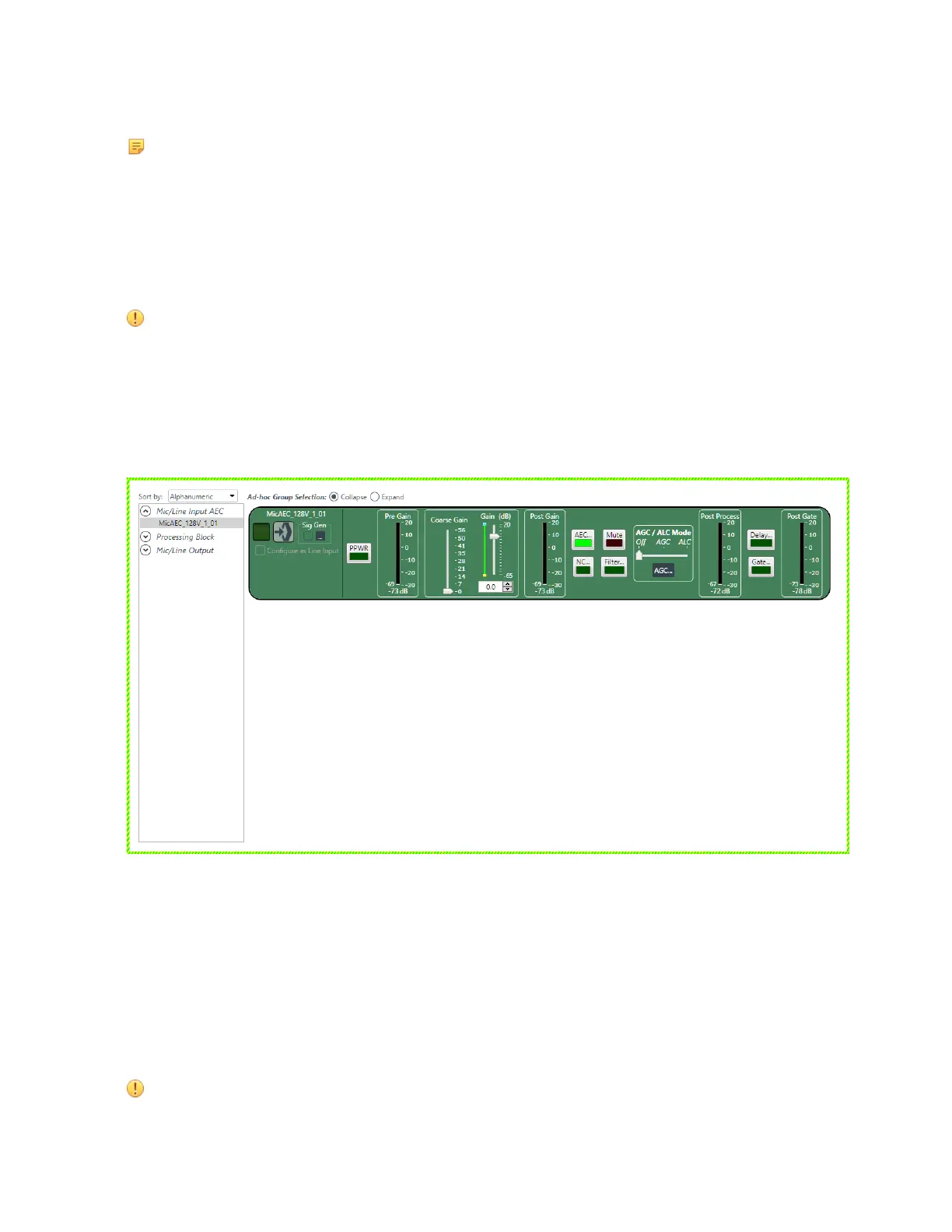
Being in online mode gives you some capabilities that are unavailable in offline mode. For example, here is
the channel properties block for a Mic/Line Input AEC channel named MIC1:
Notice that the property block is surrounded by a dashed light green border, which tells you that the
CONSOLE AI application is in online mode. This properties block has several meters to help you make
properties adjustments. For example, it has a Pre-Gain meter immediately after the PPWR button and a
Post-Gain meter immediately after the Coarse Gain and Gain sliders. These meters are designed to let you
see the effect of making gain changes, before and afterwards. These meters appear, however, only if you
are in online mode.
Offline Mode
The CONSOLE AI application is in offline mode when you have opened a project file but are not connected
to a device.
Important: When you’re in offline mode, you are seeing the state of the project as loaded in
the CONSOLE AI application. When you make changes to a project while in offline mode, those
changes are not reflected on any device unless you load the changes to the device or stack.
CONSOLE AI User Manual









 To Next Page