8.4 Edit Task
When a task is created, the user can add commands in the Task List, and when the Properties of the
added command are configured, the task program can be executed. The Task Builder screen offers
an edit function for adding/deleting/copying commands or changing the order of commands. The Task
Builder commands consist of motion commands, flow control and other commands, and skill
commands.
Note
When attempting to enter the Home, Workcell Manager or Task Writer screen, a message
confirming whether to save the program being edited is displayed. Jog and Settings screens are
displayed as popup windows. Refer to “3.4 Robot Mode and State”.
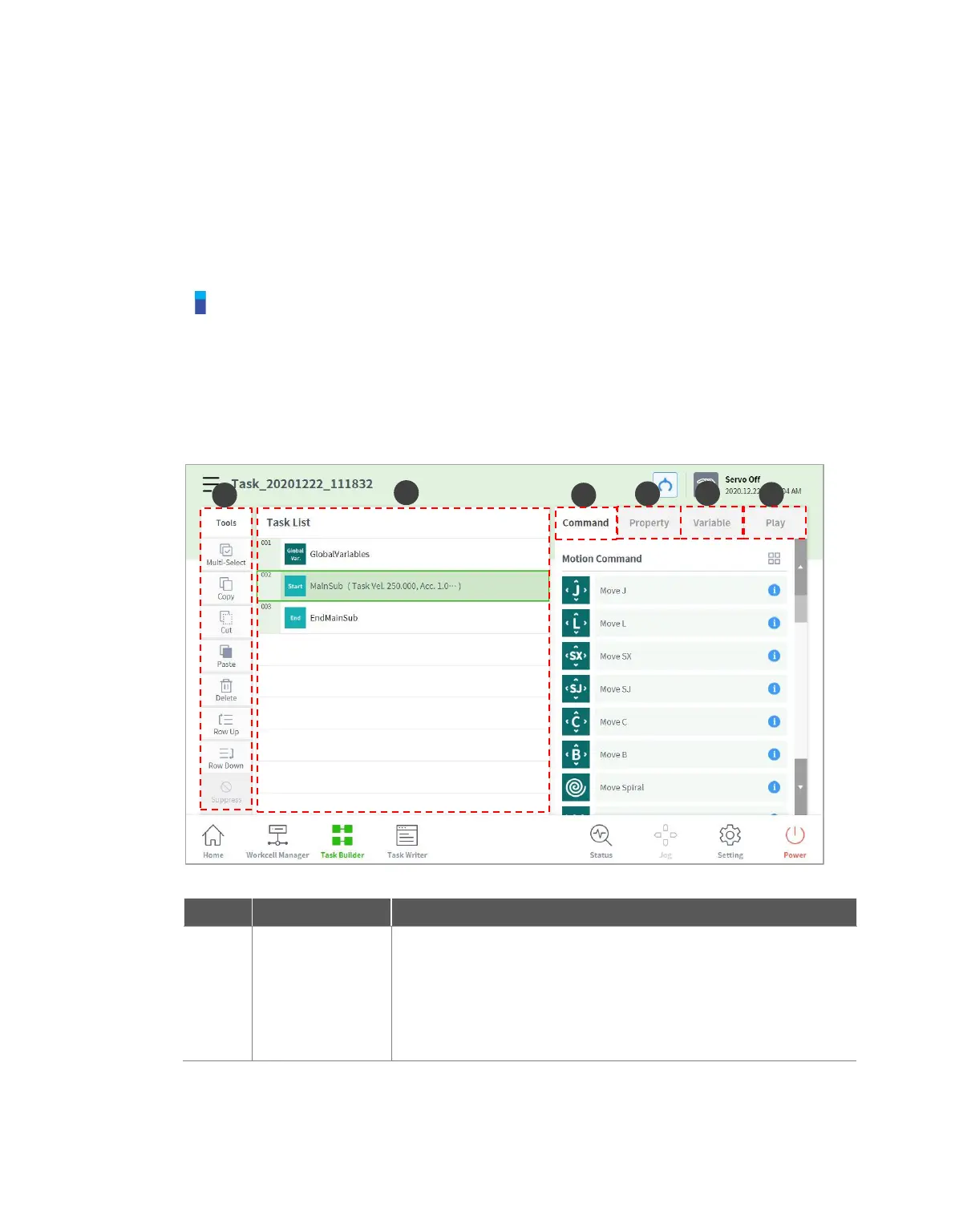
8.4.1 Edit Task Screen Configuration
The edit task screen of Task Builder is structured as follows:
Multi Select: Select multiple commands.
Copy: Copies a command.
Cut: Cuts a command.
Paste: Pastes a copied or cut command.
Delete: Deletes a command.
Line Up: Moves a command up by a line.
Line Down: Moves a command down by a line.



 To Next Page