Doosan Robotics User Manual v2.6.1
8.8.3 Real Mode Screen: I/O Information Tab
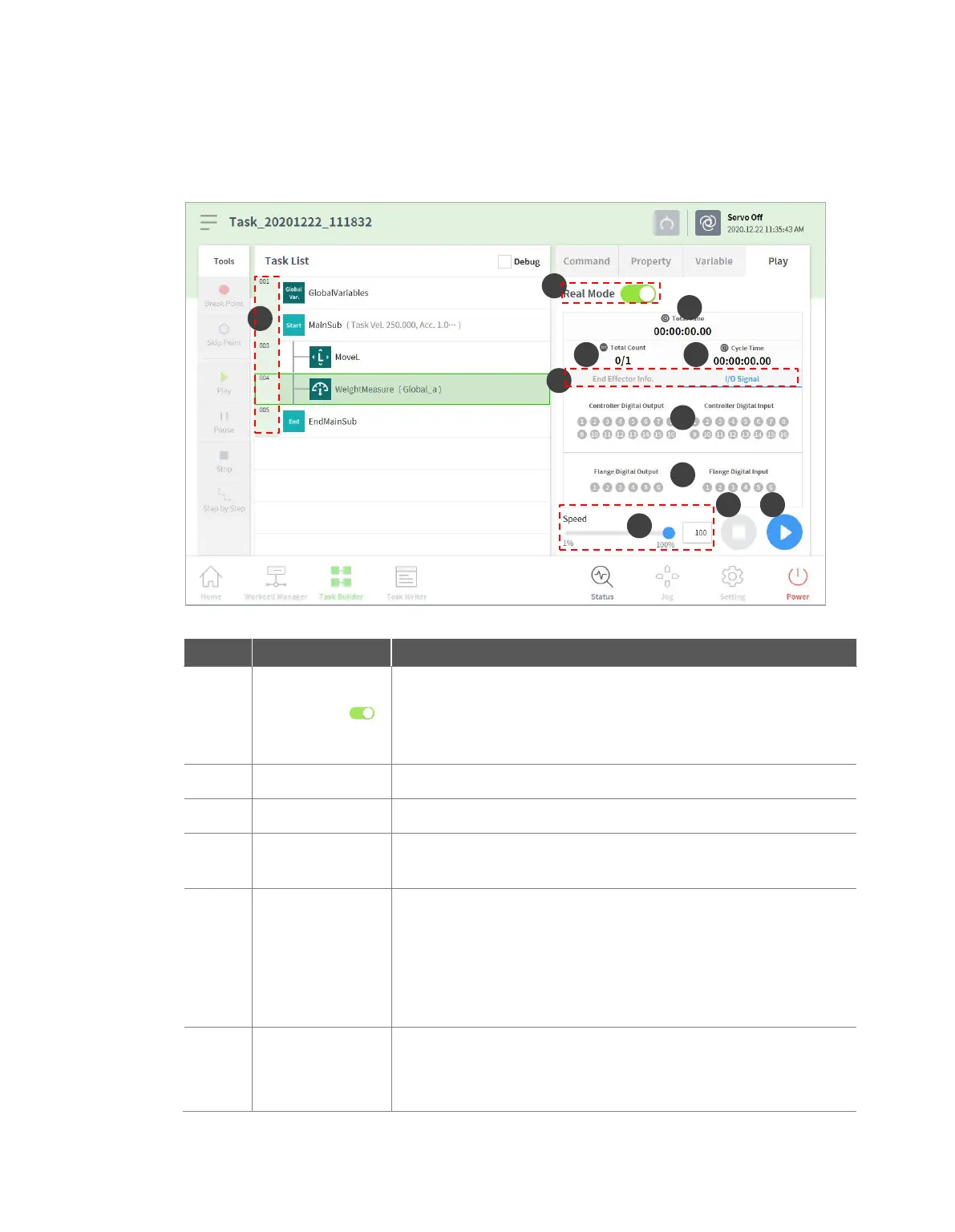
The real mode play screen end I/O information tab of Task Builder is structured as follows:
Sets the robot test play mode.
Real mode: Operates an actual robot to test the task in the
task list.
Virtual mode: Uses a simulator screen to test the task in
the task list.
Displays the total time elapsed after the task execution.
Displays the total number of task executions.
Displays the average time spent to execute one cycle of the task in
the task list.
Information
Screen Shift Tab
Shifts between the information screen of the robot end effector and
the I/O information screen.
End Effector Information Tab: Displays the center point of
the robot tool, the tool weight and the collision and force
information.
I/O Information Tab: Displays the I/O information of the
controller and the flange.
Controller digital
I/O signal
Displays the controller digital I/O signals of the current task.
If the digital signal is a high signal, the icon is displayed in
sky blue.
If the digital signal is a low signal, the icon is displayed in



 To Next Page