EasyManua.ls Logo

Doosan H2017 - Cockpit Button (Six Buttons)

Doosan H2017
253 pages
Print Icon
To Next Page IconTo Next Page
To Previous Page IconTo Previous Page
Loading...
Doosan Robotics User Manual v2.6.1
58
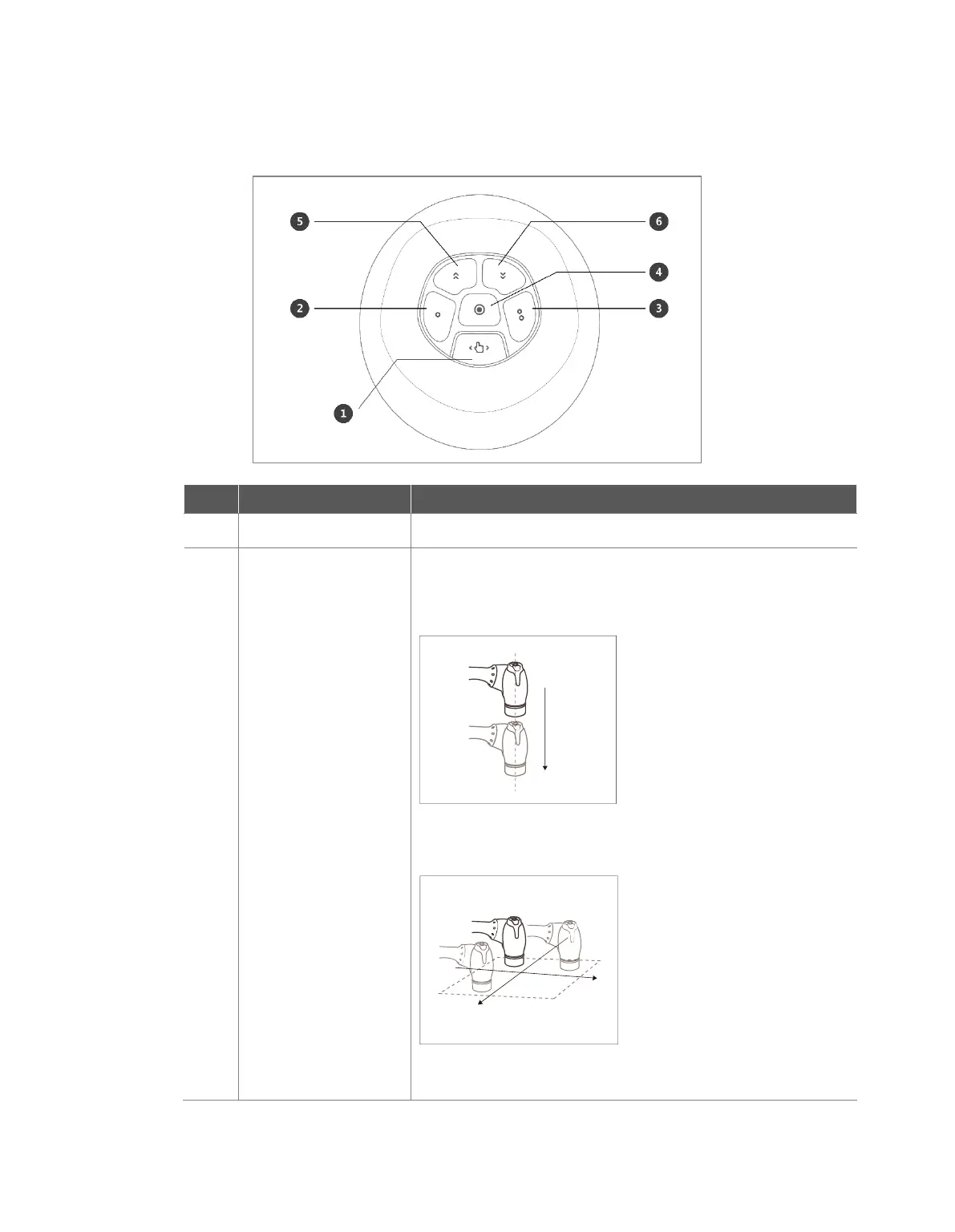
4.2.3 Cockpit Button (six buttons)
No.
Item
Description
1
Hand-Guiding Button
This button can be used to adjust or change the robot’s pose.
2,3
User Setting Button
This button can modify the robot’s pose by entering a pose
according to a lock condition corresponding to a mode.
Axis Lock: Changes the pose according to the Z-axis of
the tool coordinates
Surface Lock: Changes the pose according to the X-Y
surface of the tool coordinates
Point Lock: Changes the angle only from the reference


Table of Contents

Other manuals for Doosan H2017

Related product manuals