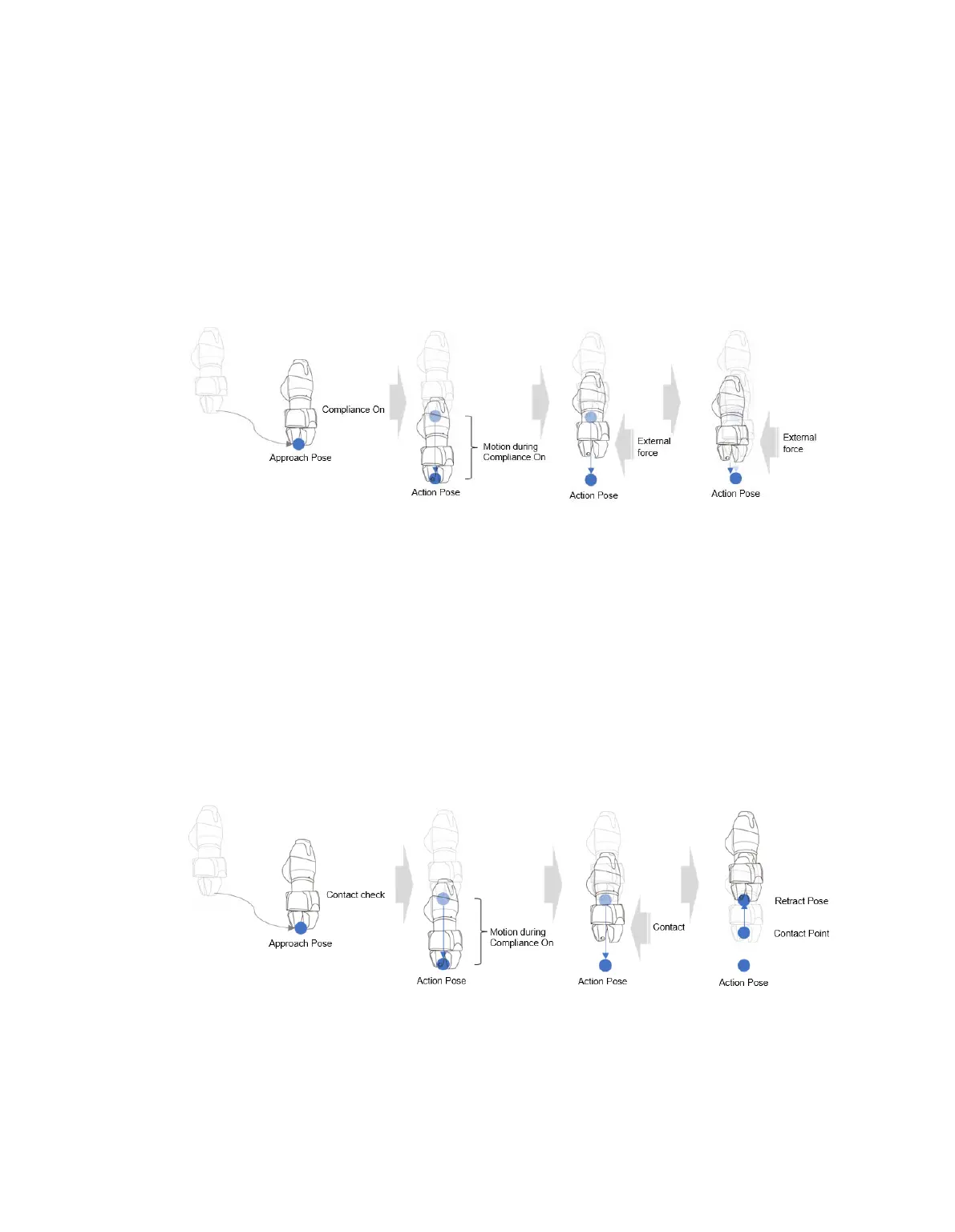
8.7.2 Compliance Control and Contact Check
With the Compliance Control and Contact Sensing functions, which is the unique force control
technology of Doosan Robotics, it is possible to easily perform teaching without repeated operation for
accurate point designation since it allows position deviation within a tolerance range between the
workpiece and surrounding items during robot operation.
Compliance Control: If force is applied during Approach →, Action → and Retract, it allows deviation
from the set position with some level of buffering, like a spring.
Contact Check: Based on the Contact Force and Contact Determination Range values entered,
the function detects contact with the target, stops at a corresponding position and activates the gripper
to grab the target.
• This function must be used with Compliance Control Function. If Force is entered and
Compliance Control is not enabled, an error occurs.
• Contact is a function that detects contact with an external force, so the sensitivity of Collision
Detection must be set at low levels or Collision Detection must be disabled.
• Be careful when using this function, as excessive force can be generated when contacting the
external environment if the Compliance Control option stiffness (i.e., Z-direction) value is too
large or the work speed is too high. (It is necessary to make adjustments according to the
situation by lowering the stiffness value if the work speed is too high or by increasing the stiffness
if work speed is too low.)



 To Next Page