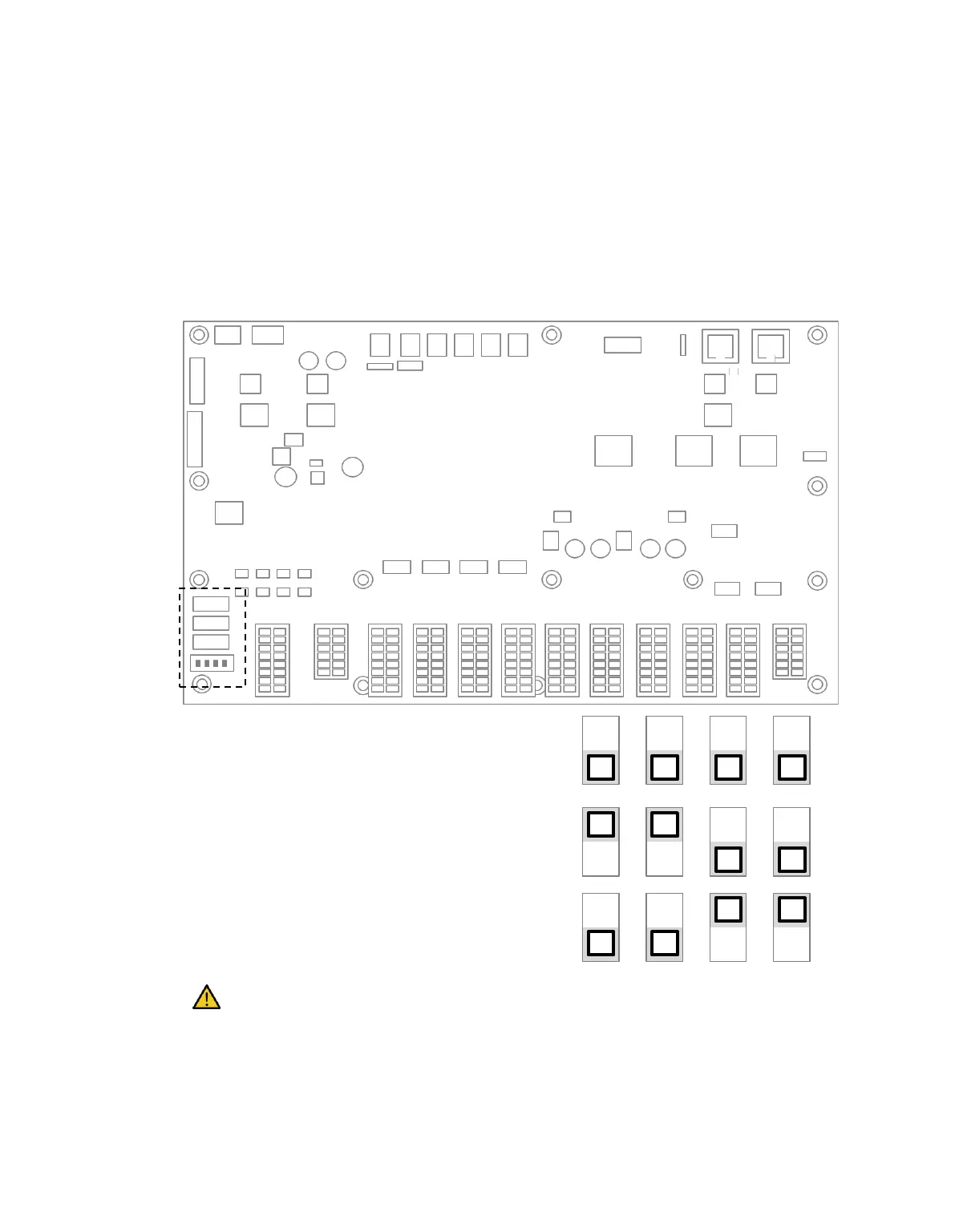
3.2 Emergency Stop Button Setting Switch (A-Series)
Configure the EMERGENCY STOP BUTTON SETTING switch on the Case according to components
and additional components before connecting and starting up the product. If the setting is not
configured according to the guide, the robot will not operate properly.
The EMERGENCY STOP BUTTON SETTING switch is located on the bottom left of the board inside
the controller door (refer to below).
Configure the setting according to the components as follows. Upon first receiving, the setting is
configured as Case 1.
1.Teach Pendant(O), Smart Pendant(O)
2.Teach Pendant(O), Emergency Stop
Button(O)
3.Use of all
1.Smart Pendant(O), Teach Pendant(X)
2.Emergency Stop Button(O), Teach
Pendant(X)
Teach Pendant(O), Smart Pendant(X),
Emergency Stop Button(X)
Warning
If the setting of the emergency stop button setting is different from the actual configuration, the
emergency stop button does not work and the user may be injured in an emergency situation.
EMERGENCY STOP BUTTON SETTING Switch



 To Next Page