Chapter 12
| Security Measures
Configuring 802.1X Port Authentication
– 353 –
◆ Current MAC Count – The number of MAC addresses currently associated with
this interface.
◆ MAC Filter – Shows if MAC address filtering has been set under Security >
Network Access (Configure MAC Filter) as described on page 305.
◆ MAC Filter ID – The identifier for a MAC address filter.
◆ Last Intrusion MAC – The last unauthorized MAC address detected.
◆ Last Time Detected Intrusion MAC – The last time an unauthorized MAC
address was detected.
Web Interface
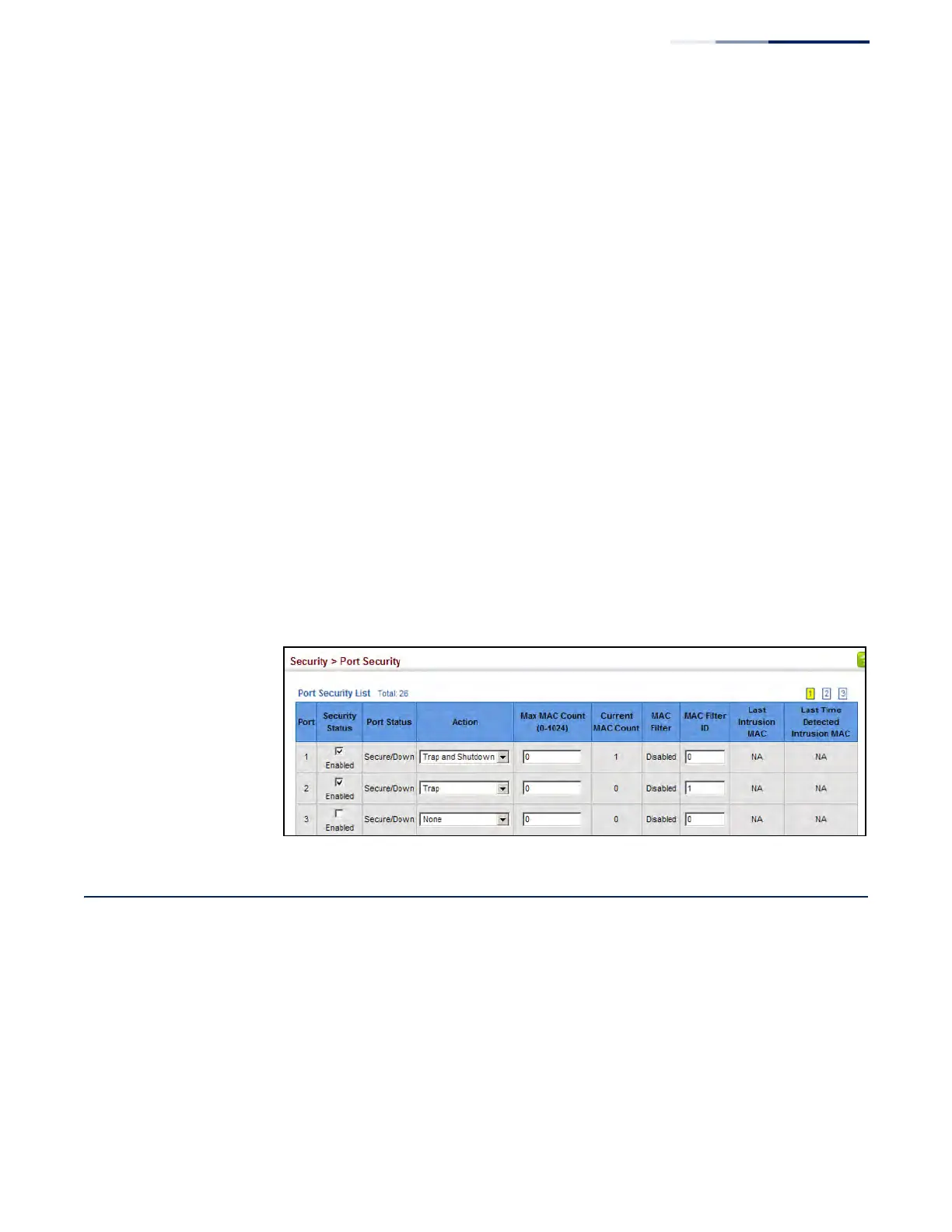
To configure port security:
1. Click Security, Port Security.
2. Mark the check box in the Security Status column to enable security, set the
action to take when an invalid address is detected on a port, and set the
maximum number of MAC addresses allowed on the port.
3. Click Apply
Figure 217: Configuring Port Security
Configuring 802.1X Port Authentication
Network switches can provide open and easy access to network resources by
simply attaching a client PC. Although this automatic configuration and access is a
desirable feature, it also allows unauthorized personnel to easily intrude and
possibly gain access to sensitive network data.
The IEEE 802.1X (dot1X) standard defines a port-based access control procedure
that prevents unauthorized access to a network by requiring users to first submit
credentials for authentication. Access to all switch ports in a network can be
centrally controlled from a server, which means that authorized users can use the
same credentials for authentication from any point within the network.











 To Next Page