Chapter 14
| Multicast Filtering
Multicast VLAN Registration for IPv4
– 597 –
Web Interface
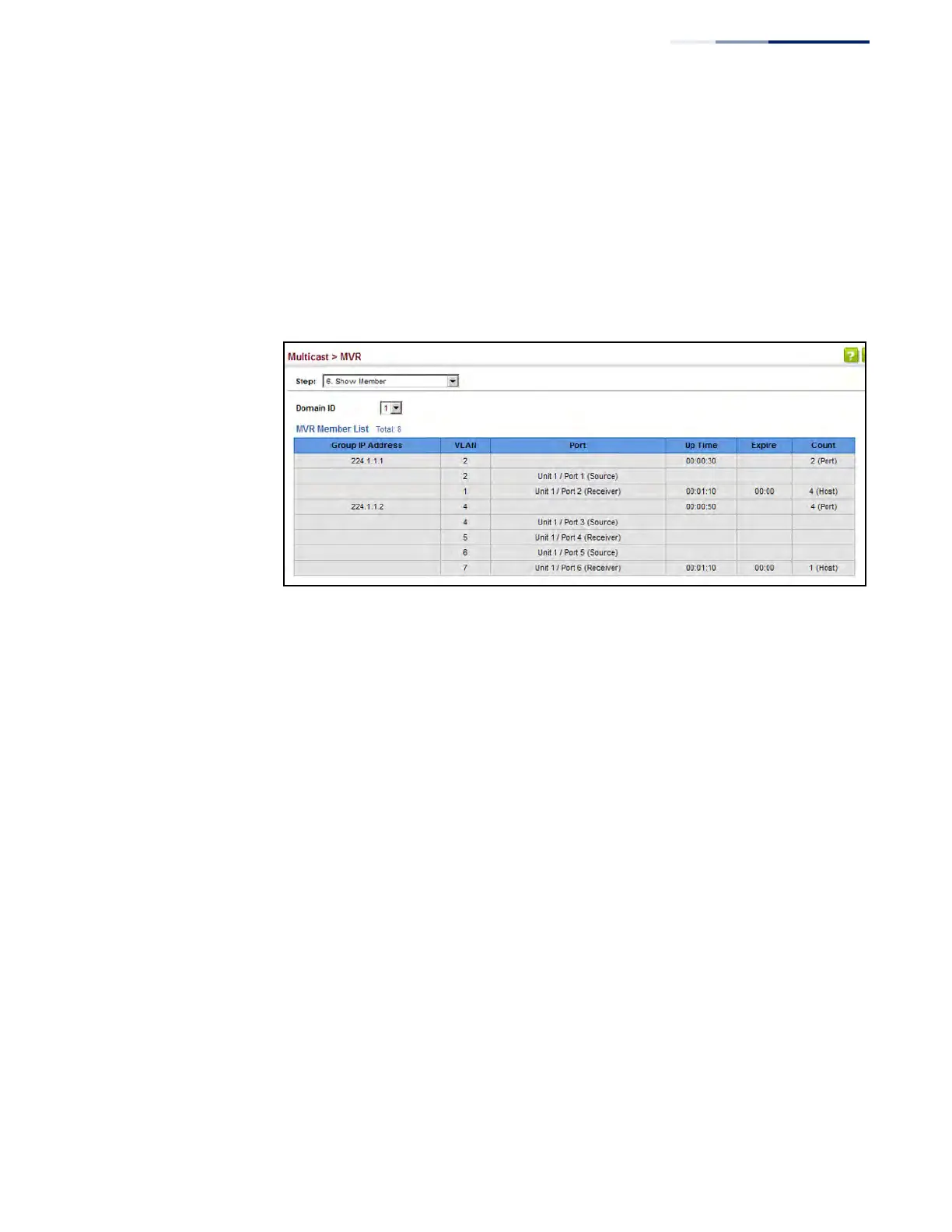
To display the interfaces assigned to the MVR receiver groups:
1. Click Multicast, MVR.
2. Select Show Member from the Step list.
3. Select an MVR domain.
Figure 382: Displaying MVR Receiver Groups
Displaying
MVR Statistics
Use the Multicast > MVR > Show Statistics pages to display MVR protocol-related
statistics for the specified interface.
Parameters
These parameters are displayed:
◆ Domain ID – An independent multicast domain. (Range: 1-5)
◆ VLAN – VLAN identifier. (Range: 1-4094)
◆ Port – Port identifier. (Range: 1-28/52)
◆ Trunk – Trunk identifier. (Range: 1-16)
Query Statistics
◆ Querier IP Address – The IP address of the querier on this interface.
◆ Querier Expire Time – The time after which this querier is assumed to have
expired.
◆ General Query Received – The number of general queries received on this
interface.
◆ General Query Sent – The number of general queries sent from this interface.











 To Next Page