A clear key for clearing the last command
A read key for viewing larger blocks of text (arrow keys now used for
scr
olling)
2 hot keys for scrolling through the default display and for control of
setting gr
oups. These are situated directly below the LCD display.
5.5 LIQUID CRYSTAL DISPLAY
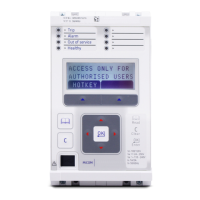
The LCD is a high resolution monochrome display with 16 characters by 3 lines and controllable back light.
5.6 USB PORT
The USB port is situated on the front panel in the bottom left hand corner, and is used to communicate with a
locally connected P
C. It has two main purposes:
● To transfer settings information to/from the PC from/to the device.
● For downloading firmware updates and menu text editing.
The port is intended for temporary connection during testing, installation and commissioning. It is not intended to
be used for permanent SCADA communications. This port supports the Courier communication protocol only.
Courier is a proprietary communication protocol to allow communication with a range of protection equipment,
and between the device and the Windows-based support software package.
You can connect the unit to a PC with a USB cable up to 5 m in length.
The inactivity timer for the front port is set to 15 minutes. This controls how long the unit maintains its level of
password access on the front port. If no messages are received on the front port for 15 minutes, any password
access level that has been enabled is cancelled.
Note:
The front USB port does not support automatic extraction of event and disturbance records, although this data can be
accessed manually.
Caution:
When not in use, alw
ays close the cover of the USB port to prevent contamination.
Chapter 3 - Hardware Design P24xM
40 P24xM-TM-EN-2.1



 To Next Page