Data Management
User Manual corpuls
3
200 ENG - Version 2.1 – P/N 04130.2
configuration can only be changed by the person responsible for the device who
can activate this option permanently (see chapter 7.4.9 Bluetooth
®
data
interface (Persons Responsible for the Device) , page 177).
If the Bluetooth® data interface is activated, the corpuls
3
can receive
automatically an connection authorisation for a connection with an external
documentation system, if this system has the same PIN. This procedure is also
called „Pairing“.
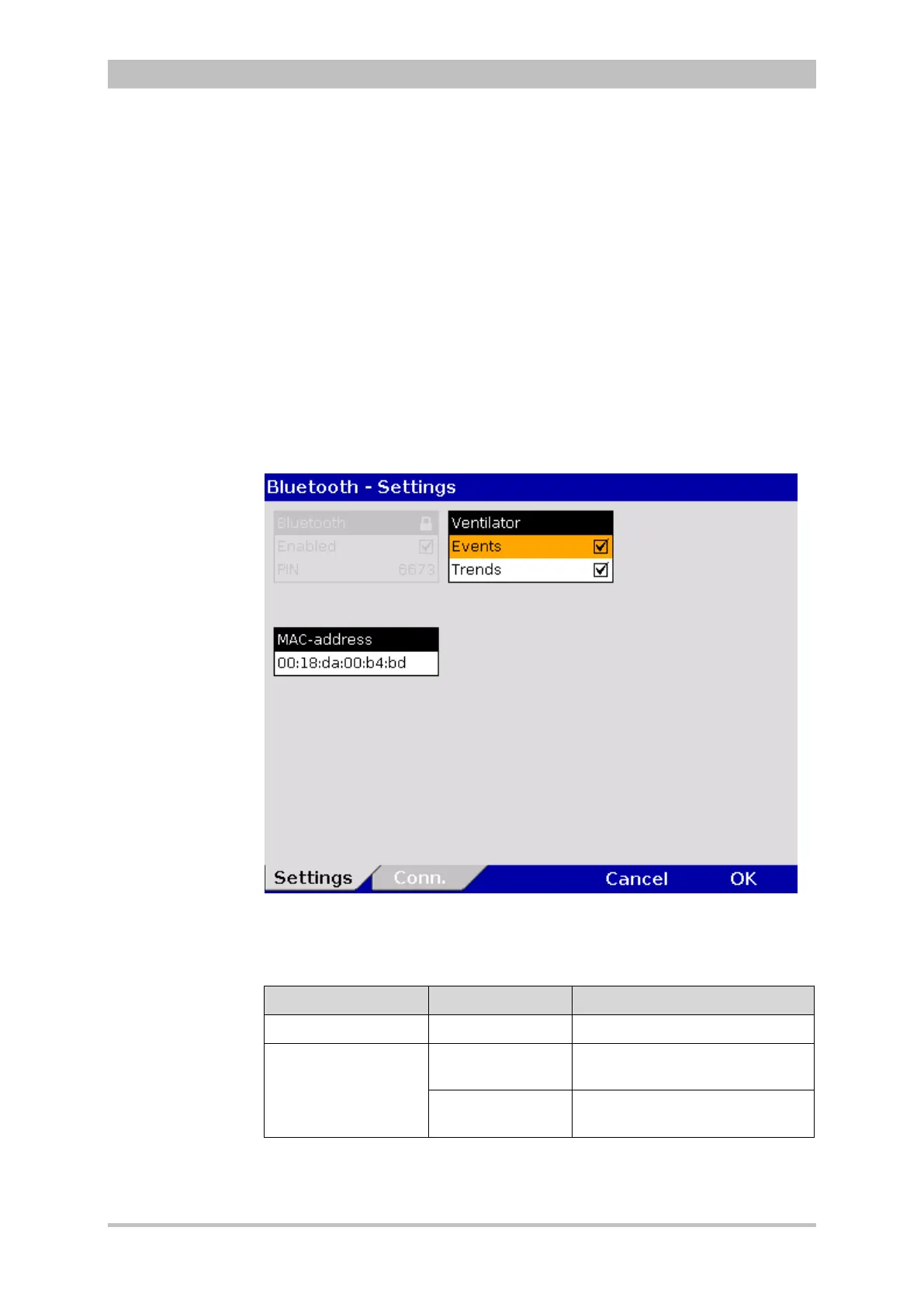
The following settings can be selected:
• Events
• Trends
1. In the main menu, select "Bluetooth" ► "Settings".
The configuration dialogue opens.
Fig. 8-7 Bluetooth settings
2. Selecting required settings.
Table 8-3 shows the possible values.
Field Setting Values
MAC address -- --
Ventilator
Events
Enabled,
disabled
Trends
Enabled,
disabled
8-3 Values for Bluetooth settings
Connection
authorisation
(Pairing)


 To Next Page