127
Bundles
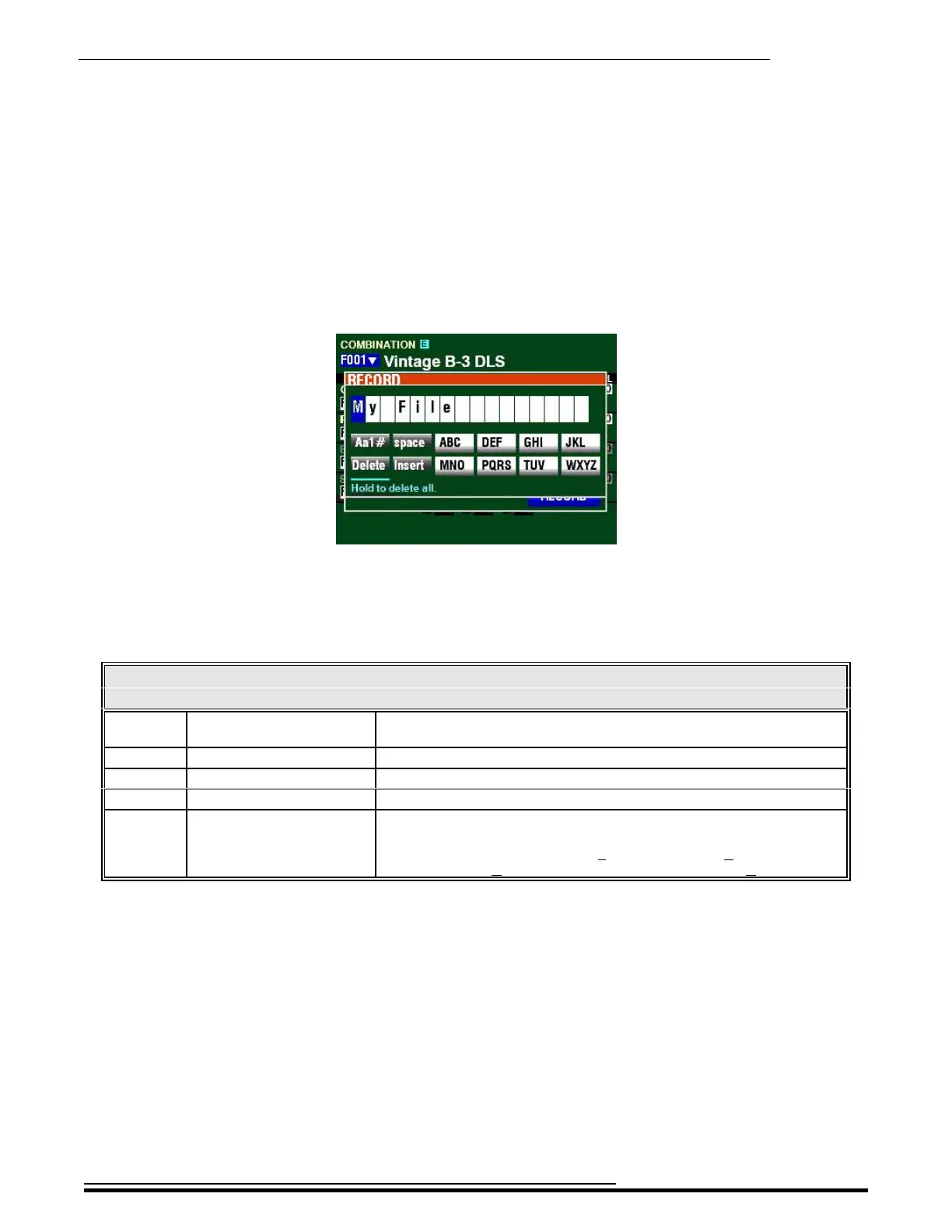
7. Press the ENTER button. The Information Center Display will look similar to this:
This is the screen you will use to Name your Bundle. You can use the FAVORITE buttons and
the BANK and MANUAL buttons (the two rows of six buttons just below the Information
Center Display) to select and enter characters The data chart below explains the function of
each of the buttons.
NAMING PARAMETERS
Parameter Button Description
Aa1 BANK Changes the character type (Capital and lower-case letters, numbers,
special characters).
Delete MANUAL Deletes the character at the cursor.
space FAVORITE 1 Replaces the character at the cursor with a space.
Insert FAVORITE 6 Inserts a space at the cursor.
ABC, etc. FAVORITES 2 ~ 5, 7 ~ 10. Use these to cycle through and select the characters for the highlighted
location. Each successive touch will cause the next character to display -
for example, touching the Number 2 button will display A, touching it
again will display B and touching it a third time will display C.
You can also turn the VALUE knob to select characters. If you wish to do this, use the
DIRECTION “t” and “u” buttons to move through the characters.
HA<O> SKX PRO Reference Guide



 To Next Page