70
Combinations
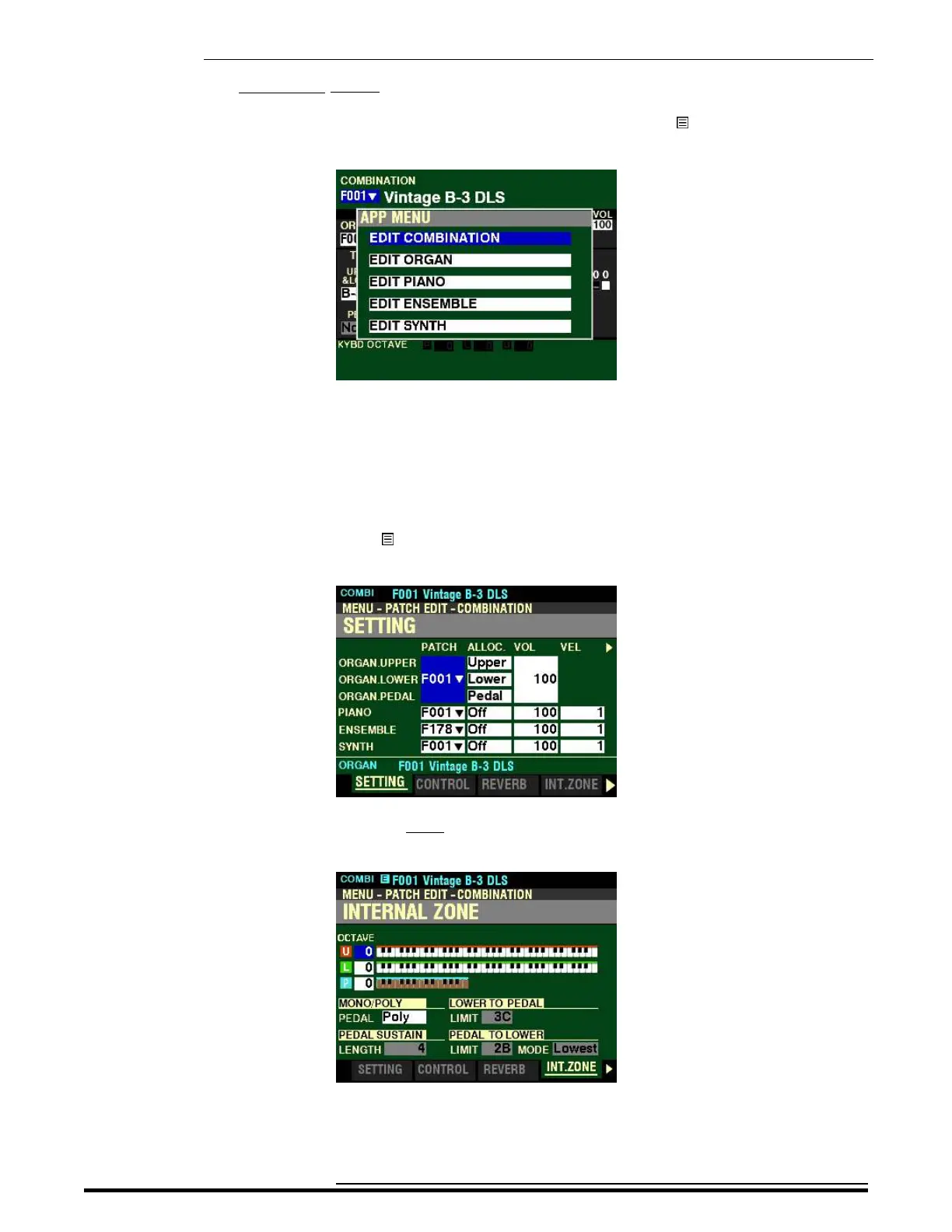
Accessing the INTERNAL ZONE FUNCTION Mode Page using the APP MENU:
1. From any of the PLAY Mode Pages, Press and Hold the MANUAL “ ” button. The Information
Center Display should now look like this:
The “EDIT COMBINATION” box should be highlighted.
NOTE: The APP MENU may not display all Voice Sections, depending on which Voice Sections
are active for the selected Combination or which ALLOCATE buttons are “ON” (LED lit). If the Voice
Section you want is not displaying, press the PLAY button, press the ALLOCATE button for the
Voice Section you want to turn it “ON” (LED lit), then repeat Steps 1 and 2 above.
2. Release the MANUAL “ ” button and press the ENTER button. The Information Center
Display should now look like this:
3. Press the PAGE “u” button three times. The Information Center Display should now look like
this:
You can now use the DIRECTION and PAGE buttons in conjunction with the VALUE knob to
make changes to the Internal Zones of your SKX PRO. These changes are explained starting
on the next page.
HA<O> SKX PRO Reference Guide



 To Next Page