56
Combinations
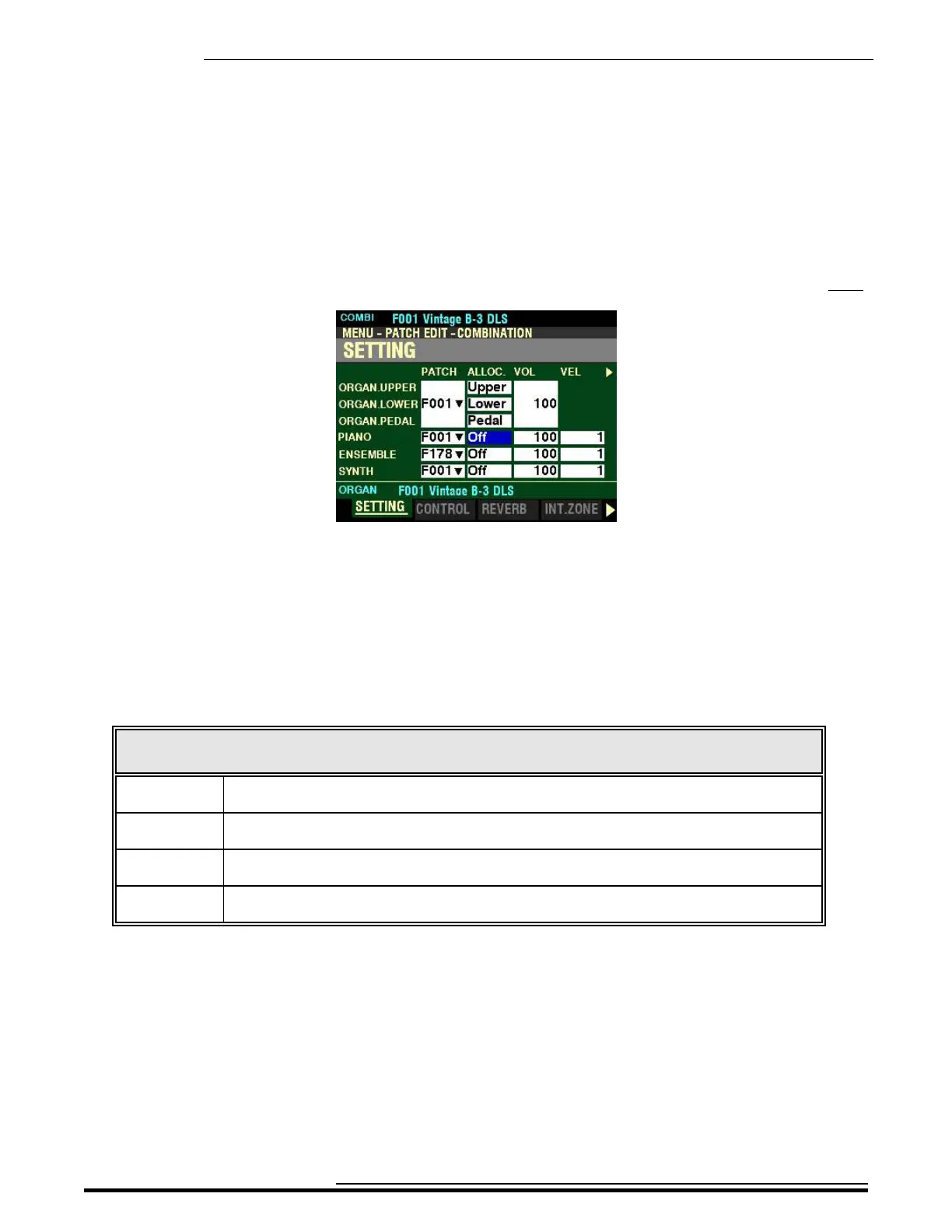
From the screen shown in the middle of the previous page, press the DIRECTION “u” button once.
The box underneath “ALLOC.” should be highlighted.
ALLOC. (Allocate)
This Parameter allows you to assign the Voice Sections to each Part. The data chart below shows the
options you can select.
NOTE: This Parameter is linked to the ALLOCATE buttons on the Control Panel.
PATCH ALLOCATE Options
Parameter Description
Off The selected Voice Section will not sound. The ALLOCATE button associated with the
selected Voice Section will not light.
Upper The selected Voice Section will sound from the UPPER Keyboard. The ALLOCATE button
associated with the selected Voice Section will light red.
Lower The selected Voice Section will sound from the LOWER Keyboard. The ALLOCATE button
associated with the selected Voice Section will light green.
Pedal The selected Voice Section will sound from the PEDALs. (The PEDAL TO LOWER button
must be “ON,” or a MIDI pedal clavier must be connected to the SKX PRO.)
Turn the VALUE knob to make your selection.
HA<O> SKX PRO Reference Guide



 To Next Page