322
MONO SYNTH Voice Section
MONO SYNTH Voice Section
The MONO SYNTH Voice Section, as the name implies, is a monophonic synthesizer utilizing physical
modeling to create the sounds and effects of classic analog synthesizers. There are several individual
Oscillator Types which can be modified by the Filter (timbre), Amplitude (volume), Section Effects (Multi
Effects and Overdrive) and Equalizer. Timed characteristics such as LFO and Envelope Generators for
Pitch/Filter and Amplitude are also provided.
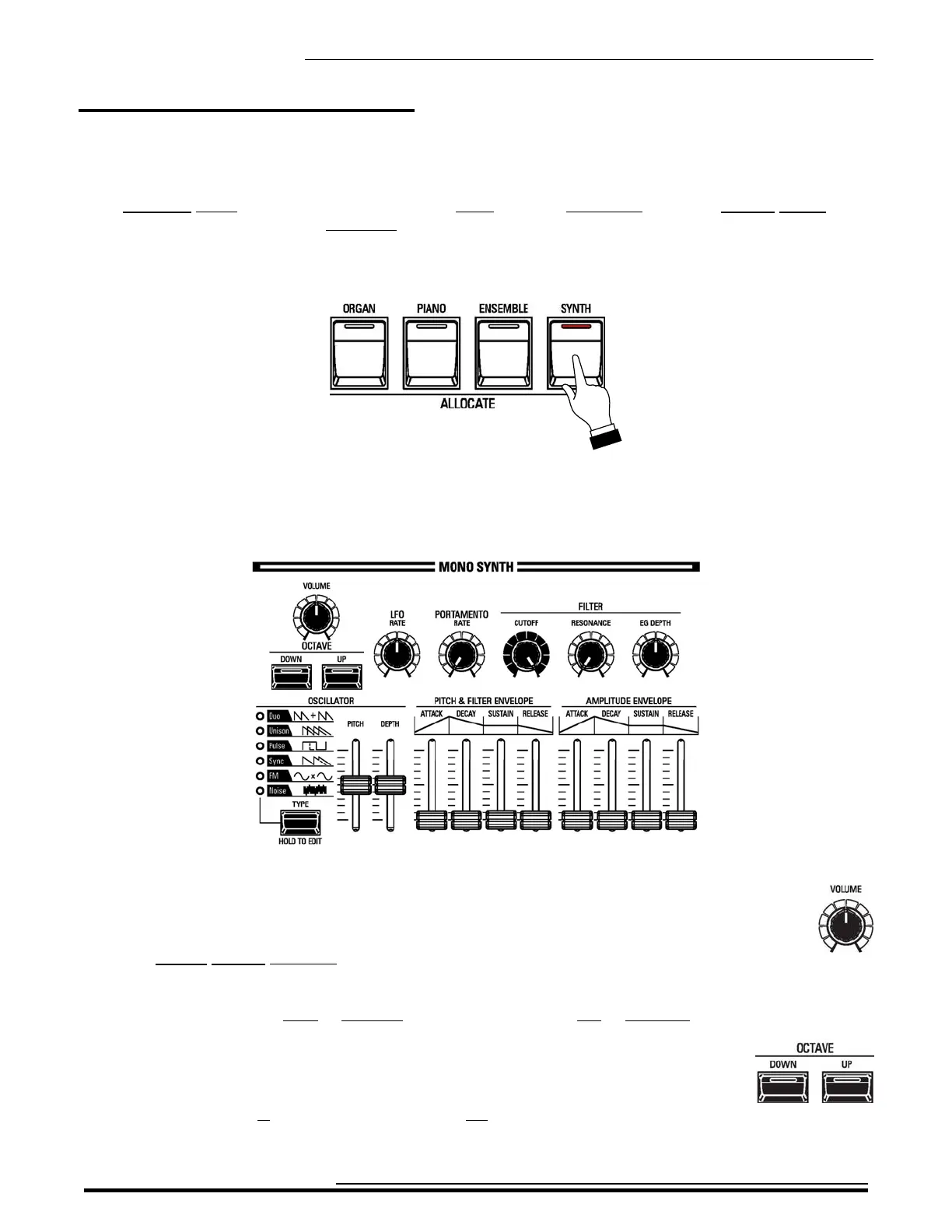
To hear the MONO SYNTH Voice Section, press the SYNTH button in the ALLOCATE button section. The
LED will light.
u MONO SYNTH Controls
The controls for the MONO SYNTH are located to the right of the Information Center Display.
These controls are explained starting below.
t MONO SYNTH VOLUME knob
The MONO SYNTH VOLUME knob is located to the left of the MONO SYNTH controls.
Use this control to raise or lower the volume of the MONO SYNTH Voice Section.
Turn this knob to the right to increase the volume, and to the left to decrease the volume.
t OCTAVE buttons
These controls allow you to select the Octave range in which the MONO SYNTH will play.
You can select from -2 (up to two octaves down) to +2 (up to two octaves up).
HA<O> SKX PRO Reference Guide


 To Next Page