21
Information Center Display
IMPORTANT: It is assumed that you have just turned the SKX PRO "ON" and have
not pressed either the PLAY or MENU/EXIT button. If you have, press the PLAY
button until a screen similar to the one shown on the previous page displays. Also
the Drawbars should be "OFF" (pushed "in").
u PLAY Modes
There are four PLAY Mode Pages:
1. COMBINATION Display,
2. ORGAN Display,
3. MONO SYNTH Display
4. INTERNAL / EXTERNAL ZONES Display.
The following paragraphs will explain each of the individual PLAY Mode Pages.
t PLAY Mode - COMBINATION Page
TRY THIS:
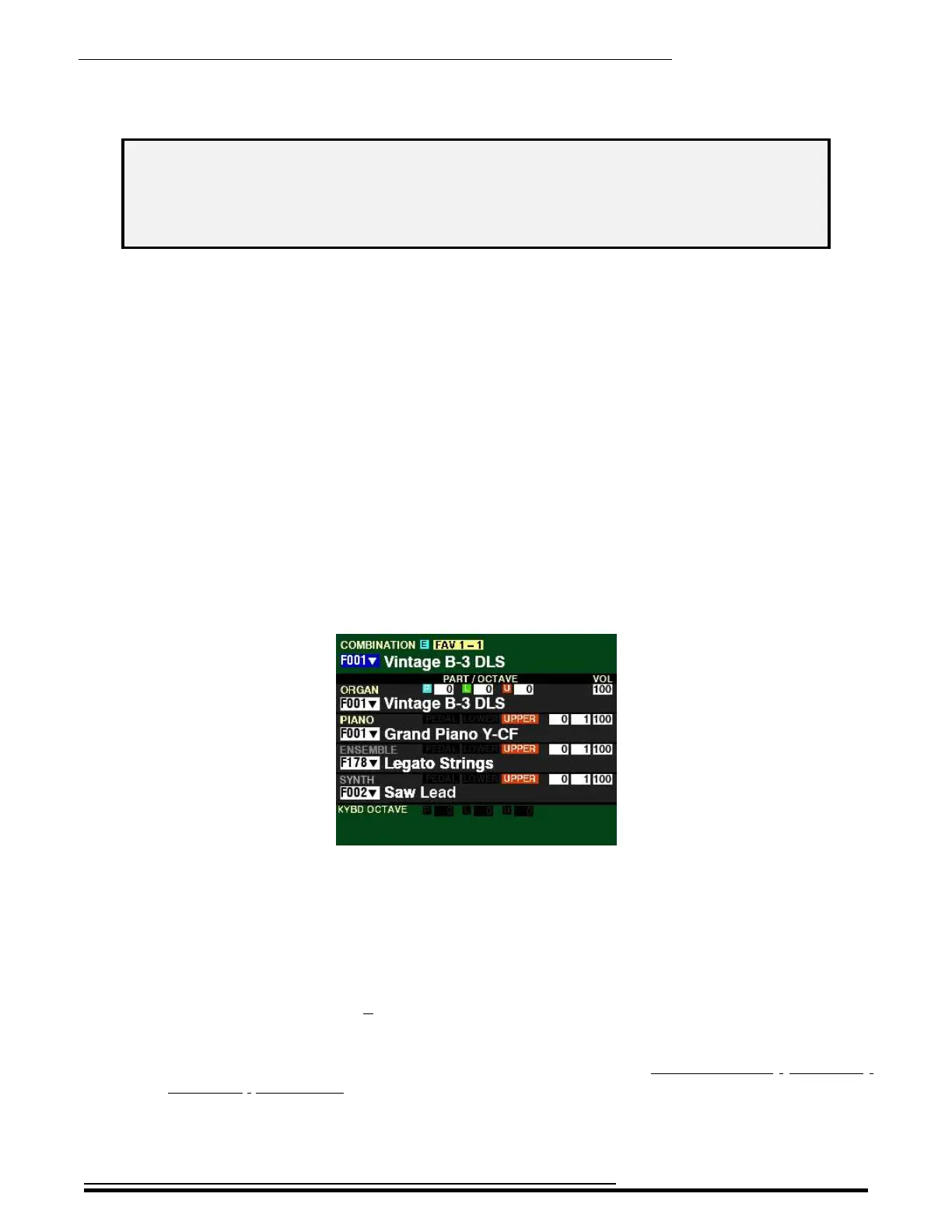
From the screen shown in the middle of the previous page, press all four ALLOCATE buttons
simultaneously to turn them “ON.” The Information Center Display should look like this:
This Page will show:
1. The Favorite Number and Favorite Bank Number,
2. The Combination Number and Name,
3. The Numbers and Names for all four Voice Sections,
4. The Part, Octave, Velocity and Volume settings for each Voice Section.
Notice also the small letter E at the top. This indicates the Combination has been changed from its
default setting.
NOTE: More information about Combinations can be found in the COMBINATIONS / PATCHES /
BUNDLES / FAVORITES chapter of this Guide starting on page 51.
HA<O> SKX PRO Reference Guide



 To Next Page