151
Saving Measurement Data
Procedures
Screen display method (For more information, see p. 29.):
(Measurement screen) FILE key>(FILE screen) SET tab
1
Insert the USB ash drive into the front
USB connector (p. 138).
2
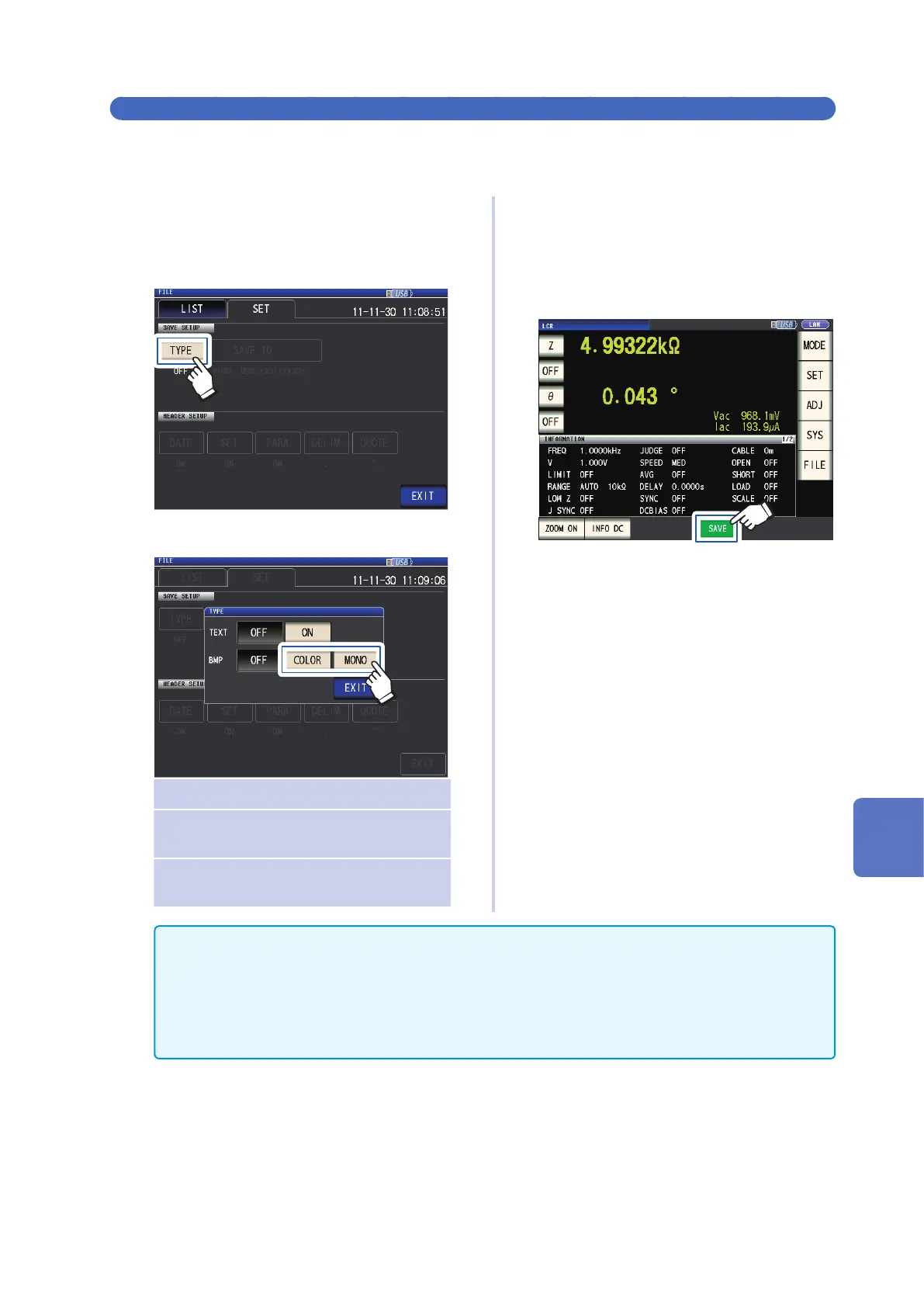
Touch the TYPE key.
3
Touch the BMP COLOR or MONO key.
OFF Disables saving of screen copies.
COLOR Saves a copy of the screen as a
256-color BMP le.
MONO Saves a copy of the screen as a
monochrome (2-color) BMP le.
4
Touch the EXIT key twice.
Displays the measurement screen.
5
Touch the SAVE key.
A copy of the measurement screen will
be saved.
• When the SAVE key is pressed, a folder is automatically created in the USB ash drive and the le is
saved.
The date is used for the name of the folder created when you press SAVE key.
Example: Saved on September 30, 2014 → 20140930
• "To specify the save folder" (p. 152)
• A lename will be assigned automatically based on the date and time.
(Example: Saved at 16:31:44 on September 30, 2014 → 140930163144.csv)
8
Using USB Flash Drive (Saving and Loading Data)



 To Next Page