EasyManua.ls Logo

Hioki IM3536 - Page 27

Hioki IM3536
276 pages
Print Icon
To Next Page IconTo Next Page
To Previous Page IconTo Previous Page
Loading...
21
Screen Layout and Operation
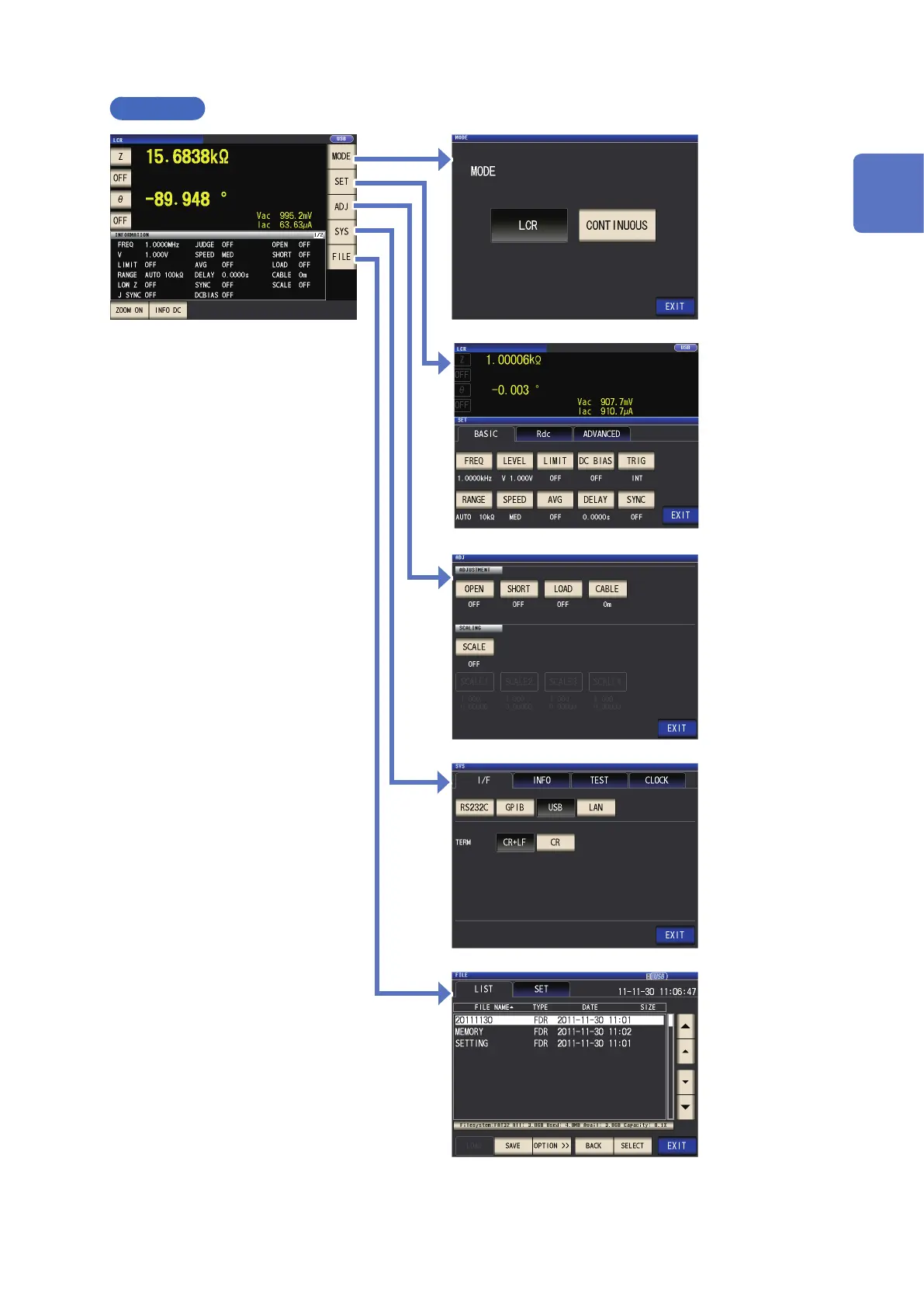
LCR mode
SET screen
MODE screen
ADJ screen
SYS screen
FILE screen
Return to the Measurement screen with the
EXIT key.
Measurement screen
This screen is used
to select the mea-
surement mode
(p. 24).
This screen is used
to congure detailed
settings such as
measurement condi-
tions (p. 25).
This screen is used
to congure cor-
rection functionality
(p. 27).
This screen is used
to congure the
instrument’s inter-
faces, to set the
time and date, and
to check the system
(p. 28).
This screen is used
to check and manipu-
late les on the USB
ash drive (p. 29).
This screen is used to view measured
values and measurement condition set-
tings information. (p. 22,p. 26)
1
Overview

Table of Contents

Related product manuals