ECC800 Data Center Controller
User Manual (for ECC800-Pro)
Copyright © Huawei Technologies Co., Ltd.
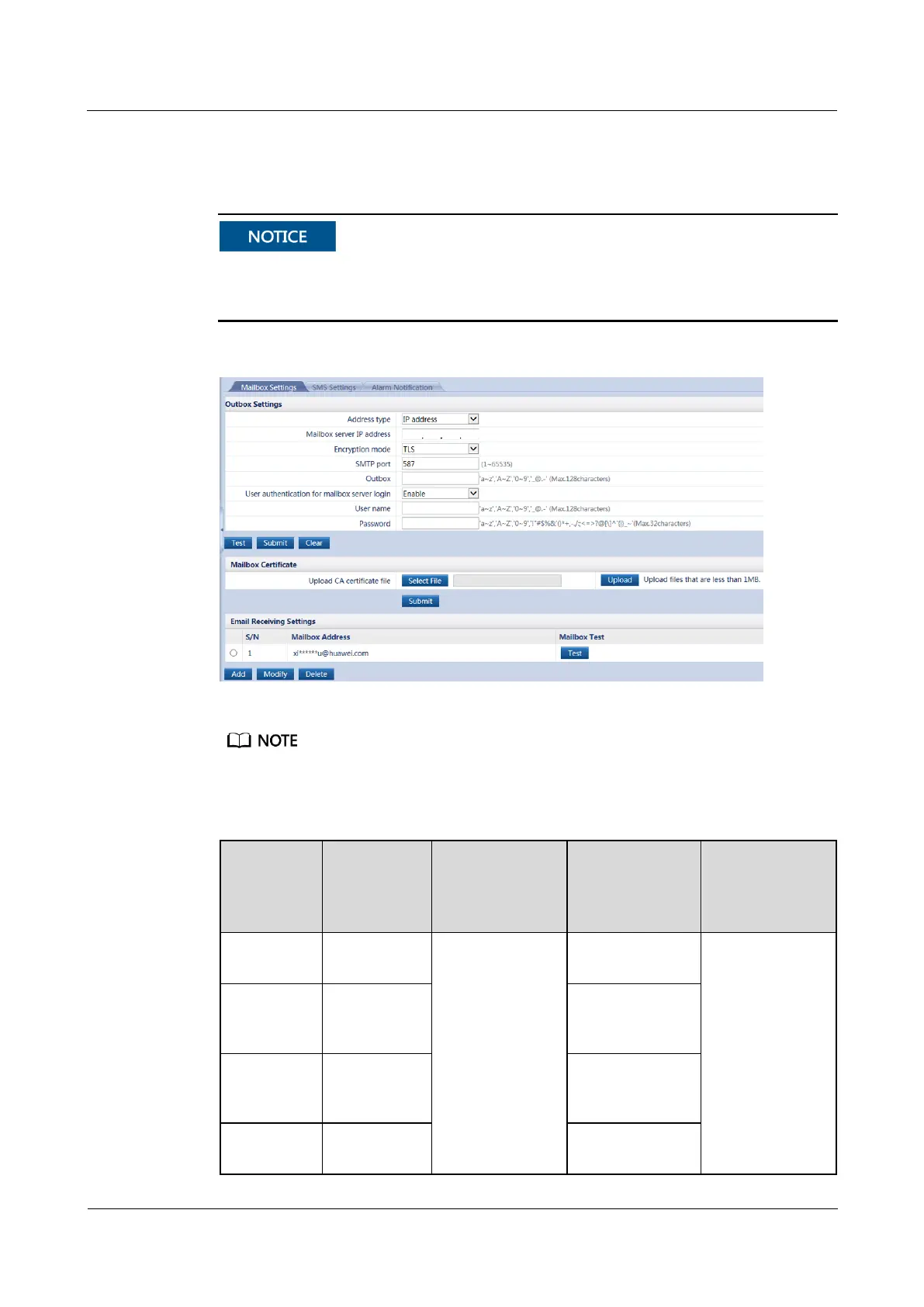
2. Click Test to check the email sending. If an email fails to be sent, check the outbox
settings and DNS Server Address. If the email is sent successfully, click Submit.
If Test email sending failed is displayed, check whether the receiver's email server requires
CA certificate verification. If it is required, download the CA certificate from the receiver's
email website and upload it in the Mailbox Certificate area.
Figure 5-4 Email setting page
The following email addresses are for reference only (the actual parameters apply) and are used only for
configuring the email function.
Table 5-2 Main parameters on the sender's email configuration page
Mailbox Server
IP Address
Encryption
Mode and
SMTP port
How to obtain:
1. Click Start on
the PC, enter
cmd in
Running area,
and press
Enter to
access the
administrator
page.
2. Enter ping
email server
The email
server must
comply with
the standard
SMTP
protocol to
ensure that the
email sending
and receiving
functions are
normal.
Enter the
Non-encryption:
25; SSL
encryption: 465
Non-encryption:
25; SSL
encryption: 465



 To Next Page