CAB DISPLAY MODULE (CDM)
4.4.18 Settin
g the Engine Intermediate Speed Control (ISC) RPM on an
M105
The ISC sets the engine speed when the header is engaged.
1. Turn ignition key to RUN, or start the engine .
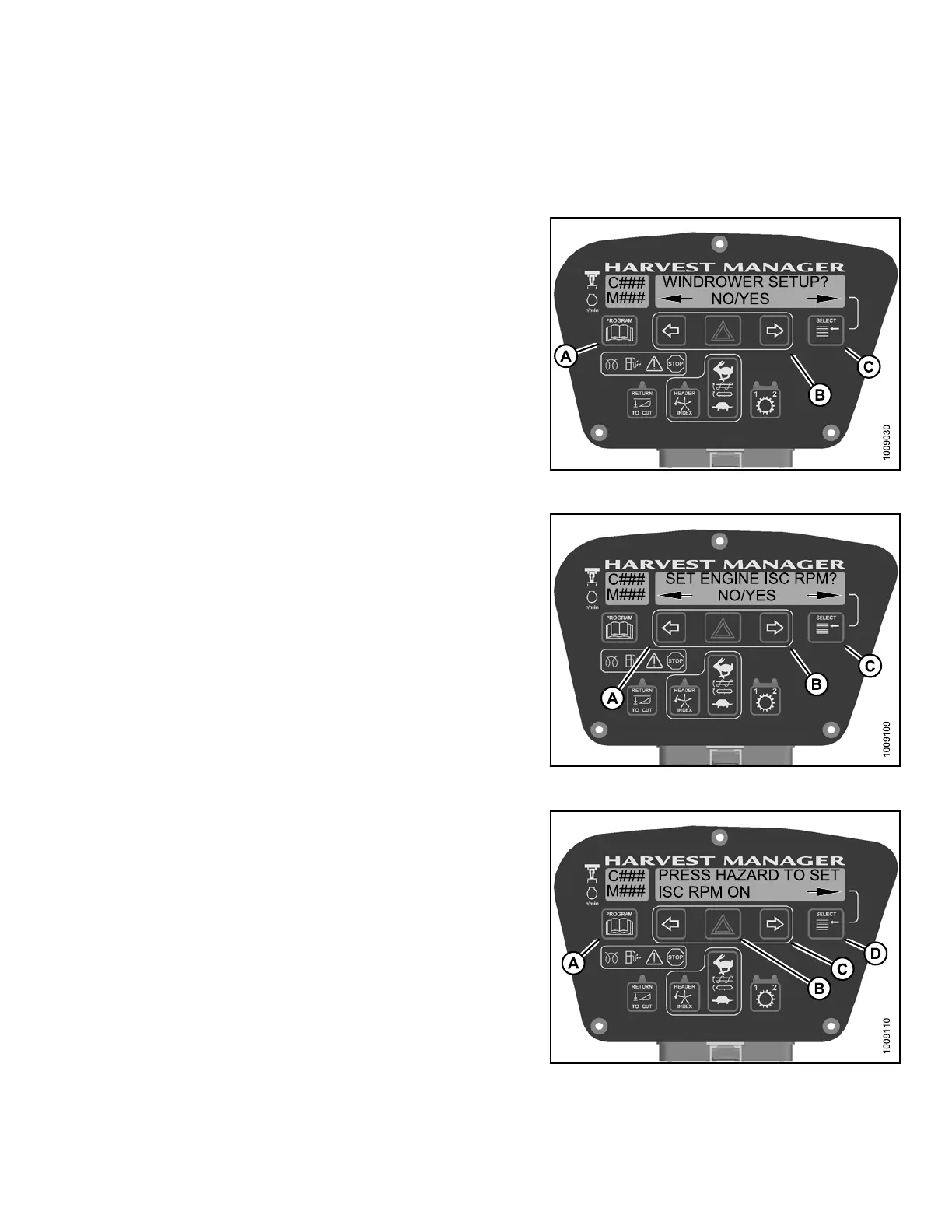
2. Press PROGRAM (A) and SELECT (C) on cab display
module (CDM) to enter Programming Mode.
• WINDROWER SETUP? is displayed on the
upper line.
• NO/YES is dis playe d on the lower lin e .
3. Press right (B)arrow to select YES. Press SELECT (C).
• SELECT HEADER TYPE? is displayed on the
upper line.
Figure 4.146: CDM Programming Buttons
4. Press SELECT (C) until SET EN GINE ISC RP M? is
displayed on the upper line.
• NO/YES is dis playe d on the lower lin e .
5. Press right (B)arrow to select YES. Press SELECT (C).
• PRESS HAZARD TO SET is displayed on the
upper line.
• ISC RPM ON is displayed on the lower line.
Figur
e 4.147: Engine ISC RPM
NOTE:
Previous IS C selection is flashing.
6. Pres
s right (C) arrow to cycle between ON and OFF.
Pres
s HAZARD (B) to set.
NOTE:
Choosing ON sets the Engine ISC to 2300 rpm.
7. Press SELECT (D).
• EXIT ENGINE ISC? is displayed on the upper line.
• NO/YES is dis playe d on the lower lin e .
8. Press right (C) arrow to select YES. Press
SELECT (D).
9. Press PROGRAM (A) to exit Programming Mode.
Figure 4.148: ISC RPM
147962
21
7
Revision A



 To Next Page