CAB DISPLAY MODULE (CDM)
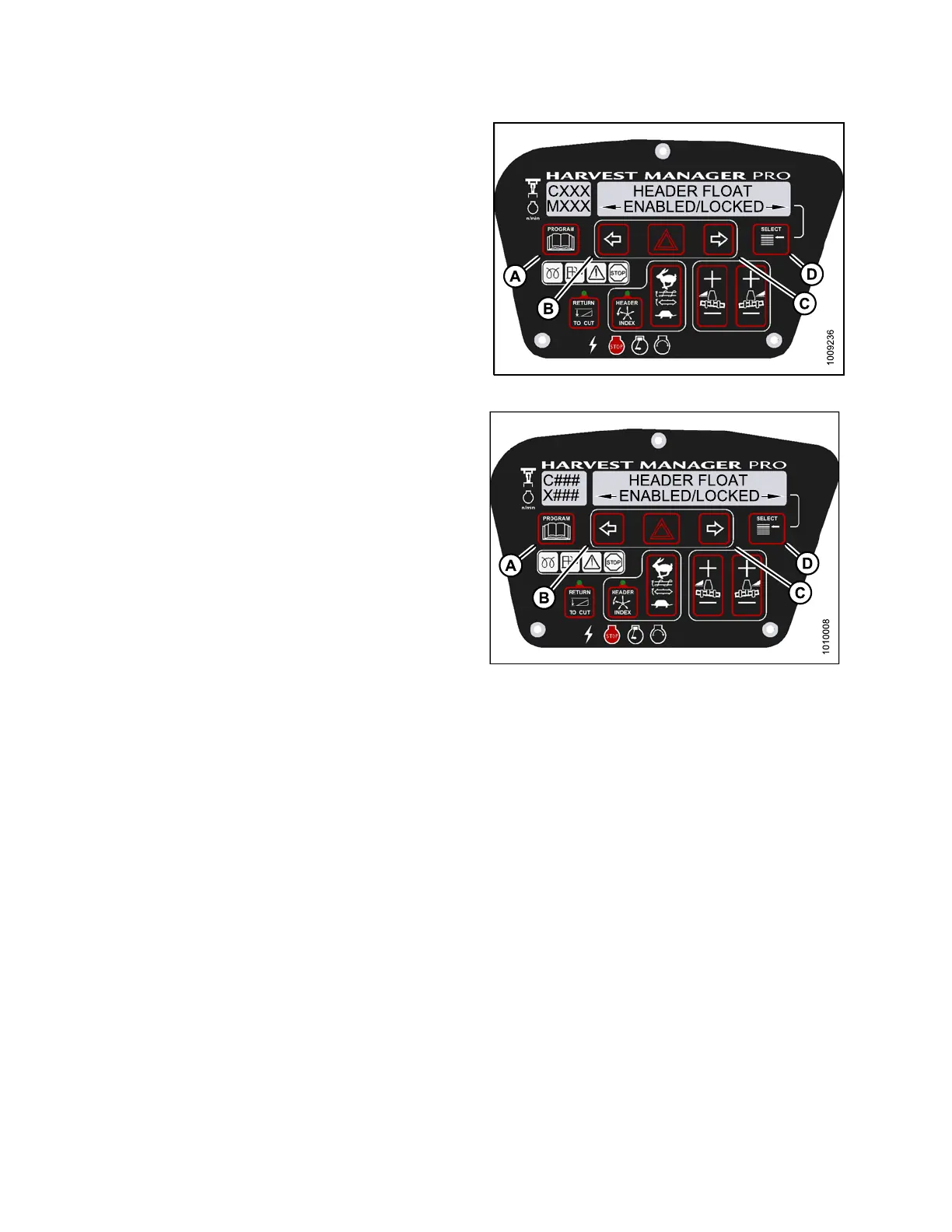
6. Press S ELE CT (D) until H EADER FLOAT is displayed
on the upper line.
• ENABLED/L O C KED is displayed on the lower line.
7. Press left arrow (B) to enable HEADER FLOAT control
switch, or press right arrow (C) to lock HEADER FLOAT
control switch.
8. Press PROGRAM (A) to exit Programming Mode or
press SELECT (D) to p roceed to next WINDROWER
SETUP action.
Figure 4.1
74: M155 Header Float Control Lock
Figure 4.175: M205 Header Float Control Lock
4.5.4 Activating the Draper Speed Control Lockout
NOTE
:
•This
procedure is for draper headers only.
•Theh
eader MUST be attached t o the windrower to pe rf orm this procedure. The cab displa y module (CDM)
aut
omatically adjusts its programming for each header.
147962 230 Revision A



 To Next Page