CAB DISPLAY MODULE (CDM)
4.4 Programming the Windrower
The windrower can be programmed to meet changing crop conditions, activate newly added options, indicate a
change of header type, or increase your comfort level.
4.4.1 Selecting Header Type
The M105 must
be programmed w hen a new h e ader is attached to allo w the CDM to adjust its pro gra mming
accordingl y
and display the proper information to the Operator; however, the windrower control module (WCM) will
automatica
lly read a header ID when a new header is attached to an M155 or M205.
NOTE:
• Displaying draper or A40 header reel or knife speed requires installation of the optional Expansion Module
(MD #B4666). For more information, refer to the windrower operator’s manual or the windrowertechnical manual.
• The A30 H eader reel speed is not displayed on the CDM.
1. Turn ignition ke y to RUN, or start the e ngine. Refer to
3.15 St artin g Engine , pag e 84.
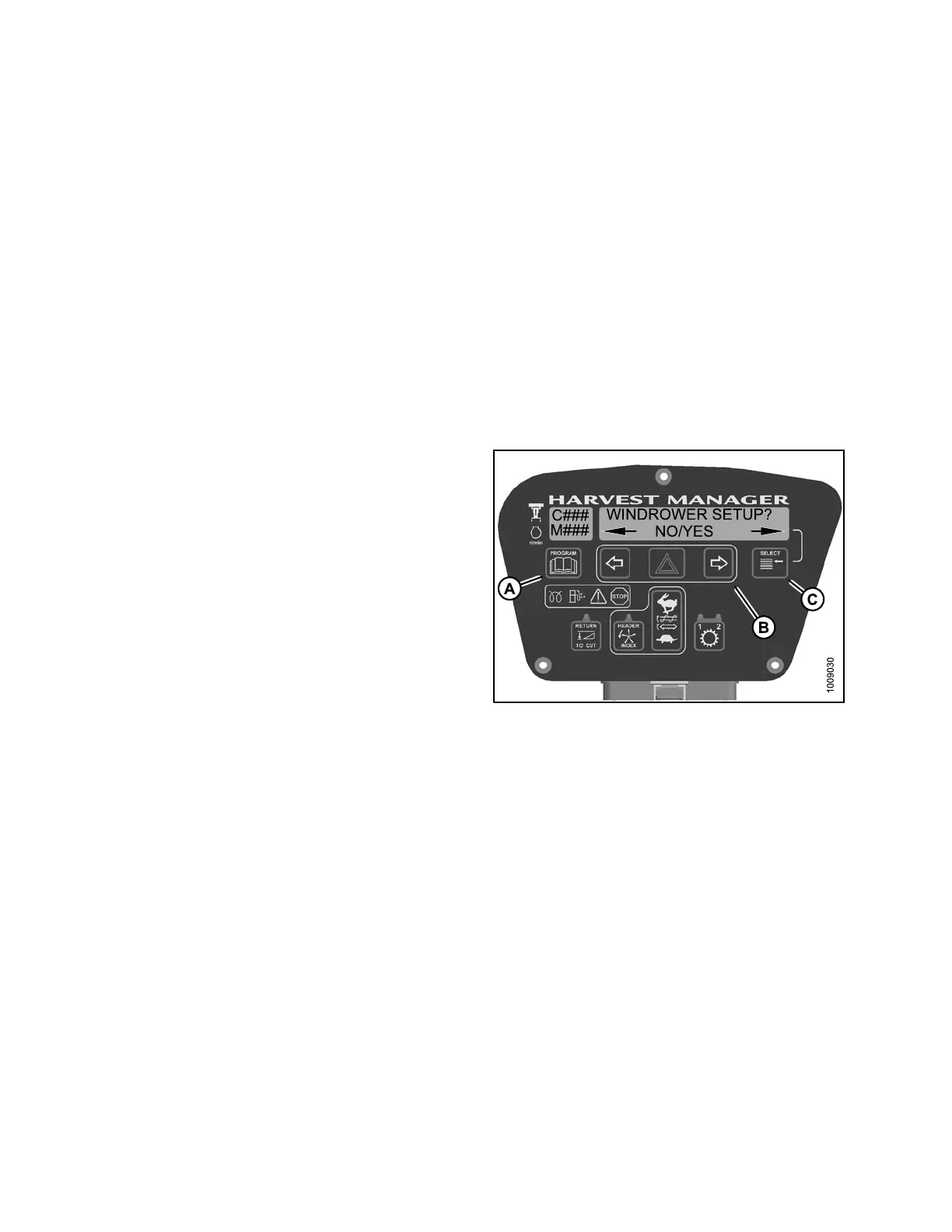
2. Press PROGRAM (A) and SELECT (C) on cab display
module (CDM) to enter Programming Mode.
• WINDROWER SETUP? is displayed on the
upper line.
• NO/YES is displayed on the lower line.
Figure 4.72: Cab Display Module Programming
Buttons
147962 184 Revision A



 To Next Page