CAB DISPLAY MODULE (CDM)
NOTE:
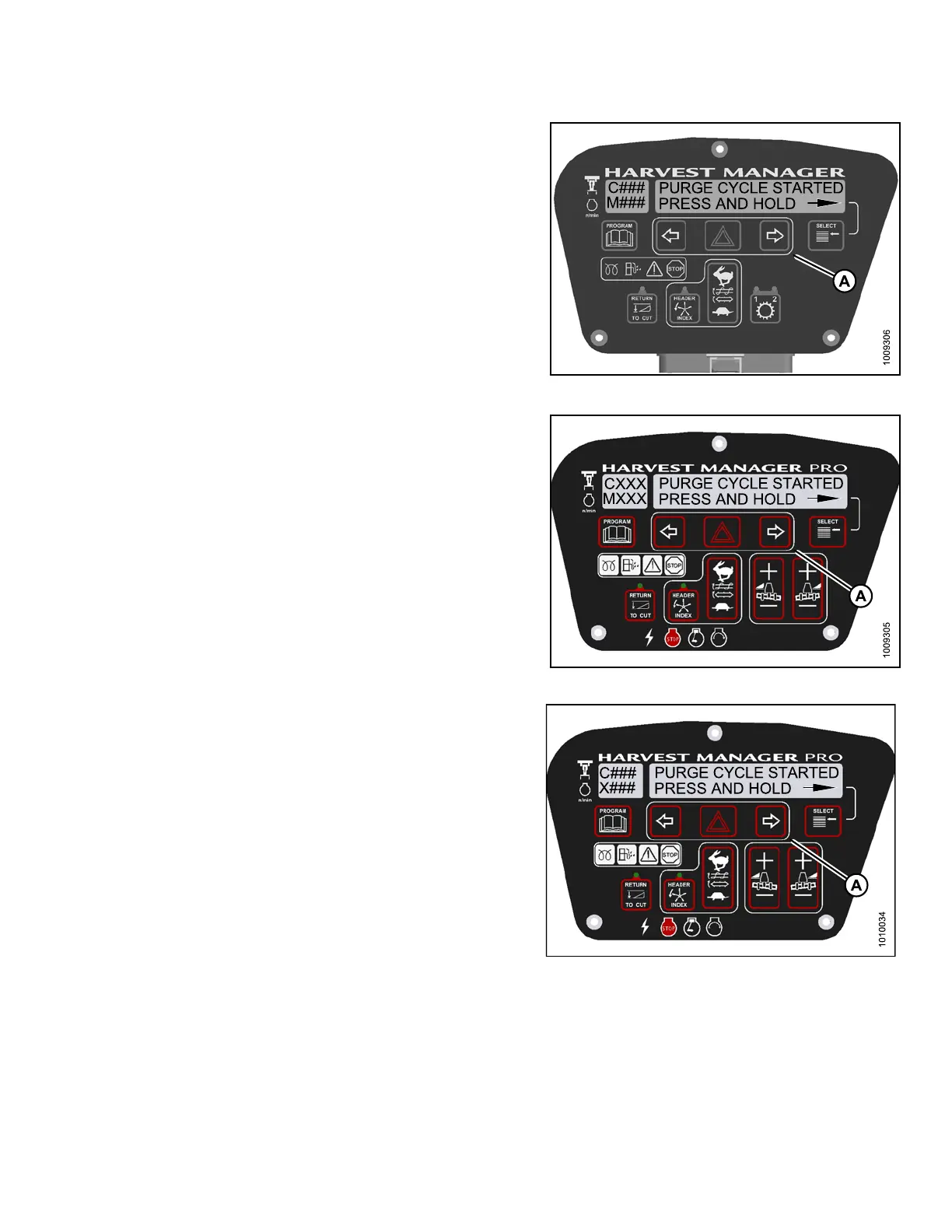
Holding the right arrow (A) activates a timed
purge cycle. The CDM will jump to the exit menu
if the arrow is released before the end of the
timed cycle.
9. Press and hold right (A) arrow to activate purge cycle.
• PURGE CYCLE STARTED will display on the
upper line.
10. When PURGE CYCLE ENDED is displayed release
right (A) arrow.
• NO EXIT YES is disp lay ed on the lower line.
11. Press right arrow to select YES. Press SELECT.
12. Press PROGRAM to exit Programming Mode or press
SELECT to proceed to next ACTIVATE FUNCTION .
Figure 4.3
39: M105 Hydraulic Purge Cycle
Figure
4.340: M155 Hydraulic Purge Cycle
Figure4.341:M205HydraulicPurgeCycle
4.8.9 Testing the Knife Drive Circuit Using the Cab Display Module (CDM)
I
MPORTANT:
Do not over-speed a drive. Over-speeding can lead to vibration, belt failures, or other over-speeding related
problems.
147962 297 Revision A



 To Next Page