CAB DISPLAY MODULE (CDM)
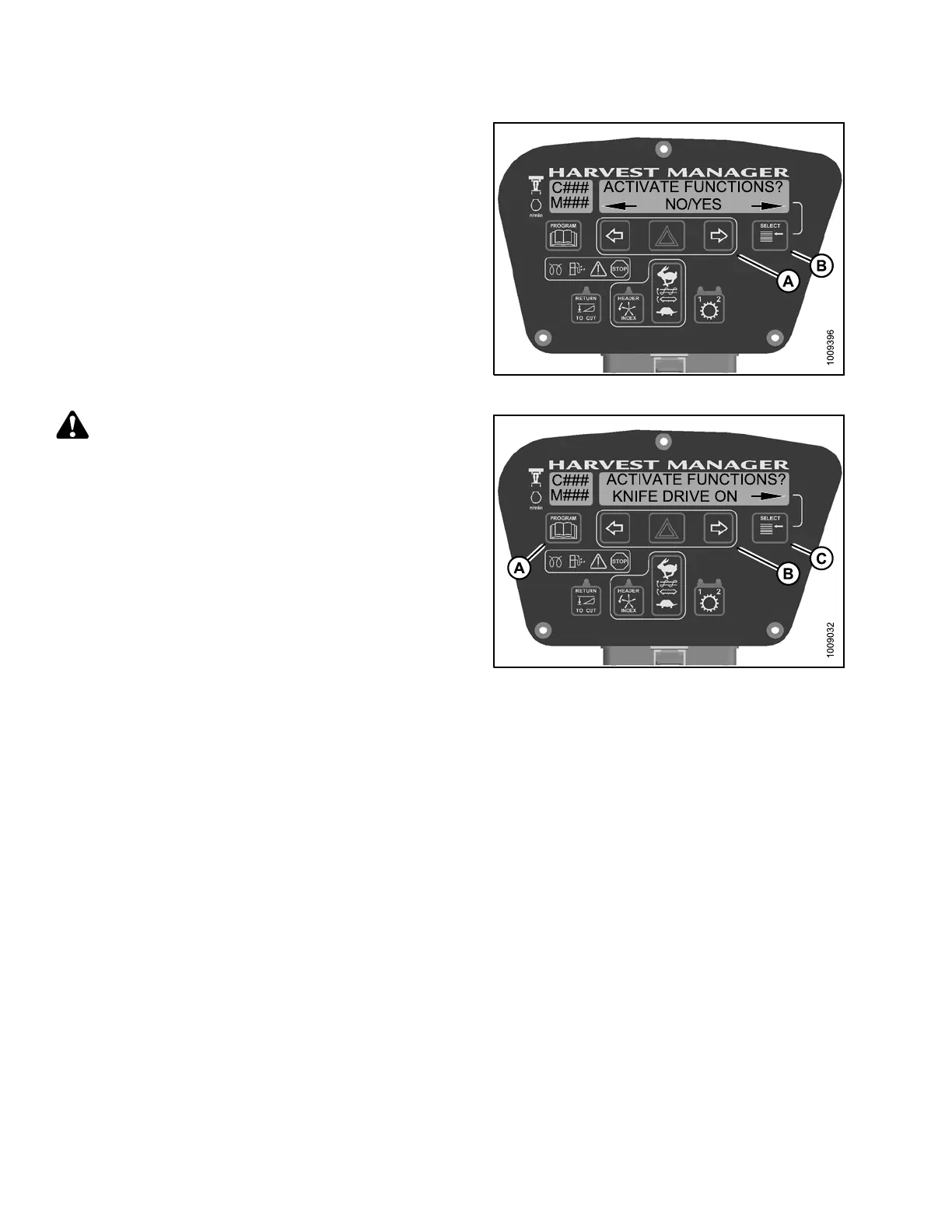
5. Press SELEC T (B) until ACTIVATE F UN CTIONS? is
displayed on the upper line.
• NO/YES is displayed on the lower line.
6. Press right(A) arrow to select YES. P ress SELECT (B).
Figure 4.3
05: Activate Functions
CAUTION
Check to be sure a ll bystanders have cleared t he area.
7. Press SELECT (C) until KNIFE DRIVE ON is displayed
on the lower line.
8. Press and hold right (B) arrow to activate knife drive.
Verify knife is functioning properly.
9. Relea se rig ht (B) arrow to deactiv at e knife drive .
10. Press PROGRAM (A) to exit Programming
Mode or press SELECT (C) to proceed to next
ACTIVATE FUNCTION.
Figure 4
.306: Knife D rive
4.8.5 T
esting the Draper or Auger Drive Circuit Activate Function Using the
Cab Dis
play Module (CDM) on an M105
NOTE:
• The header MUST be attached to windrower to perform this procedure.
• The engine MUST be running to perform this procedure.
147962 284 Revision A



 To Next Page