CAB DISPLAY MODULE (CDM)
1. Start the engine.
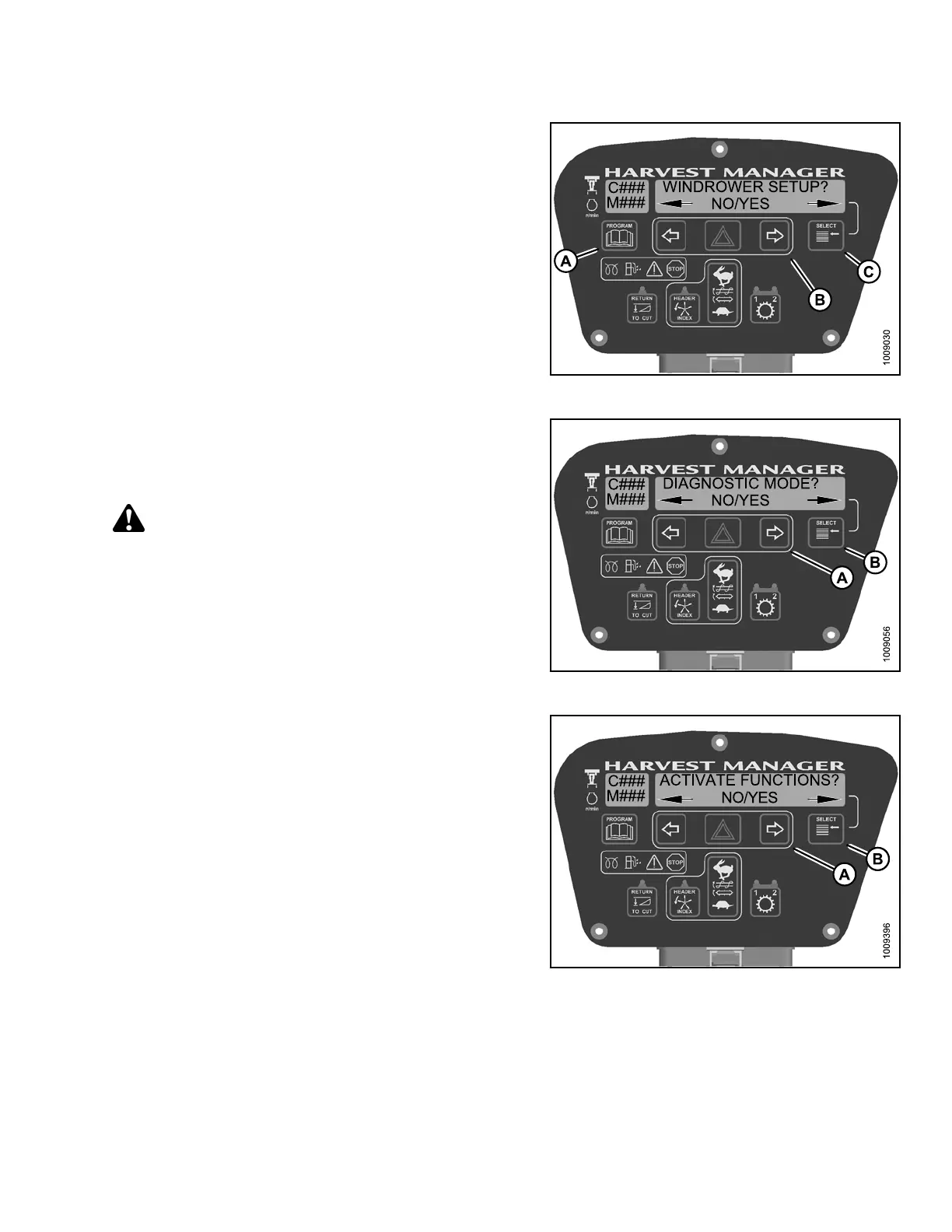
2. Press PROGRAM (A) and SELECT (C) on cab display
module (CDM) to enter Programming Mode.
Figure 4.3
07: C DM Programming Buttons
3. Press SELECT (B) until DIAGNOSTIC MODE? is
displayed in upper line.
• NO/YES is dis playe d on the lower lin e .
4. Press right (A) arrow to select YES. Press SELECT ( B).
CAUTION
Check to be sure all bystanders have cleared the area.
Figure 4.308: Diagnostic Functions
5. Press S
ELECT (B) until ACTIVATE FUNCTIONS? is
displa
yed on the upper line.
• NO/YES
is displayed on the lowe r lin e.
6. Press
right (A) arrow to select YES. Press SELECT (B).
Figure 4.309: Activate Functions
147962 285 Revision A



 To Next Page