CAB DISPLAY MODULE (CDM)
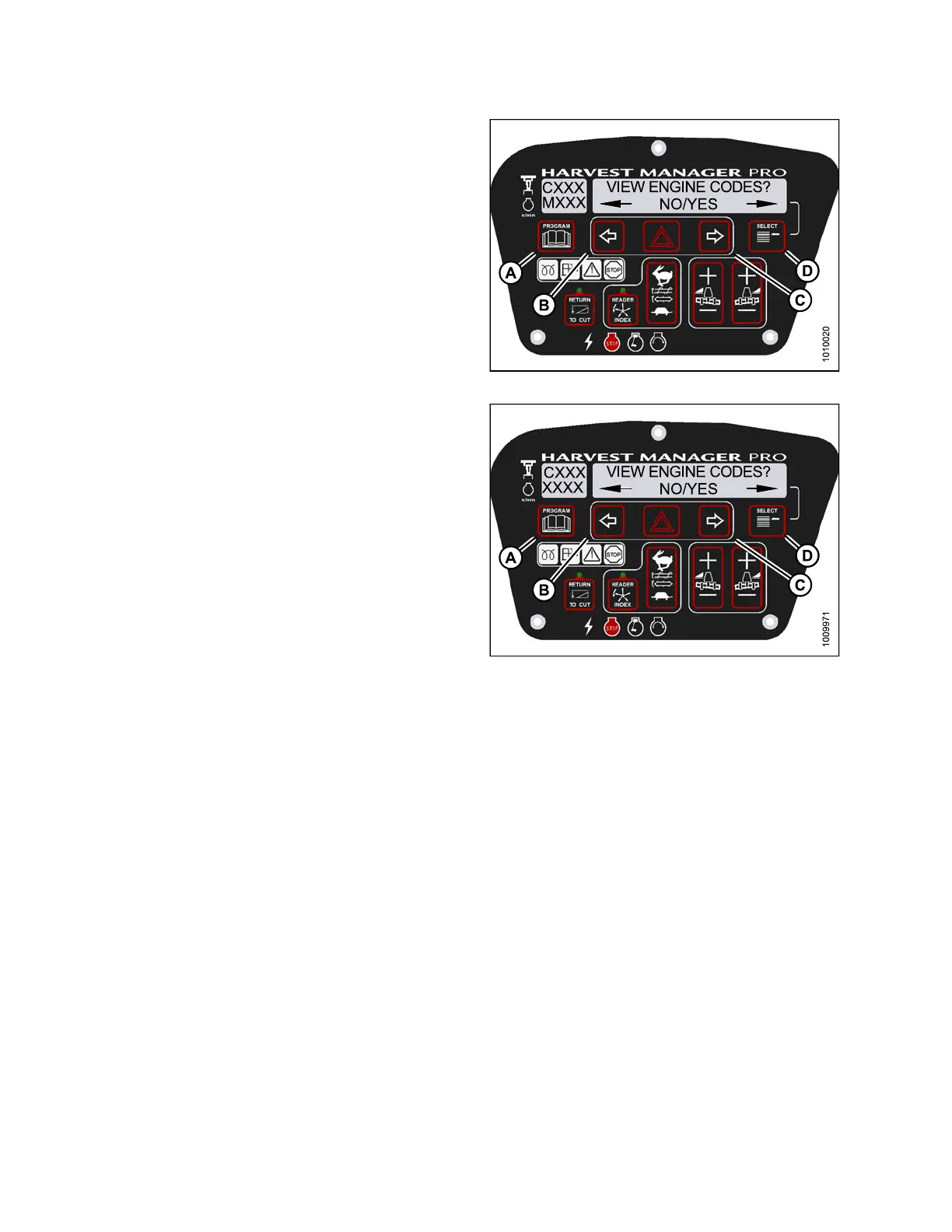
14. Press right (C) arrow to select YES. Press
SELECT (D).
15. Pressleft(B)orright(C)arrow to cycle through the last
ten recorded engine error c od es u nt il EXIT ENGINE
CODES is displayed.
16. Press right (C) arrow to select YES. Press
SELECT (D).
17. Press PROGRAM (A) to exit Programming
Mode or press SELECT (D) to proceed to next
DIAGNOSTIC MODE.
Figure 4.239: M155 Engine Codes
Figure 4.240: M205 Engine Codes
4.7.2 Switching the Installed Header Sensors ON or OFF
You can selectively enable or disable header sensors in the event of a malfunction or as part of a
troubleshooting routine.
NOTE
:
•The
header MUST be attached t o the windrower to pe rf orm this procedure. The cab displa y module (CDM)
aut
omatically adjusts its programming for each header.
•Dis
playing knife, reel, and center-link readings require installation of the optional Expansion Module
(MD
#B4666). For more information, refer to the windrower operator’s manual or the windrower
tec
hnical manual.
•Di
sabled sensors flash the word SENSOR on CDM during regular operation.
147962 256 Revision A



 To Next Page