CAB DISPLAY MODULE (CDM)
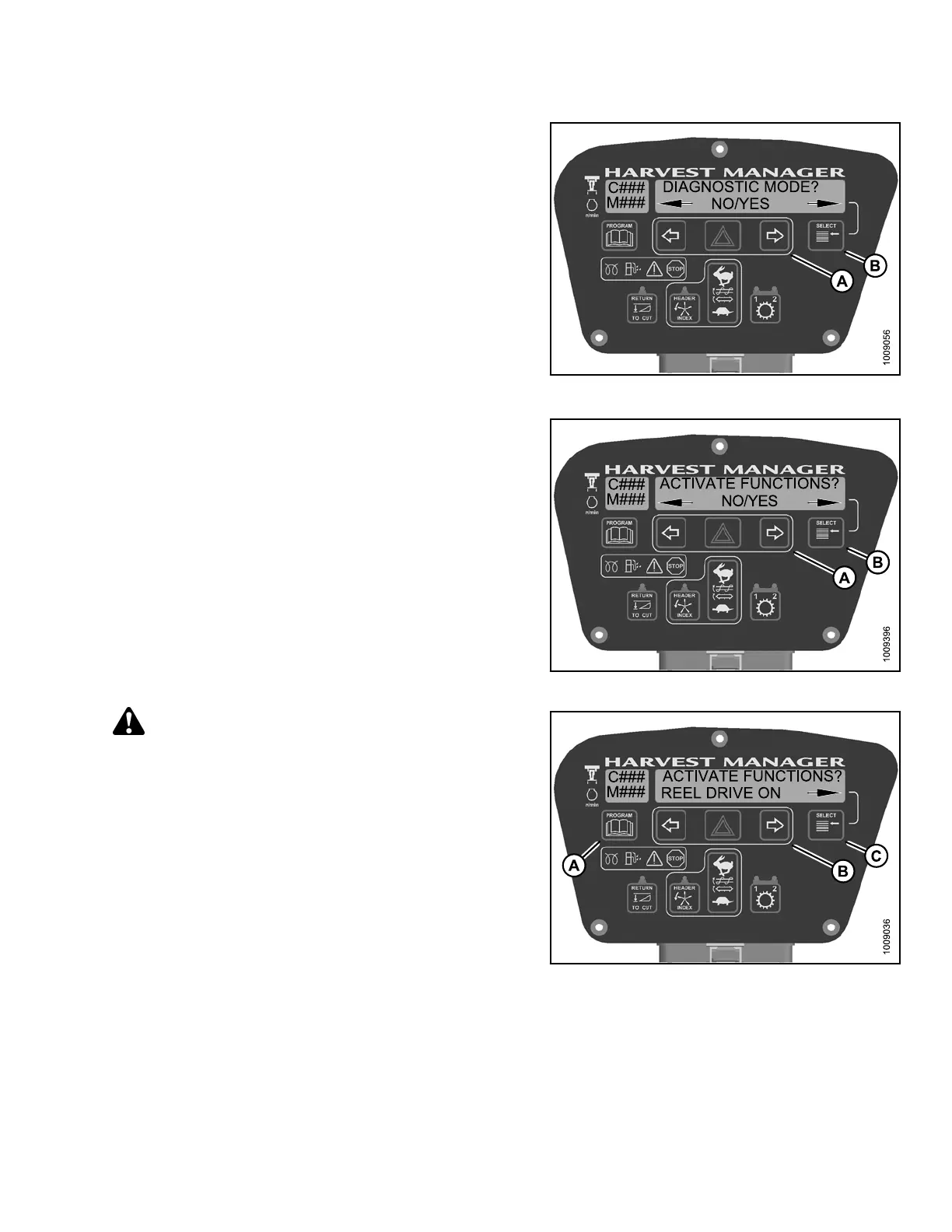
3. Press SELECT (B) until DIAGNOSTIC MODE? is
displayed in upper line.
• NO/YES is dis playe d on the lower lin e .
4. Press right (A) arrow to select Yes. Press SELECT (B).
Figure 4.3
12: Diagnostic Functions
5. Press S ELECT (B) until ACTIVATE FUNCTIONS? is
displayed on the upper line.
• NO/YES is dis playe d on the lower lin e .
6. Press right (A) arrow to select YES. Press SELECT ( B).
Figure 4.313: Functions
CAUTION
Check to be sure all bystanders have cleared the area.
7. Press SELECT (C) until REEL DRIVE ON appears on
the lower line.
8. Press and hold right (B) arrow to activ ate reel drive.
Verify reel is functioning properly.
9. Release right (B) arrow to deactivate reel drive.
10. Press PROGRAM (A) to exit Programming
Mode or press SELECT (C) to proceed to next
ACTIVATE F UNCTION.
Figure 4.314: Reel Drive
147962 287 Revision A



 To Next Page