CAB DISPLAY MODULE (CDM)
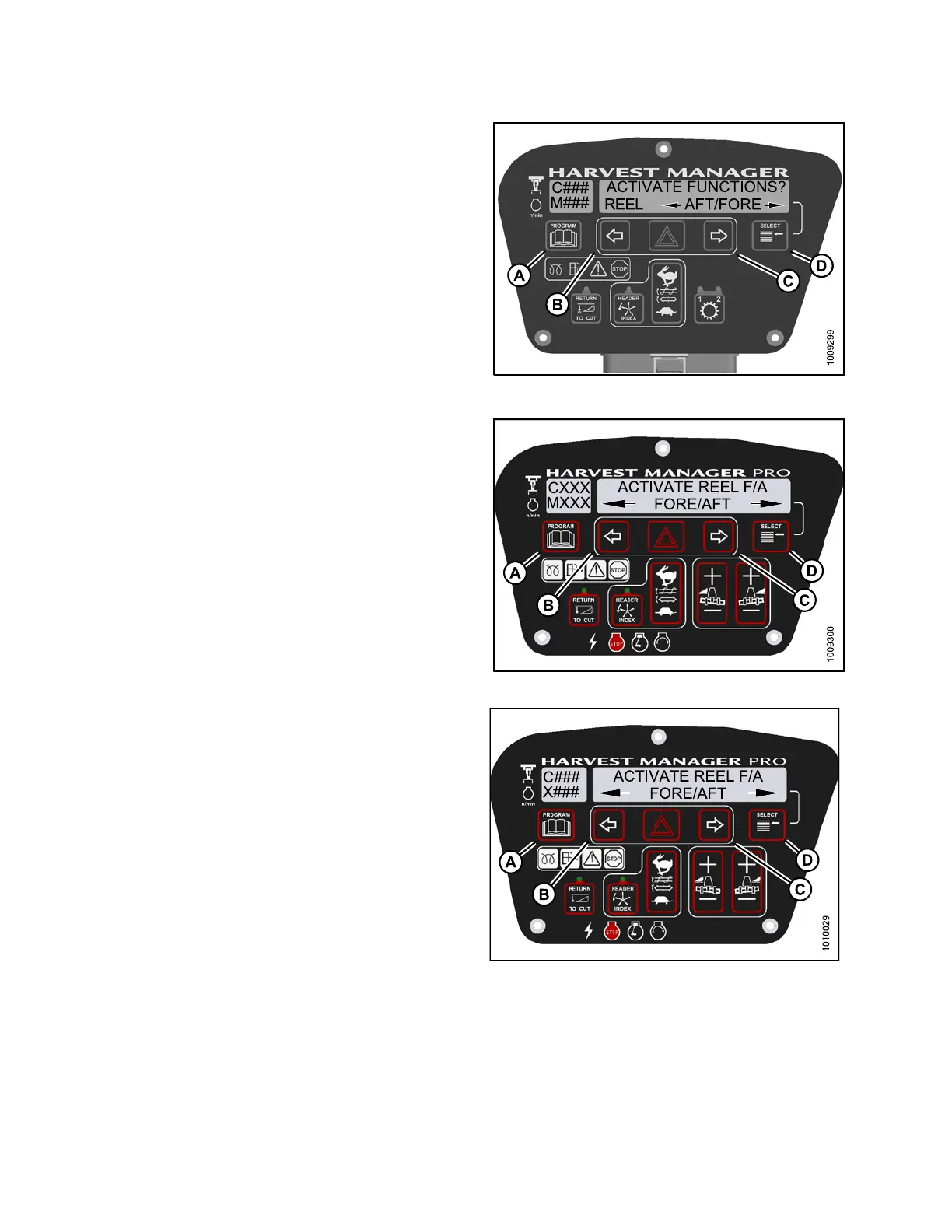
9. Press SELECT (D) until REEL AFT/FORE is displayed
on the lower line.
10. Press and hold left arrow (B) to move reel backward,
or press and hold right arrow (C) to move reel forward.
Verify reel fore-aft is functioning properly.
11. Press PROGRAM (A) to exit Programming
Mode or press SELECT (D) to proceed to next
ACTIVATE FUNCTION.
Figure 4.3
24: M105 Reel Fore-Aft
12. Press SELECT (D) until ACTIVATE REEL F/A is
displayed on the upper line.
• FORE/AFT is displayed on the lower line.
13. Verify reel fore-aft is functioning p roperly.
a. Press and hold left (B) arrow to move reel
forward. P ress and hold right (C) arrow to mo ve
reel backward.
b. Press P ROGRAM (A) to exit P rogramming
Mode or press SELECT (D) to proceed to next
ACTIVATE FUNCTION.
Figure 4.325: M155 Reel Fore-Aft
Fig
ure 4.326: M205 Reel Fore-Aft
147962 292 Revision A



 To Next Page