ENTERTAINMENT
09–20–28
CAR-NAVIGATION CONTROL SWITCH OUTLINE
CHU092066921S01
• A remote control for the car-navigation system, with simplified design for easy operation, has been adopted.
End Of Sie
CAR-NAVIGATION CONTROL SWITCH CONSTRUCTION/OPERATION
CHU092066921S02
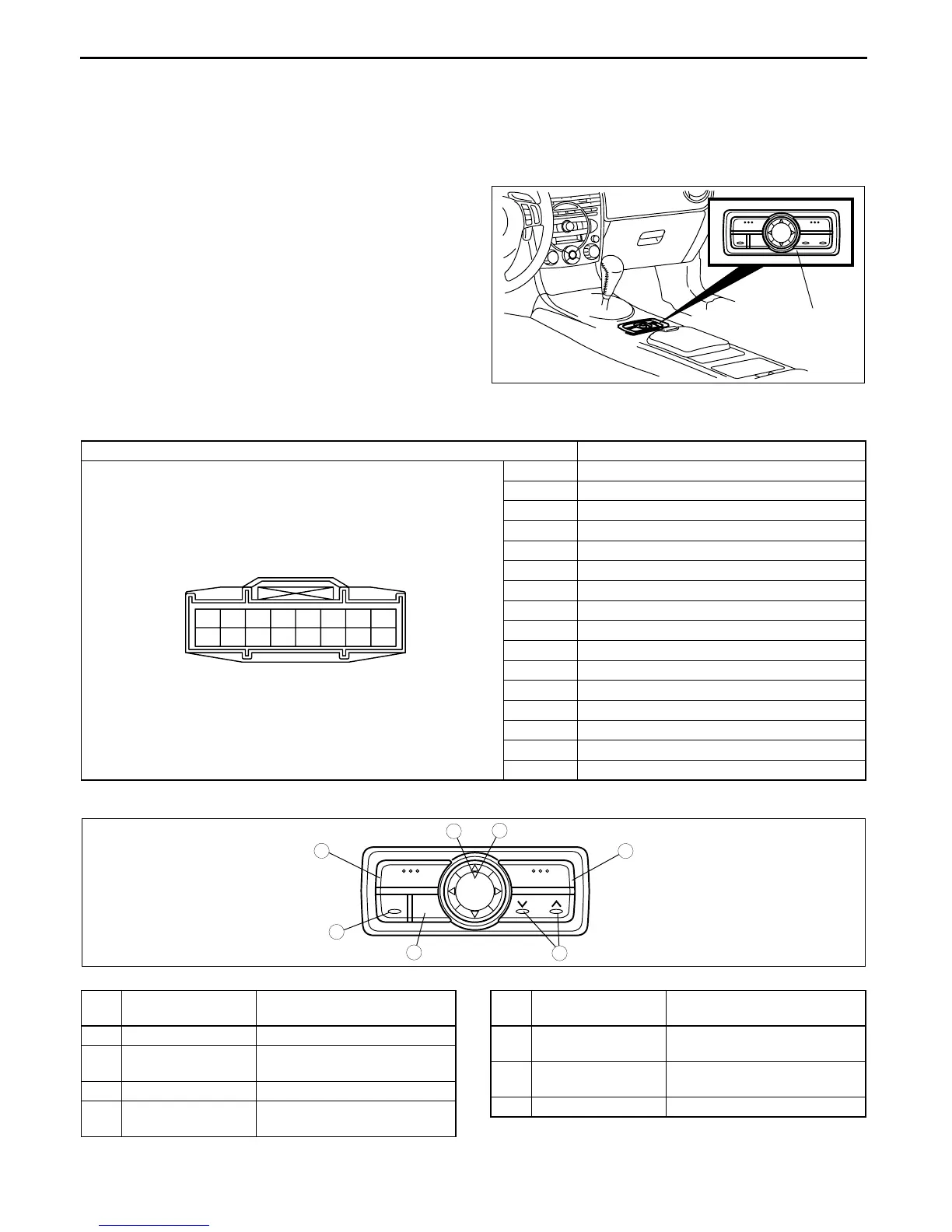
Construction
• The car-navigation control switch is located on the console.
Terminal layout and signal
Operation
CAR-NAVIGATION
CONTROL SWITCH
CHU0920S114
Terminal Signal
A —
B —
C —
D —
E —
F —
GB+
HGND
ITNS (+)
J —
K Remote data
L Shield GND
M —
N —
O —
P —
A
B
C
D
E
F
G
H
I
J
K
L
M
N
O
P
MENU
POS
VOICE
RET
ZOOM
ENTER
DISPLAY
7
5
4
3
6
1
2
CHU0920S115
No.
Button
(component)
Function
1 [MENU] button Select a menu.
2 Joystick Selects items by tilting it up,
down, right and left.
3 [ENTER] button Executes a selected item.
4 [POS (Position)]
button
Displays the current position.
5 [VOICE] button Initiates vocal guidance for
route maneuvers.
6 [RET] button Returns to the previous
screen.
7 [ZOOM] button Changes the map scale.
No.
Button
(component)
Function


 To Next Page