ENTERTAINMENT
09–20–31
09–20
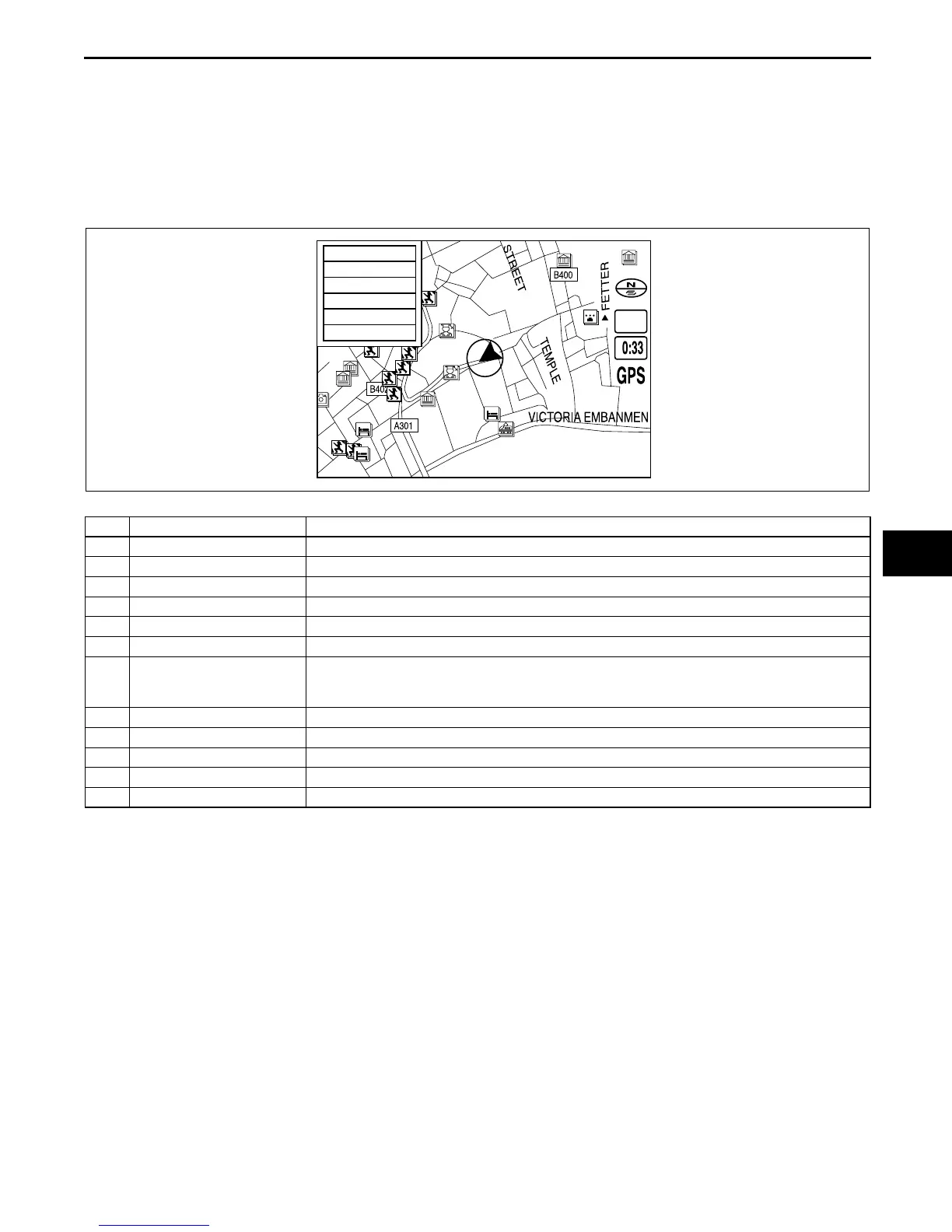
Pop-up Menu
• Pop-up menu appears when pressing [ENTER] button.
• The following items are displayed on the pop-up menu. The actual displayed items vary according to the
selected map, guidance, and other factors.
Note
• Pop-up menu is not available on intersection zoom maps.
• Pop-up menu cannot be displayed when the intersection zoom map is displayed.
.
1/20mi
Route Preview
Maneuver List
Marked Point
Head up
Calc Method
Detour
CHU0920S131
No. Contents Description
1 Detour Displays route change options. (See 09–20–34 Detour function.)
2 Route Preview Displays complete route preview.
3 Maneuver List Displays a route list.
4 Marked Point Registers a point indicated by the crosshair cursor.
5 North up/Head up Selects either north up or head up map display direction.
6 Stop Calc Cancels route search.
7 Reroute Searches for another route to return to the original route when the vehicle has moved away
from it. (Appears only when the auto reroute function is inactivated. See 09–20–34 Setup
Function.)
8 Calc Method Changes route search settings. (See 09–20–34 Whole route search function.)
9 Volume Adjusts volume of voice guidance.
10 Guidance Off Selects/cancels voice guidance.
11 Destination Registers a point indicated by the crosshair cursor as a destination.
12 Nearest POI Searches for POI’s close to current location of the vehicle.


 To Next Page