■■■■■■■■■■■■■■■■■■■■■■
29 Parameters
900 Touch Control
■■■■■■■■
307
In the first example in the above figure, two equivalence points are recog-
nized in two different windows (EP1 in window 1 and EP2 in window 2).
In the second example, two equivalence points are found in one window,
but only the first one is recognized. In order to ensure that the user recog-
nizes that more than one equivalence point was found in the set window,
EP1 is marked with a "+" in the result view. In addition, a corresponding
message is entered in the message list.
Evaluation and equivalence point criterion with MET
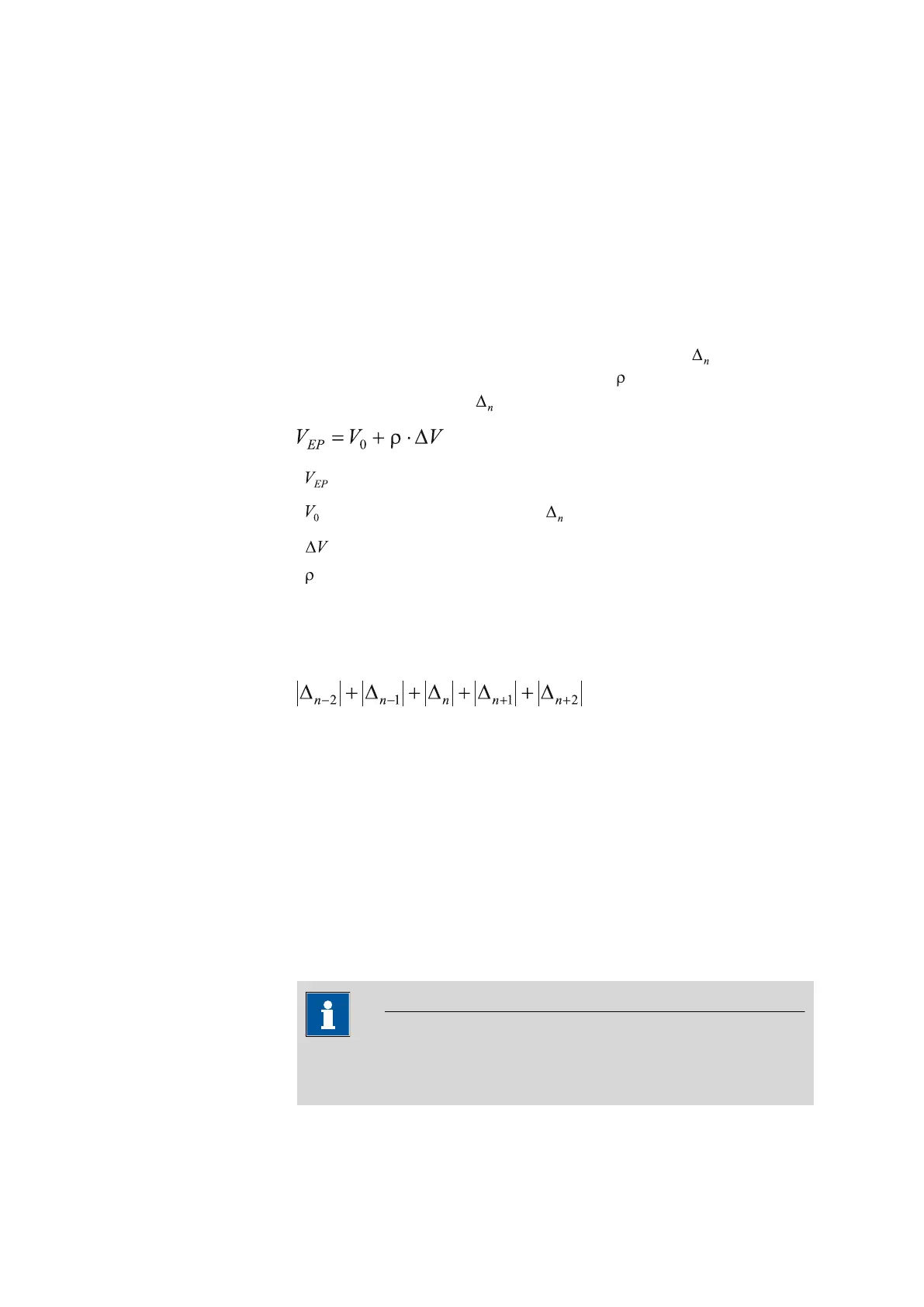
The equivalence points (EPs) are localized by a method based on the For-
tuin method which has been adapted by Metrohm for numerical methods.
A search is made for the largest measured value change (
). The exact EP
is determined by using an interpolation factor which depends on the
Δ values before and after .
:
EP volume
:
Dosed total volume before
: Volume increment
: Interpolation factor according to Fortuin
For the recognition of the EPs found, the set EP criterion is compared to
the ERC (Equivalence point Recognition Criterion) found. The ERC is the
sum of the measured value changes before and after the jump:
In certain cases only three or only one summand is taken into account.
EPs whose ERC is smaller than the defined EP criterion will not be recog-
nized. The ERC is displayed in the results dialog for each discovered and
recognized EP. If you adjust the EP criterion later in order to recognize
more or fewer EPs, then you can reevaluate the determination ([Recalcu-
late] function in the results dialog).
29.2.5 Control instrument
The control instrument the determination is carried out with is selected
under [Control device]. Control instruments are defined under Sys-
tem ▶ Device manager.
NOTICE
This button is only displayed when several control instruments have
been configured.















 To Next Page