Automatically Searching MOBOTIX Cameras in the Same Subnet
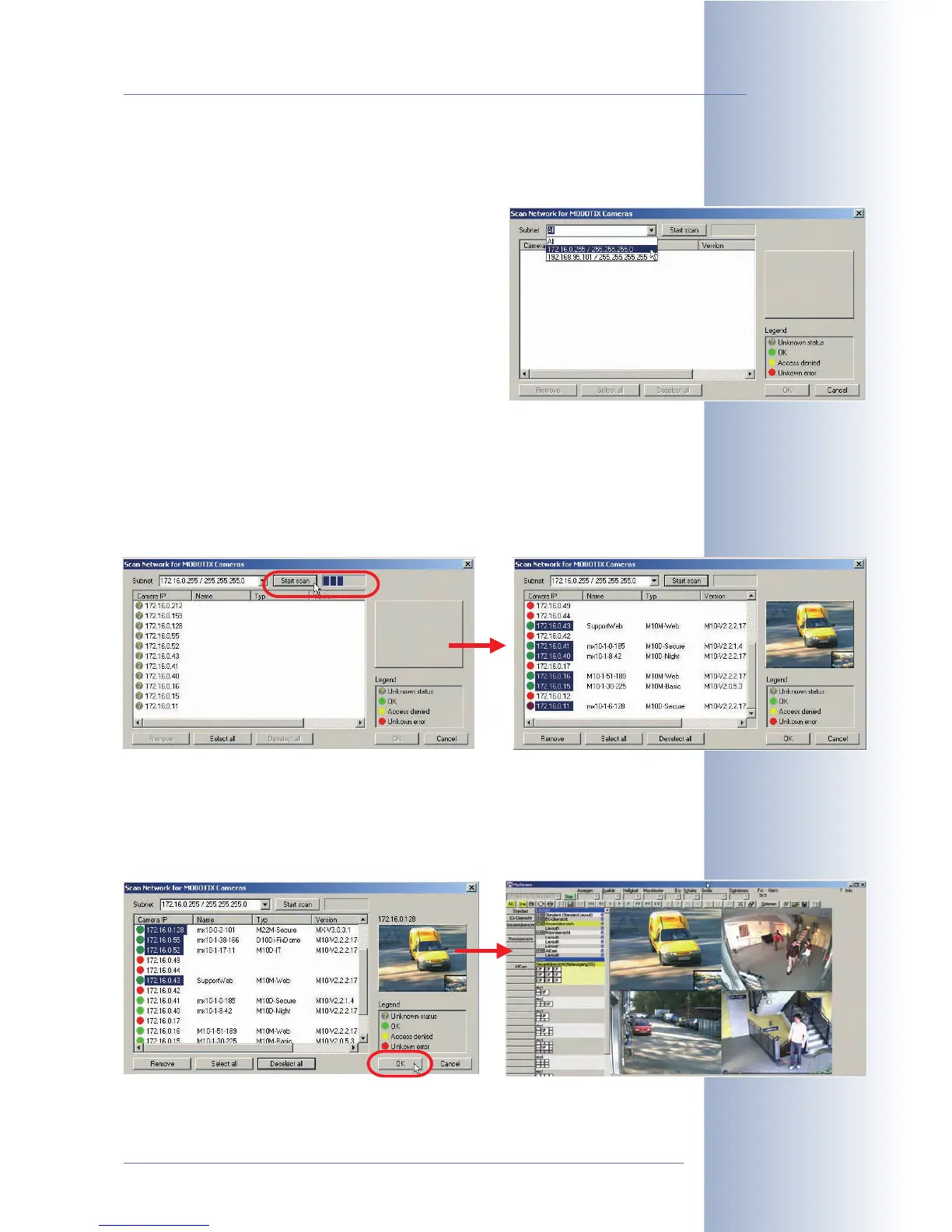
MxViewer displays the Scan network for MOBOTIX cameras dialog:
• Click on the Subnet dropdown list and select the
desired subnet.
• Click on Scan to start the camera search.
If MxViewer finds only one subnet, the scanning proc-
ess will start automatically.
In the first pass, MxViewer searches the selected subnet for MOBOTIX cameras
and in the second pass, MxViewer verifies if it can access the cameras.
MxViewer then highlights all cameras in the list, which have a status of
OK
or
Access denied
:
Using the Highlighted Cameras
Click on OK to use the
highlighted
cameras and to include them in the default lay-
out generated by MxViewer:
© MOBOTIX AG • Security-Vision-Systems • Made in Germany
www.mobotix.com • sales@mobotix.com • 10.10.2006
13/288
Software Camera Manual Part 2



 To Next Page