6-12 Qualitek mR Owner’s Guide
Fill/Evac 1/2
Specifies the time to expose the component to the test air. Ideally the Fill Time
should be set so that, for a good component, no pressure variation occurs during
the stabilization phase, generally a small variation is acceptable.
The Fill Time should be set to a period that is only long enough to ensure that the
test component is filled to the correct pressure. If either of the Fill/Evac steps is not
required, simply set its duration to zero to disable it.
If the Fill Time is too short, the test pressure displayed during the stabilization
phase will either be lower than the set pressure, or will reduce during the
stabilization phase as the pressure equalizes within the component.
The Fill/Evac steps can both be used in a single program, if desired. For example,
this can be used as a “pre-fill” to expedite the fill time of a large volume in a
pressure test. One Fill/Evac time could be set to allow a large flow terminated after
a specific duration. This would be the Fill/Evac1 step. The Fill/Evac 2 step could
then be used to bring the filled pressure to the desired value.
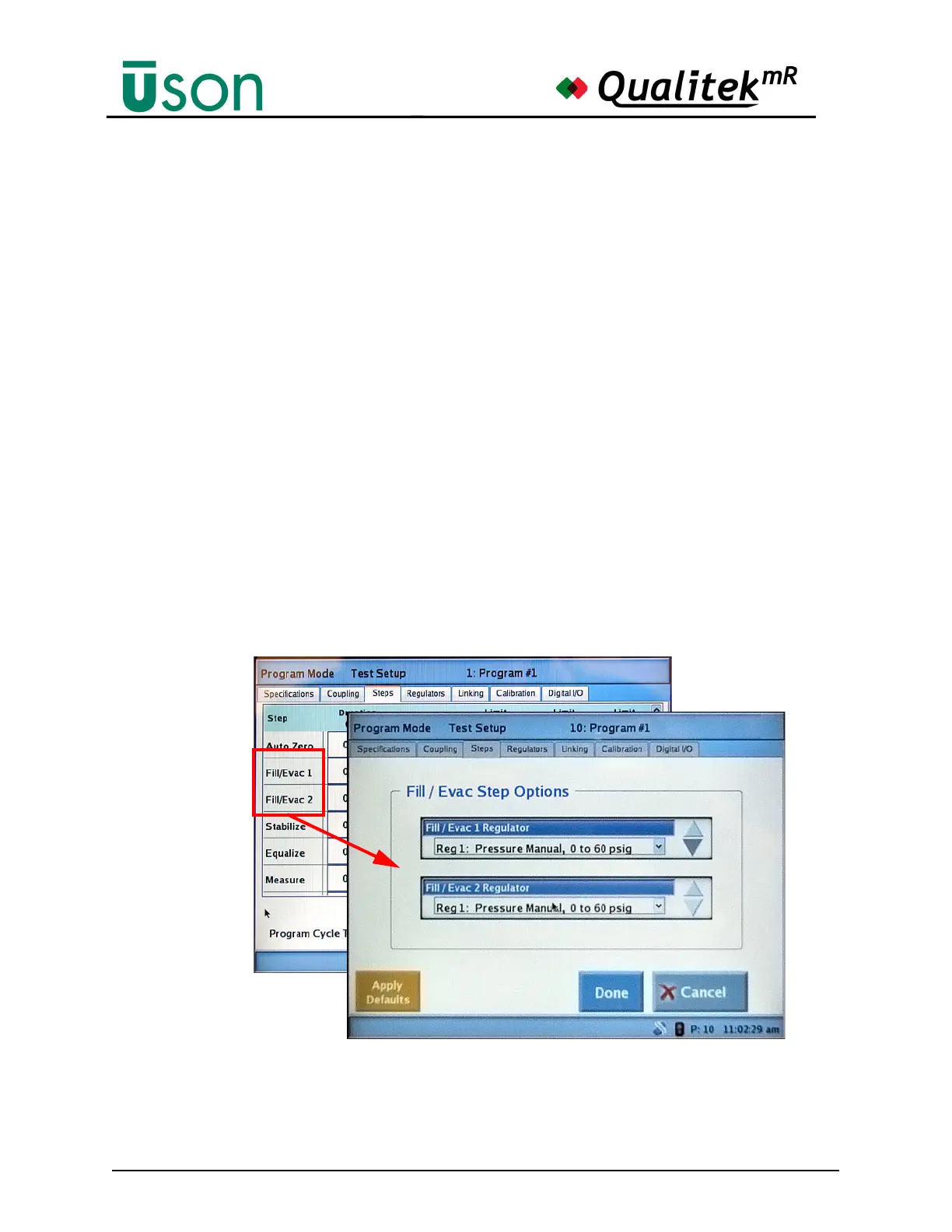
Each Fill/Evac step can have the same or a different regulator assigned (or none).
To assign the regulator(s) to use in each fill/evac step, tap the label for Fill/Evac 1
or Fill/Evac 2 to view the Fill/Evac Step Options screen. The selections available
are limited by the installed regulators, of course. An example of this screen is
shown below:



 To Next Page