DRAFT
September 1, 2004 11:38 am, CH_Overview.fm
SDS Software Related Files and Formats
Applied Biosystems 7900HT Fast Real-Time PCR System and SDS Enterprise Database User Guide 1-15
SDS Software Related Files and Formats
Files Used and
Created by the
SDS Software
IMPORTANT! Never move or delete program files or directories for SDS-related
software unless specifically directed to do so by an Applied Biosystems
representative or documentation.
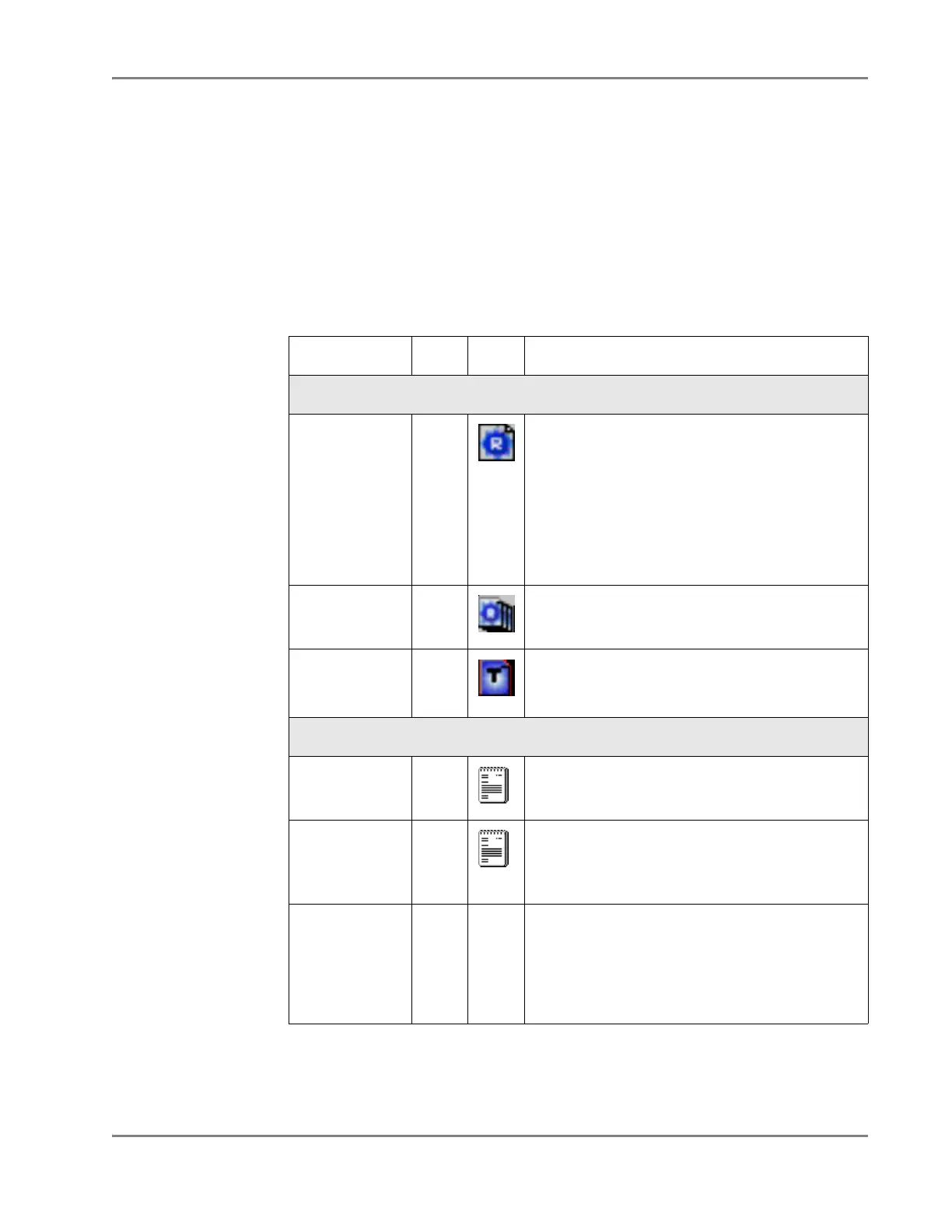
The SDS software uses many different files and directories (Table 1-5). Some of
these files store run data and calibration data: others are required to run the 7900HT
instrument.
Table 1-5 Common SDS Files
File Type Ext. Icon Description/Comments
Plate Document Files
SDS 7900HT
Document
*.sds • Serves as a virtual representation of a single
consumable used to contain samples and
reagents during a sequence detection run
• Contains all sample and assay data (names,
locations, reporter dye) contained by the
consumable
• Contains instructions for running the instrument
(thermal cycling and data collection parameters)
• Stores data gathered during the run
SDS 7900HT
Multiple Plate
Document
*.sdm • Used to analyze relative quantification data
(small studies)
SDS 7900HT
Tem p l at e
Document
*
*The use of plate document templates is optional but useful as a timesaving device for
experiments where samples are run on plates with identical assay configurations.
*.sdt • Used to create plate documents
• Can store assay data, thermal cycling, and data
collection parameters
Imported/Exported Files
Assay Plate
Document
Setup Files
*.txt Used to create plate documents
Exported Data
Files
*.txt • Contains exported raw or analyzed data for all or
a select group of wells on a plate document
• Uses (*.txt) a tab-delimited format (compatible
with most spreadsheet applications)
JPEG
†
Graphic
File
†Joint Photographic Experts Group
*.jpg
‡
‡Icon will varies depending on the application associated with the image file type
• Most panes and plots of the plate document can
be exported as JPEG graphic files
• Compatible with most word processing and
spreadsheet applications
• Can be incorporated directly into HTML or XML
documents



 To Next Page