© AGRGS 2016 | Data subject to change without notice
67385867493098462 | en, eu, V5, 07. Oct 2016, page 123
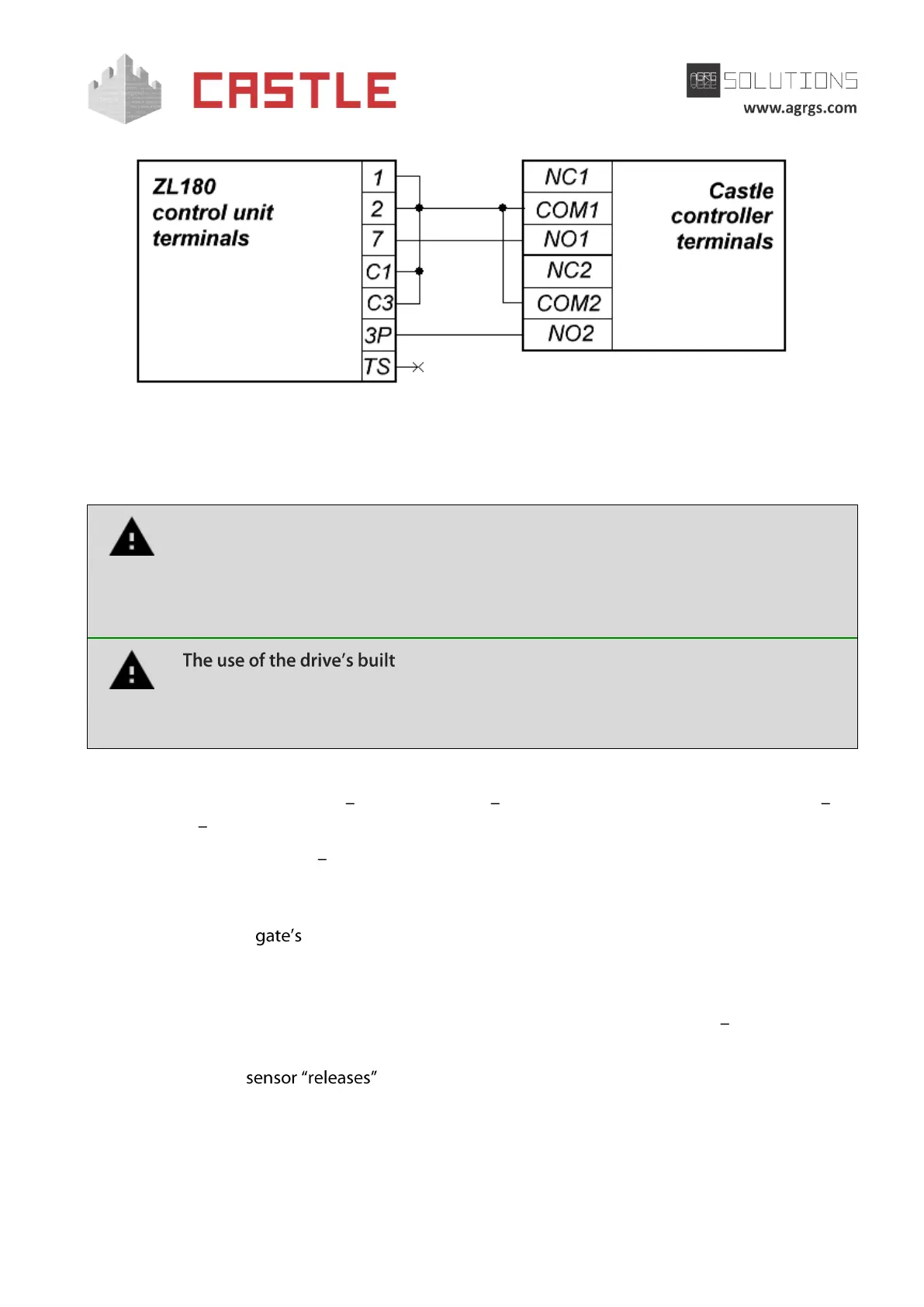
Pic 110. Connecting ZL180 control unit
The rest of the unit terminals (10, 11, E) are connected according to the original instruction for
ZL180 control unit.
All vehicle presence sensors, as well as manual control panel, should be connected
exclusively to the controller, and not to the barrier drive or to both of them.
Violation of this requirement may lead to different conflicts ranging from passage
registration failure to "freezing" the barrier beam in the intermediate states to
eventual damage of a passing vehicle.
-in radio receiver is forbidden. Command submission
bypassing the ACS controller will sooner or later lead to a damage of a passing
vehicle. For controlling the drive via remote keys, you should use Wiegand
interface radio receivers connected to the ACS controller.
Before enabling the access point, you need to make its mandatory settings.
To do this, run Control Program select Doors tab select the desired controller from the list
click Settings uncheck Show only basic settings. Then make the following settings:
● Gate control mode select Straight drive direction (Direct drive control) from the drop-
down menu.
● Set Time to open/close gate sections in direct gate control mode equal to about 1.1
times of the real opening (closing) time. E.g., if the gate opens fully within 10
seconds, then the parameter value must be equal to 11 seconds.
● Set Max waiting time before autoclosing an opened gate as desired.
● Delay between sector motors activation in direct gate control mode 0.00 second.
● Set Gate sensor activation delay within 0.5-2.0 seconds. This parameter is used to ignore
short-term when detecting passing vehicles with a trailer or other parts
that are transparent to the sensor.
● Other parameter values are not fundamental and may be left at their default values.
● After setting up, click OK. All the parameter values will be applied automatically.



 To Next Page